Author: Rudolf Batt

  • How to Approach Search Problems with Querqy and searchHub

    How to Approach Search Problems with Querqy and searchHub

    How to approach search problems
    with Querqy and searchHub

    Limits of rule based query optimization

    Some time ago, I wrote how searchHub boosts onsite search query parsing with Querqy. Now, with this blog post I want to go into much more detail by introducing new problems and how to address them. To this end, I will also consider the different rewriters that come with Querqy. However, I won’t cover details already well described in the Querqy documentation. Additionally, I will illustrate where our product searchHub fits into the picture and which tools are most suited for problem solving.

    First: Understanding Term-Matching

    In a nutshell the big challenge with site search, or the area of Information Retrieval more generally, is mapping user input to existing data.

    The most common approach is term matching. The basic idea is to split text into small, easy-to-manage pieces or “terms”. This process is called “tokenization”. Eventually these terms are transformed using “analyzers” and “filters”, in a process known as “analyzing”. Finally, this process is applied to the source data during “indexing” and the results are stored in an “inverted index”. This index stores the relationship of the newly produced terms to the fields and the documents they appear in.

    This same processing is done for every incoming user query. Newly produced terms are looked up in an inverted index and the corresponding document ids become the queries’ result set. Of course this is a simplified picture, but it helps to understand the basic idea. Under the hood, considerably more effort is necessary in order to support partial matches, get proper relevance calculation etc.

    Be aware that, in addition to everything described above, rules too must be applied during query preprocessing. The following visualization illustrates the relationship and impact of synonyms on query matching.
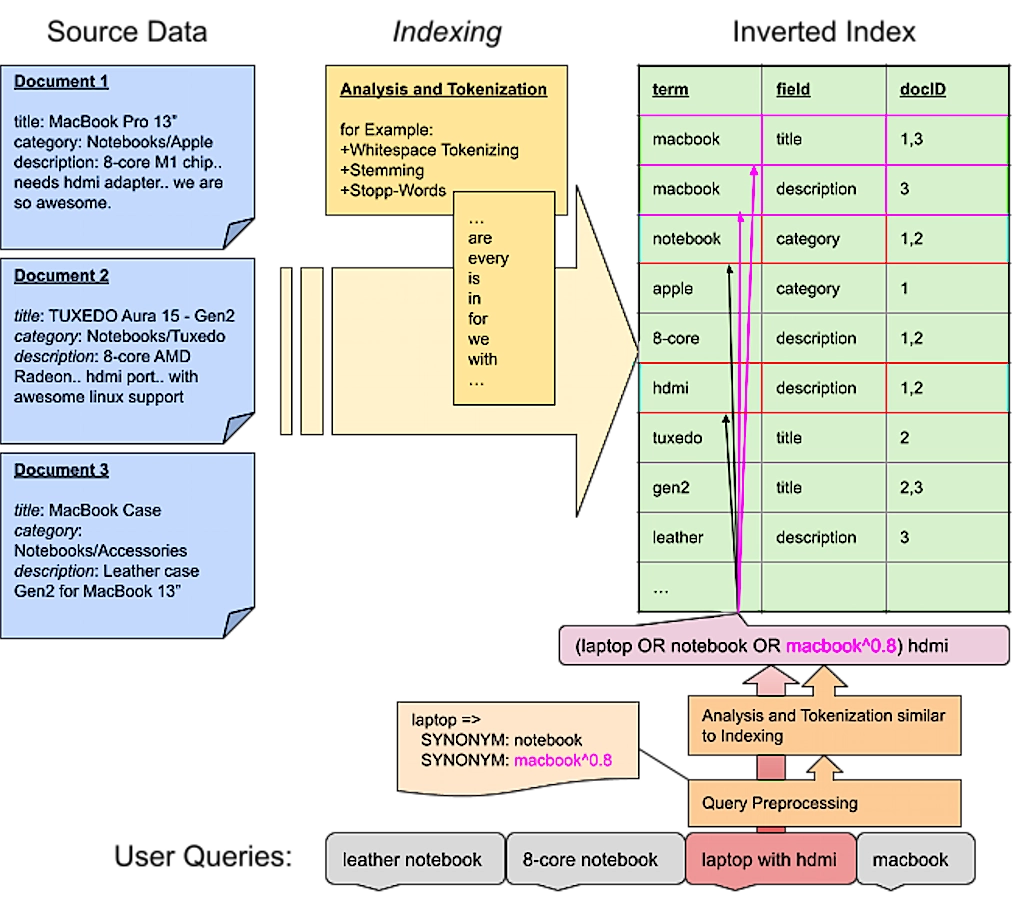
    Term matching is also the approach of Lucene – the core used inside Elasticsearch and Solr. On that note: most search-engines work this way, though many new approaches are gaining acceptance across the market.

    A Rough Outline of Site Search Problems

    Term matching seems rather trivial if the terms match exactly: The user searches for “notebook” and gets all products that contain the term “notebook”. If you’re lucky, all these products are relevant for the user.

    However, in most cases, the user – or rather we, as the ones who built search and are interested in providing excellent user experiences – is not so lucky. Let’s classify some problems that arise with that approach and how to fix them.

    Unmitigated order turns to chaos

    What is Term Mismatch?

    In my opinion, this is the most common problem: One or more terms the user entered aren’t used in the data. For example the user searches for “laptop” but the relevant products within the data are titled “notebook”.

    This is solved easily by creating a “synonym” rewrite rule. This is how that rule looks in Querqy:

    				
    					laptop => 
      SYNONYM: notebook


    With that rule in place, each search for “laptop” will also search for “notebook”. Additionally, a search for “laptop case” is handled accordingly so the search will also find “notebook case”. You can also apply a weight to your synonym. This is useful when other terms are also found and you want to rank them lower:

    				
    					laptop =>
    SYNONYM: notebook
    SYNONYM: macbook^0.8


    Another special case of term mismatching are numeric attributes: users search for ‘13 inch notebook’ but some of the relevant products, for example, might have the attribute set to a value of ‘13.5’. Querqy helps with rules that make it easy to apply filter ranges and even normalize numeric attributes. For example, by recalculating inches into centimeters, in case there are product attributes that are searched in both units. Check out the documentation of the “Number Unit Rewriter” for detailed and good examples.

    However there are several cases where such rules won’t fix the problem:

    • In the event the user makes a typo: the rule no longer matches.
    • In the event the user searches for the plural spelling “notebooks”: the rule no longer applies, unless an additional stemming filter is used prior to matching.
    • The terms might match irrelevant products, like accessories or even other products using those same terms (e.g. the “paper notebook” or “macbook case”)

    With searchHub preprocessing, we ensure user input is corrected before applying Querqy matching rules. At least this way the first two problems are mitigated.

    How to Deal with Non-Specific Product Data?

    The “term mismatch problem” is worse, if the products have no explicit name. Assume all notebooks are classified only by their brand and model names. For example: “Surface Go 12”, and put together with accessories and other product-types into a “computers & notebooks” category.

    First of all some analysis needs to stem the plural term “notebooks” to “notebook” in the data and also in potential queries. This is something your search engine has to support. An alternative approach is to just search fuzzily through all the data, making it easier to match such minor differences. However, this may lead to other problems, for example not all stems have a low edit distance (e.g. cacti/cactus). Or yet another issue: other similar but unrelated words might match (shirts/shorts). More about that below, when I talk about typos.

    Nevertheless, a considerable amount of irrelevant products will still match. Even ranking can’t help you here. You see, with ranking you’re not just concerned with relevance, but mostly looking for the greatest possible impact of your business rules. The only solution within Querqy is to add granular filters for that specific query:

    				
    					"notebook" => 
      SYNONYM: macbook^0.9
      SYNONYM: surface^0.8
      FILTER: * price:[400 TO 3000]
      FILTER: * -title:pc


    A little explanation:

    • First of all this “rule set” only applies to the exact query “notebook”. That’s what the quotes signify.
    • The synonym rules also include matches for “macbook” and “surface” in descending order.
    • Then we use filters to ensure only mid to high price products are shown excluding those with “pc” in the title field.

    Noticeably, such rules get really complicated. Oftentimes there are products that can’t be matched at all. And what’s more: rules only fix the search for a specific query. Even if searchHub could handle all the typos etc. a shop with such bad data quality will never escape manual rule hell.

    This makes the solution obvious: fix your data quality! Categories and product names are the most important data for term-matching search:

    • Categories should not contain combinations of words. Or if they do, don’t use such categories for searching. Also at least the final category level should name the “things” it contains (use “Microsoft Notebooks” instead of a category hierarchy “Notebook” > “Microsoft”) Also be as specific as possible (use “computer accessories” instead of “accessories”, or even “mice” and “keyboards”).
    • Similar for product names: they should contain the most specific product type possible and attributes that only matter for that product.

    searchHub’s analysis tool “SearchInsights” helps by analyzing which terms are searched most often and which attributes are relevant for associated product types.

    How to Deal with Typos

    The problem is obvious: User queries with typos need a more tenable solution. Correcting them all with rules would actually be insane. However, handling prominent typos or “alternative spellings” using Querqy’s “Replace Rewriter” still might make sense. Querqy has a minimalistic syntax easily allowing the configuration of lots of rules. It also allows substring correction using a simple wildcard syntax.

    Example rule file:

    				
    					leggins; legins; legings => leggings
    tshirt; t shirt => t-shirt


    Luckily, all search engines support some sort of fuzzy matching as well. Most of them use a variation of the “Edit Distance” algorithm that accepts a match of another term if only one or two characters differ. Nevertheless fuzzy matching is also mismatch prone. Even more so if used for every incoming term. For example, depending on the algorithm used, “shirts” and “shorts” have a low edit distance to each other but mean different things.

    For this reason Elasticsearch offers the option to limit the maximum edit distance based on query length. This means, no fuzzy search will be initiated for short terms due to their propensity for fuzzy mismatches. Our project OCSS (Open Commerce Search Stack) moves fuzzy search to a later stage during query relaxation. This means we first try exact and stemmed terms, and only if there are no matches do we use fuzzy search. Also running spell-correction in parallel fixes typos in single words of a multi-term query. (some details are described in this post)

    With searchHub we use extensive algorithms to achieve greater precision for potential misspellings. We calculate them once, then store the results for significantly faster real-time correction.

    Unfortunately, if there are typos in the product data the problem gets awkward. In these cases, the correctly spelled queries won’t find potentially relevant products. Even if such typos can consistently be fixed, the hardest part is detecting which products weren’t found. Feel free to contact us if you need help with this!

    Cross-field Matches

    Best case scenario: users search for “things”. These are terms that name the searched items, for example “backpack” instead of “outdoor supplies”. Such specific terms are mostly found in the product title. If the data is formatted well, most queries can be matched to the product’s titles. But if the user searches more generic terms or adds more context to the query, things might get difficult.

    Normally, a search index is set up to search in all available data fields, e.g. titles, categories, attributes and even long descriptions – which often have quite noisy data. Of course matches in those fields must be scored differently, nevertheless it happens that terms do get matched in the descriptions of irrelevant products. For example, the term “dress” can be part of many description texts for accessory products, that describe how good they might be combined with your next “dress”.

    With Querqy you can set up rules for single terms and restrict them to a certain data field. That way you can avoid such matches:

    Example rule file:

    				
    					dress => 
      FILTER: * title:dress


    But you should also be careful with such rules, since they would also match for multi-term queries like “shoes for my dress”. Here query understanding is key to mapping queries to the proper data terms. More about this below under “Terms in Context”.

    Structures require supreme organization

    Decomposition

    This problem arises mostly for several European languages, like Dutch, Swedish, Norwegian, German etc. where words can be combined for new, mostly more specific words. For example the German word “federkernmatratze” (box spring mattress) is a composite of the words “feder” (spring), “kern” (core/inner) and “matratze” (mattress).

    First problem with compound words: There are no specific rules about how words can be combined and what that means for semantics, only that the last word in a series determines the “subject” classification. Is a compound word made of many words, then each word in the series needs to be placed before the “subject” which always has to appear at the end.

    The following German example makes this clear: “rinderschnitzel” is a “schnitzel” made of beef (Rinder=Beef – meaning that it’s a beef schnitzel) but a “putenschnitzel” is a schnitzel made of turkey (puten=turkeys). Here the semantics come from the implicit context. And you can even say “rinderputenschnitzel” meaning a turkey schnitzel with beef. But you wouldn’t say “putenrinderschnitzel” because the partial compound word “putenrinder” would mean “beef of a turkey” – no one says that. 🙂

    By the way, that concept or even some of those words have swapped over into English. For example: “kindergarden” or “basketball”, however in German, for many generic compound words, it’s possible to also use the words separately: “Damenkleid” (women’s dress) can also be named “Kleid für Damen” (dress for women).

    The impending problem with these types of words is bidirectional though: these cases exist both inside the data, and come from users searching for them. Let’s distinguish between the two cases:

    The Problem When Users Enter Compound Words

    The problem occurs when the user searches for the compound word but the relevant products contain the single words. In English that doesn’t make sense (e.g. no product title would have “basket-ball” written separately. In German however the query “damenschuhe” (women’s shoes) must also match “schuhe” (“shoes”) in the category “damen” (“women”) or “schuhe für damen” (shoes for women).

    Querqy’s “Word Break Rewriter” is good for such cases. It uses your indexed data as a dictionary to split up compound words. You can even control it by defining a specific data field as a dictionary. This can either be a field with known precise and good data or a field that you artificially fill with proper data.

    In the slightly different case where the user searches for the decompounded version (“comfort mattress”) and the data contains the compound word (“comfortmattress”) Querqy helps with the “Shingle Rewriter”. It simply takes adjacent words and combines the terms. These are called “shingles”. It’s then possible to match them optionally in the data as well. A query could look like this:


    If decompounding with tools like Wordbreak fails, you’re left with only one option: rewrite such queries. For this use case Querqy’s “Replace Rewriter” was developed. However, because searchHub picks the spelling with the better KPIs: like queries with low exitRates or high clickRates, we solve such problems automatically.

    Dealing with Compound Words within the Data

    Assume “basketball” is the term of the indexed products. Now if a user searches for “ball” he would most likely see the basketball inside the result as well. In this case the decomposition has to take place during indexing in order to have the term “ball” indexed for all the basketball products. This is where neither Querqy nor searchHub can help you (yet). Instead you have to use a decompounder during indexing and make sure to index all decompounded terms with those documents as well.

    In both cases however, typos and partial singular/plural words might lead to undesirable results. This is handled automatically with searchHub’s query analysis.

    How to Handle Significant Semantic Terms

    Terms like “cheap”, “small”, and “bright” most likely won’t match any useful product related terms inside the data. Of course they also have different meanings depending on their context. A “small notebook” means a display size of 10 to 13 inches, while a small shirt means size S.

    With Querqy you can specify rules that apply filters depending on the context of such semantic terms.

    				
    					small notebook => 
      FILTER: * screen_size:[10 TO 14]
    small shirt => 
      FILTER: * size:S


    But as you might guess, such rules easily become unmanageable due to thousands of edge cases. As a result, you’ll most likely only run these kinds of rules for your top queries.

    Solutions like Semknox try to solve this problem by using a highly complex ontology that understands query context and builds such filters or sortings automatically based on attributes that are indexed within your data.

    With searchHub we recommend redirecting users to curated search result pages, where you filter on the relevant facets and even change the sorting. For example: order by price if someone searches for “cheap notebook”.

    Terms in Context

    A lot of terms have different meanings depending on their context. Like a notebook could be an electronic device or a paper device to take notes. A similar case for the word “mobile”: on its own the user is most likely searching for a smartphone. But in the context of the words “disk”, “notebook” or “home” , completely different things are meant.

    Also brands tend to use common words for special products, like the label “orange” from “Hugo Boss”. In a fashion store this might become problematic if someone actually searches for the color “orange” in combination with other terms.

    Next, broad queries like “dress” need more context to get more fitting results. For example a search for “standard women’s dresses” should not deliver the same types of results as a search for “dress suit”.

    There is no specific problem about it and thus also no specific way to solve it. Just keep it in mind when writing rules. With Querqy you can use quotes on the input query to restrict it to be only for term beginnings, endings or full query matches.

    With quotes around the input, the rule only matches the exact query ‘dress’:

    				
    					"dress" =>
      FILTER: * title:dress


    With a quote at the beginning of the input, the rule only matches queries starting with ‘dress’:

    				
    					"dress =>
      FILTER: * title:dress


    With a quote at the end of the input, the rule only matches queries ending with ‘dress’:

    				
    					dress" =>
      FILTER: * title:dress


    Of course this may lead to even more rules, as you strive for more precision to ensure you’re not muddying or restricting your result set. But there’s really no way to prevent it, we’ve seen it in almost every project we’ve been involved: sooner or later the rules get out of control. At some point, there are so many queries with bad results that it makes more sense to delete rules rather than add new ones. The best option is to start fixing the underlying data to avoid “workaround rules” as much as possible.

    Gears improperly placed limit motion.

    Conclusion

    At first glance, term matching is easy. But language is difficult. And this post merely scratches the surface of it. Querqy, with all the different rule possibilities, helps you handle special cases. searchHub locates the most important issues with “SearchInsights”. It also helps reduce the amount of rules and increase the impact of the few rules you do build.


  • How SmartQuery boosts onsite search query parsing with Querqy

    How SmartQuery boosts onsite search query parsing with Querqy

    How SmartQuery boosts onsite search query
    parsing with Querqy

    Do you know Querqy? If you have a Lucene-based search engine in place – which will be Solr or Elasticsearch in most cases – you should have heard about Querqy Sounds like: “Quirky“! It’s a powerful query parsing and enhancement engine. It uses different rewriters to add context to the incoming search queries. The most basic rewriter uses a manual rule configuration to add Synonyms, Filters, and Up- and Down-Boostings for the final Lucene Query. More rewriters handle decomposition, number unit normalization, and replacements.

    Error-Tolerance know when to say when

    If you use another search engine, you most likely have similar tools to handle synonyms, filtering, and so on. So this post is also for you because search engines all share one big problem: rules have to be maintained manually! And all those rules are not error-tolerant. So let’s have a look at some examples.

    Example 1 – the onsite search typo

    Your rule: Synonym “mobile” = “smartphone” The query: “mobil case” As you can see, this rule won’t match because of the missing “e” in “mobile”. So in this example, the customer won’t see the smartphone cases.

    Example 2 – the search term composition

    The same rule, another query: “mobilecase” Again the synonym won’t be applied since the words are not separated correctly. For such queries, you should consider Querqys word-break rewriter.

    Example 3 – search term word order

    Your rule: women clothes = ladies clothes The query: “clothes for women” or “women’s outdoor clothes” A unique problem arises when using rules for multiple words. There will be many cases where the order changes and the rules won’t match anymore.

    These are just a few constructed examples, but there are plenty more. None of them are fundamental, but they stack up quickly. Additionally, different languages come with other nuances and tricky spelling issues. For us, in Germany, word-compositions are one of the significant problems. From our experience, at least 10-20% of search traffic contains queries with such errors. And we know that there is even more potential for improvement. Our working hypothesis assumes around 30% of traffic can be rephrased into a unified and corrected form.

    What options do you have? Well, you could add many more rules, but you’ll run into the following problem: Complexity.

    We’ve seen many home-grown search configurations with thousands of rules. Over time, these become problematic because the product basis changes. Meaning old rules lead to unexpected results. For example, the synonym “pants” and “jeans” was a good idea once, but since the data changed, you have a lot of mismatches because meanwhile, the word “jeans” references many different concepts.

    SearchHub – your onsite search’s intuitive brain!

    With SearchHub, we reduce the number of manual rules by unifying miss-spellings, composition and word-order variants, and conceptual similar queries.

    If you don’t know SearchHub yet, our solution groups different queries with the same intent and decides the best candidate. Then, come search-time, we transform unwanted query variants into their best candidate respectively.

    What does that mean for your rules? First, you can focus on error-free, unified, and standard queries. SearchHub handles all spelling errors, compositions alternatives, and word order variations.

    Additionally, you can forego adding rules to add context to your queries. For example, it might be tempting to add “apple” when someone searches for “iphone”. But this could lead to false positives when searching for iPhone accessories from different brands. SearchHub, on the other hand, only adds context to queries where people search for such connections. In case of ambiguous queries, you can further split these queries into two unique intents.

    Use the best tools

    Querqy is great. It allows you to add the missing knowledge to the user’s queries. But don’t misuse it for problems like query normalization and unified intent formulation; for that, there’s SearchHub. The combination of these tools makes for a perfect symbiosis. Each one increases the effectiveness of the other. Leveraging both will make your query parsing method a finely tuned solution.

  • Why Your Source Code is Less Important than You Think

    Why Your Source Code is Less Important than You Think

    Why Your Source Code is
    Less Important than You Think

    Have you ever thought of publishing the code you built for your company? Or even tried to convince your project lead to do so? Assume you created a remarkable and successful product. Maybe an excellent app in the app store. Now go and publish the source code!

    Why Open-Source is the Right Thing To Do

    It feels dangerous. Maybe even insane!

    Other than the obvious that you should only do it for a good reason, I don’t believe anything would happen. Let me tell you why I think your source code is less important than you think.

    A puzzle is more than its pieces.

    As you might know, we build and provide a SaaS optimization solution for e-commerce search. Lately, we have had several discussions about several algorithms and features. I found it remarkable how much background knowledge everyone in the team has piled up in their brain! If we were to give you all our source code, and none of the context we carry around with us every day, I bet you would have a hard time building a business around it. Not because the code quality is so bad or poorly documented. Even if you know the technology stack and understand what we do, you still would be hard-pressed to wrap your head around it. Why is that?

    No pain, no gain

    First of all, I think it has to do with you not being part of our journey! If no one explains it to you, you would not understand why we did several things the way we did.

    Last week a colleague wanted to reimplement a part of some complicated and faulty algorithm. I encouraged him to use an approach I tried and failed before. “Why will it work this time?” He asked. Good question. “Some of the conditions changed; that’s why it should work this time.”

    After some more discussions, we agreed on another approach.

    You see: Just having some technology or some fancy algorithm in place won’t make it work. You may end up building strange-looking code just because you imagine the problem in a very unique and specific way. That’s not bad. It’s just important that it works. At the very least, you and your mates must understand it. But for others, on the outside, it might get hard to follow. You will only ever comprehend the code if you grasp the same “mental model” we have.

    No passion, just bytes

    The problem described is a very particular example. Let’s take a step back. Assuming you understood it all and managed to make it run, what’s missing? Users. Customers. How will you get them? Do you have the same passion for presenting it? Have you understood the actual problem we solve and all the use-cases we see?

    A product is just as good as the weakest part of the people providing it. You can have the best source code, but in lack of people representing it, the product will stay what it is: some bytes in oblivion. However, it’s also the other way around. You can have fantastic marketing and excellent sales, but if your product is shit, its documentation hated, and your support team sucks (read more about why you should solve that), you can’t hold the customers for long.

    No vision, no mission

    Also, while you might be busy wrapping your head around it and making it run, we are already several steps ahead. You can’t imagine how many ideas we have. The more we work on solving this specific problem in e-commerce search, the more potential we see in it. With every change and every tiny new feature, we solve another problem – some of them the users haven’t even seen before. And they like it. It feels like being on the fast track. And the longer we are, the more speed we gain.

    Can you get on that track as well? Not just by taking parts of it.

    Prove me wrong!

    Still not convinced? Last few months, I was working on Open Commerce Search. I had the honor of being part of a great project with it. Guess what: it went live a few weeks ago. I still can’t believe it. It works! 😉

    So. Around 90% of the code I wrote is open source. I already wrote several times about it, producing a sweeping guideline that was the backbone for it. It is ready to use.

    Will you be able to build a successful e-commerce site search solution with it? No? Let me guess – you need more than just source code.

    Nevertheless, you should try and experience the potential of how OCSS simplifies and compensates for major flaws of using Elasticsearch for document and product search.

    But generally speaking, I hope to have encouraged you to take the plunge into releasing your source code when the time is right. Many projects reap tremendous rewards once made public. And remember, the final product is always more than the sum of its parts.

    Want to become a part of our great team and the thrilling products we create? We are hiring!

  • Quick-Start with OCSS – Creating a Silver Bullet

    Quick-Start with OCSS – Creating a Silver Bullet

    Last week, I took pains to share with you my experience building Elasticsearch Product Search Queries. I explained there is no silver bullet. And if you want excellence, you’ll have to build it. And that’s tough. Today, I want to show how our OCSS Quick-Start endeavors to do just that. So, here you have it: a Quick-Start framework to ensure Elasticsearch Product Search performs at an exceptional level, as it ought.

    How-To Quick-Start with OCSS

    Do you have some data you can get your hands on? Let’s begin by indexing and try working with it. To quickly start with OCSS, you need docker-compose. Find the “operations” folder of the project, at a minimum, and run docker-compose up inside the “docker-compose” folder. It might also be necessary to run docker-compose restart indexer since it will fail to set up properly if the Elasticsearch container is not ready at the start.

    You’ll find a script to index CSV data into OCSS in the “operations” folder. Run it without parameters to view all options. Now, use this script to push your data into Elasticsearch. With the “preset” profile in the docker-compose setup active by default, data fields like “EAN,” “title,” “brand,” “description,” and “price” are indexed respectively for search and facet usage. Have a look at the “preset” configuration if more fields need to be indexed for search or facetting.

    Configure Query Relaxation

    True to the OCSS Quick-Start philosophy, the “preset” configuration already comes with various query stages. Let’s take a look at it; afterward, you should be able to configure your own query logic.

    How to configure “EAN-search” and “art-nr-search”

    The first two query configurations “EAN-search” and “art-nr-search” are very similar:

    				
    					ocs:
      default-tenant-config:
        query-configuration:
          ean-search:
            strategy: "ConfigurableQuery"          1️⃣
            condition:                             2️⃣
              matchingRegex: "\s*\d{13}\s*(\s+\d{13})*"
              maxTermCount: 42
            settings:                              3️⃣
              operator: "OR"
              tieBreaker: 0
              analyzer: "whitespace"
              allowParallelSpellcheck: false
              acceptNoResult: true
            weightedFields:                        4️⃣
              "[ean]": 1
          art-nr-search:
            strategy: "ConfigurableQuery"          1️⃣
            condition:                             2️⃣
              matchingRegex: "\s*(\d+\w?\d+\s*)+"
              maxTermCount: 42
            settings:                              3️⃣
              operator: "OR"
              tieBreaker: 0
              analyzer: "whitespace"
              allowParallelSpellcheck: false
              acceptNoResult: true
            weightedFields:                        4️⃣
              "[artNr]": 2
              "[masterNr]": 1.5


    1️⃣ OCSS distinguishes between several query strategies. The “ConfigurableQuery” is the most flexible and exposes several Elasticsearch query options (more to come). See further query strategies below.

    2️⃣ The condition clause configures when to use a query. These two conditions (“matchingRegex” and “maxTermCount“) specify that a specific regular expression must match the user input. These are then used for a maximum of 42 terms. (A user query is split by whitespaces into separate “terms” in order to verify this condition).

    3️⃣ The “settings” govern how the query is built and how it should be used. These settings are documented in the QueryBuildingSettings. Not all settings are supported by all strategies, and some are still missing – this is subject to change. The “acceptNoResult” is essential here because if a numeric string does not match the relevant fields, no other query is sent to Elasticsearch, and no results are returned to the client.

    4️⃣ Use the “weightedFields” property to specify which fields should be searched with a given query. Non-existent fields will be ignored with a minor warning in the logs.

    How to configure “default-query” the OCSS Quick-Start way

    Next, the “default-query” is available to catch most queries:

    				
    					ocs:
      default-tenant-config:
        query-configuration:
          default-query:
            strategy: "ConfigurableQuery"
            condition:                            1️⃣
              minTermCount: 1
              maxTermCount: 10
            settings:
              operator: "AND"
              tieBreaker: 0.7
              multimatch_type: "CROSS_FIELDS"
              analyzer: "standard"                2️⃣
              isQueryWithShingles: true           3️⃣
              allowParallelSpellcheck: false      4️⃣
            weightedFields:
              "[title]": 3
              "[title.standard]": 2.5             5️⃣
              "[brand]": 2
              "[brand.standard]": 1.5
              "[category]": 2
              "[category.standard]": 1.7


    1️⃣ “Condition” is used for all queries with up to 10 terms. This is an arbitrary limit and can, naturally, be increased – depending on users’ search patterns.

    2️⃣ “Analyzer” uses the “standard” analyzer on search terms. This means it applies stemming and stopwords. These analyzed terms are then searched within the various fields and subfields (see point #5 below). Simultaneously, the “quote analyzer” is set to “whitespace” to match search phrases exactly.

    3️⃣ The option “isQueryWithShingles” is a unique feature we implemented into OCSS. It combines neighboring terms and searches, combined with their individual variations, but set at nearly double the weight. The goal is to find compound words in the data as well.

    Example: “living room lamp” will result in “(living room lamp) OR (livingroom^2 lamp)^0.9 OR (living roomlamp^2)^0.9”.

    4️⃣ “allowParallelSpellcheck” is set to false here because this requires extra time, which we don’t want to waste in most cases wherever users pick the correct spelling. If enabled, a parallel “suggest query” is sent to Elasticsearch. If the first try yields no results and it’s possible to correct some terms, the same query will be fired again using the corrected words.

    5️⃣ As you can see here, subfields can be uniquely applied congruent to their function.

    How to configure additional query strategies

    I will not go into any great detail regarding the following query stages configured within the “preset” configuration. They are all quite similar — here just a few notes concerning additionally available query strategies.

    • DefaultQueryBuilder: This query tries to balance precision and recall using a minShouldMatch value of 80% and automatic fuzziness. Use if you don’t have the time to configure a unique default query.
    • PredictionQuery: This is a special implementation that necessitates a blog post all its own. Simply put, this query performs an initial query against Elasticsearch to determine which terms match well. The final query is built based on the returned data. As a result, it might selectively remove terms that would, otherwise, lead to 0 results. Other optimizations are also performed, including shingle creation and spell correction. It’s most suitable for multi-term requests.
    • NgramQueryBuilder: This query builder divides the input terms into short chunks and searches them within the analyzed fields in the same manner. In this way, even partial matches can return results. This is a very sloppy approach to search and should only be used as a last resort to ensure products are shown instead of a no-results page.

    How to configure my own query handling

    Now, use the “application.search-service.yml” to configure your own query handling:

    				
    					ocs:
      tenant-config:
        your-index-name:
          query-configuration:
            your-first-query:
              strategy: "ConfigurableQuery"
              condition:
                # ..
              settings:
                #...
              weightedFields:
                #...


    As you can see, we are trying our best to give you a quick-start with OCSS. It already comes pre-packed with excellent queries, preset configurations, and the ability to use query relaxation without touching a single line of code. And that’s pretty sick! I’m looking forward to increasing the power behind the configuration and leveraging all Elasticsearch options.

    Stay tuned for more insights into OCSS.

    And if you haven’t noticed already, all the code is freely available. Don’t hesitate to get your hands dirty! We appreciate Pull Requests! 😀

  • My Journey Building Elasticsearch for Retail

    My Journey Building Elasticsearch for Retail

    If, like me, you’ve taken the journey that is building an Elasticsearch retail project, you’ve inevitably experienced many challenges. Challenges like, how do I index data, use the query API to build facets, page through the results, sorting, and so on? One aspect of optimization that frequently receives too little attention is the correct configuration of search analyzers. Search analyzers define the architecture for a search query. Admittedly, it isn’t straightforward!

    The Elasticsearch documentation provides good examples for every kind of query. It explains which query is best for a given scenario. For example, “Phrase Match” queries find matches where the search terms are similar. Or “Multi Match” with “most field” type are “useful when querying multiple fields that contain the same text analyzed in different ways”.

    All sounds good to me. But how do I know which one to use, based on the search input?

    Elasticsearch works like cogs within a Rolex

    Where to Begin? Search query examples for Retail.

    Let’s pretend we have a data feed for an electronics store. I will demonstrate a few different kinds of search inputs. Afterward, I will briefly describe how search should work in each case.

    Case #1: Product name.

    For example: “MacBook Air

    Here we want to have a query that matches both terms in the same field, most likely the title field.

    Case #2: A brand name and a product type

    For example: “Samsung Smartphone”

    In this case, we want each term to match a different field: brand and product type. Additionally, you want to find both terms as a pair. Modifying the query in this way prevents other smartphones or Samsung products from appearing in your result.

    Case #3: The specific query that includes attributes or other details

    For example: “notebook 16 GB memory”

    This one is tricky because you want “notebook” to match the product type, or maybe your category is named such. On the other hand, you want “16 GB” to match the memory attribute field as a unit. The number “16” shouldn’t match some model number or other attribute.

    For example: “MacBook Pro 16 inch“ is also in the “notebook” category and has some “GB” of “memory“. To further complicate matters, search texts might not contain the term “memory”, because it’s the attribute name.

    As you might guess, there are many more. And we haven’t even considered word composition, synonyms, or typos yet. So how do we build one query that handles all cases?

    Know where you come from to know where you’re headed

    Preparation

    Before striving for a solution, take two steps back and prepare yourself.

    Analyze your data

    First, take a closer look at the data in question.

    • How do people search on your site?
    • What are the most common query types?
    • Which data fields hold the required content?
    • Which data fields are most relevant?

    Of course, it’s best if you already have a site search running and can, at least, collect query data there. If you don’t have a site search analytics, even access-logs will do the trick. Moreover, be sure to measure which queries work well and which do not provide proper results. More specifically, I recommend taking a closer look at how to implement tracking, the analysis, and evaluation.

    You are welcome to contact us if you need help with this step. We enjoy learning new things ourselves. Adding searchHub to your mix gives you a tool that combines different variations of the same queries (compound & spelling errors, word order variations, etc.). This way, you get a much better view of popular queries.

    Track your progress

    You’ll achieve good results for the respective queries once you begin tuning them. But don’t get complacent about the ones you’ve already solved! More recent optimizations can break the ones you previously solved.

    The solution might simply be to document all those queries. Write down the examples you used, what was wrong with the result before, and how you solved it. Then, perform regression tests on the old cases, following each optimization step.

    Take a look at Quepid if you’re interested in a tool that can help you with that. Quepid helps keep track of optimized queries and checks the quality after each optimization step. This way, you immediately see if you’re about to break something.

    The fabled, elusive silver-bullet.

    The Silver-Bullet Query

    Now, let’s get it done! Let me show you the perfect query that solves all your problems…

    Ok, I admit it, there is none. Why? Because it heavily depends on the data and all the ways people search.

    Instead, I want to share my experience with these types of projects and, in so doing, present our approach to search with Open Commerce Search Stack (OCSS):

    Similarity Setting

    When dealing with structured data, the scoring algorithms of Elasticsearch “TF/IDF” and BM25 will most likely screw things up. These approaches work well for full-text search, like Wikipedia articles or other kinds of content. And, in the unfortunate case where your product data is smashed into one or two fields, you might also find them helpful. However, with OCSS (Open Commerce Search Stack), we took a different approach and set the similarity to “boolean”. This change makes it much easier to comprehend the scores of retrieved results.

    Multiple Analyzers

    Let Elasticsearch analyze your data using different types of analyzers. Do as little normalization as possible and as much as necessary for your base search-fields. Use an analyzer that doesn’t remove information. What I mean with this is no stemming, stop-words, or anything like that. Instead, create sub-fields with different analyzer approaches. These “base fields” should always have a greater weight during search time than their analyzed counterparts.

    The following shows how we configure search data mappings within OCSS:

    				
    					{
      "search_data": {
        "path_match": "*searchData.*",
        "mapping": {
          "norms": false,
          "fielddata": true,
          "type": "text",
          "copy_to": "searchable_numeric_patterns",
          "analyzer": "minimal",
          "fields": {
            "standard": {
              "norms": false,
              "analyzer": "standard",
              "type": "text"
            },
            "shingles": {
              "norms": false,
              "analyzer": "shingles",
              "type": "text"
            },
            "ngram": {
              "norms": false,
              "analyzer": "ngram",
              "type": "text"
            }
          }
        }
      }
    }
    				
    			
    Analyzers used above explained

    Let’s break down the different types of analyzers used above.

    • The base field uses a customized “minimal” analyzer that removes HTML tags, non-word characters, transforms the text to lowercase, and splits it by whitespaces.
    • With the subfield “standard”, we use the “standard analyzer” responsible for stemming, stop words, and the like.
    • With the subfield “shingles”, we deal with unwanted composition within search queries. For example, someone searches for “jackwolfskin”, but it’s actually “jack wolfskin”.
    • With the subfield “ngram,” we split the search data into small chunks. We use that if our best-case query doesn’t find anything – more about that in the next section, “Query Relaxation”.
    • Additionally we copy the content to the “searchable_numeric_patterns” field which uses an analyzer that removes everything but numeric attributes, like “16 inch”.

    The most powerful Elasticsearch Query

    Use the “query string query” to build your final Elasticsearch query. This query type gives you all the features from all other query types. In this way, you can optimize your single query without the need to change to another query type. However, it would be best to strip “syntax tokens”; otherwise, you might get an invalid search query.

    Alternatively, use the “simple query string query,” which can also handle most cases if you’re uncomfortable with the above method.

    My recommendation is to use the “cross_fields” type. It’s not suitable for all kinds of data and queries, but it returns good results in most cases. Place the search text into quotes and use a different quote_analyzer to prevent the search input from being analyzed with the same analyzer. Also, if the quoted-string receives a higher weight, a result with a matching phrase is boosted. This is how the query-string could look: “search input “^2 OR search input.

    And remember, since there is no “one query to rule them all,” use query relaxation.

    How do I use Query Relaxation?

    After optimizing a few dozen queries, you realize you have to make some compromises. It’s almost impossible to find a single query that works for all searches.

    For this reason, most implementations I’ve seen opt for the “OR” operator, thus allowing a single term to match when multiple terms are in the search input. The issue here is that you still end up with results that only partially match. It’s possible to combine the “OR” operator with a “minimum_should_match” definition to boost more matches to the top and control the behavior.

    Nevertheless, this may have some unintended consequences. First, it could pollute your facets with irrelevant attributes. For example, the price slider might show a low price range just because the result contains unrelated cheap products. It may also have the unwanted effect of making ranking the results according to business rules more difficult. Irrelevant matches might rank toward the top simply because of their strong scoring values.

    So instead of the silver-bullet query – build several queries!

    Relax queries, divide the responsibility, use several

    The first query is the most accurate and works for most queries while avoiding unnecessary matches. Run a second query that is more sloppy and allows partial matches if the initial one leads to zero results. This more flexible approach should work for the majority of the remaining queries. Try using a third query for the rest. Within OCSS, at the final stage, we use the “ngram” query. Doing so allows for partial word matches.

    “But sending three queries to Elasticsearch will need so much time,” you might think. Well, yes, it has some overhead. At the same time, it will only be necessary for about 20% of your searches. Also, zero-matches are relatively fast in their response. They are calculated pretty quickly on 0 results, even if you request aggregations.

    Sometimes, it’s even possible to decide in advance which query works best. In such cases, you can quickly pick the correct query. For example, identifying a numeric search is easy. As a result, it’s simple only to search numeric fields. Also, as there is no need to analyze a second query, it’s easier to handle single-term searches uniquely. Try to improve this process even further by using an external spell-checker like SmartQuery and a query-caching layer.

    Conclusion

    I hope you’re able to learn from my many years of experience; from my mistakes. Frankly, praying your life away (e.g., googling till the wee hours of the morning), hoping, and waiting for a silver-bullet query, is entirely useless and a waste of time. Learning to combine different query analysis types and being able to accept realistic compromises will bring you closer, faster to your desired outcome: search results that convert more visitors, more of the time than what you previously had.

    We’ve shown you several types of analyzers and queries that will bring you a few steps closer to this goal today. Strap in and tune in next week to find out more about OCSS if you are interested in a more automated version of the above.

  • Introducing Open Commerce Search Stack – OCSS

    Introducing Open Commerce Search Stack – OCSS

    Why Open-Source (also) Matters in eCommerce

    There are plenty of articles already out there that dig into this question and list the different pros and cons. But as in most cases, the honest answer is “it depends”. So, I want to keep it short and pick – from my perspective – the biggest advantage and the main disadvantage of using open source in the context of eCommerce – or more specifically when it comes to a search solution. Along the way, I’m introducing the Open Commerce Search Stack (OCSS) and show, how it leverages that advantage and reduces the disadvantage. Let’s dig in!

    Pro: Don’t Reinvent the Wheel

    Search is quite a complex topic. Even for bigger players, it requires a lot of time to build something new. There are already outstanding open-source solutions available. No matter if you’re eager to use some fancy AI or just a standard search solution. However, your solution won’t make a difference as long as it hasn’t solved the basic issues.

    In the case of e-commerce search, these are things like data indexation, synonym handling, and faceting. Not to forget operational topics like high availability and scalability. Even companies with a strong focus on search have failed in this area. So why bother with that stuff, when you can get it for free?

    Solutions like Solr and Elasticsearch offer a good basis to get started with the essentials. In this way, you can implement the nice ideas and special features that differentiate your solution. In my opinion this is what matters in the end, and where SaaS solutions come to their limit: you can only ever get as good as the SaaS service you’re using.

    Con: Steep learning curve

    In contrast to a paid SaaS solution, an open-source solution requires you to take care of everything on your own. Without the necessary knowledge and experience, it will be hard to come to a comparable or competitive result. In most cases, it takes time to fully understand the technology and to get it up and running. And even after you have understood what you’re doing, you need take a long hard path to create an outstanding solution. Not to mention the operational side of things, which needs to be taken care of – like forever.

    Where we see demand for a search solution

    So, why are we building the next search solution? A few years ago, we started a proof of concept to see if and how we can build a product search solution with Elasticsearch. We found a very nice guideline and implemented most of it. But even with that guideline and some years of experience, it took us quite a few months to get to a feasible solution.

    The most significant difference to most SaaS solutions is the complex API of Elasticsearch. To get at least some relevant results, you have to build the correct elasticsearch-queries respective of the search query. The same applies to getting the correct facets and to implement filtering correctly and so on. It’s mostly the same case for Solr. As a result, someone unfamiliar with these topics, is going to need more time to get it right. In comparison, proprietary solutions come with impressive REST APIs that only require basic search and filter information.

    We are introducing Open Commerce Search Stack into this gap: a slim layer between your platform and existing open-source solutions. It comes with a simple API for indexation and searching. This way it hides all the complexity of search. Instead of reinventing the wheel, we care about building a nice tire – so to speak – for existing wheel rims out there. At the same time, we lower the learning curve. The result is a solution to get you up and running more quickly without having to mess with all the tiny details. Of course, it also comes with all the other advantages of open source, like flexibility and extendibility, so you always have the option to dive deeper.

    Our Goals for Open Commerce Search Stack

    To sum it up, these are the main goals we focused on when building the OCSS:

    • Extend what’s there: To this end, we take Elasticsearch off the shelf and use best practices to focus only on filling the gaps.
    • Lower the learning curve: With a simple API on top of our solution we hide the complexity of building the correct queries to achieve relevant results. We also prepared a default configuration, that should fit 80% of all use-cases.
    • Keep it flexible: All the crucial parts are configurable. But with batteries included: the stack already comes with a proved and tested default configuration.
    • Keep it extendible: We plan to implement some minimal plugin mechanics to run custom code for indexation, query creation, and faceting.
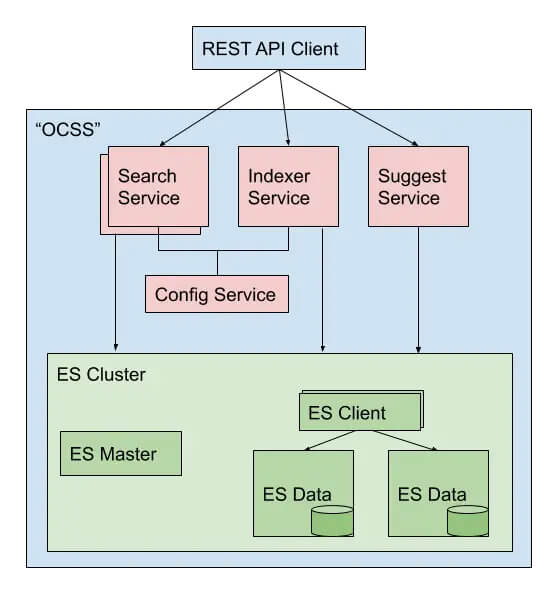
    • Open for change: With separated components and the API-first approach, we don’t bind to the usage of Elasticsearch. For example we used pure Lucene to build the Auto-Suggest functionality. So it is easy to adopt other search solutions (even proprietary ones) using that API.

    Open Commerce Search Stack – Architecture Overview

    We’re just at the start, so there are only basic components in place. But more are on the horizon. Already, it’s possible to fulfill the major requirements for a search solution.

    • Indexer Service: Takes care of transforming standard key-value data into the correct structure, perfectly prepared for the search service. All controlled by configuration – even some data wrangling logic.
    • Search Service: Hidden behind the simple Search API (you can start with “q=your+term”) a quite complex logic cares about the results. It analyzes the passed search terms and, depending on their characteristic, it uses different techniques to search the indexed data. It also contains “fallback queries” that try some query relaxation in case the first try didn’t succeed.
    • Auto-Suggest: With a data-pull approach, it’s independent of Elasticsearch and still scalable. We use the same service to build our SmartSuggest module, but with cleansed and enriched searchHub data.
    • Configuration Service: Since the Indexer and Search Service are built with Spring Boot, we use Spring Cloud Config to distribute the configuration to these services. However, we’re already planning to build a solution that also allows changing the configuration – of course with a nice REST API. 🙂


    You are welcome to take a look at the current state. In the next installment of this series, I will present a simple “getting started”, so you can get your hands dirty – well, only as much as necessary.