Category: Education

  • How SmartQuery boosts onsite search query parsing with Querqy

    How SmartQuery boosts onsite search query parsing with Querqy

    How SmartQuery boosts onsite search query
    parsing with Querqy

    Do you know Querqy? If you have a Lucene-based search engine in place – which will be Solr or Elasticsearch in most cases – you should have heard about Querqy Sounds like: “Quirky“! It’s a powerful query parsing and enhancement engine. It uses different rewriters to add context to the incoming search queries. The most basic rewriter uses a manual rule configuration to add Synonyms, Filters, and Up- and Down-Boostings for the final Lucene Query. More rewriters handle decomposition, number unit normalization, and replacements.

    Error-Tolerance know when to say when

    If you use another search engine, you most likely have similar tools to handle synonyms, filtering, and so on. So this post is also for you because search engines all share one big problem: rules have to be maintained manually! And all those rules are not error-tolerant. So let’s have a look at some examples.

    Example 1 – the onsite search typo

    Your rule: Synonym “mobile” = “smartphone” The query: “mobil case” As you can see, this rule won’t match because of the missing “e” in “mobile”. So in this example, the customer won’t see the smartphone cases.

    Example 2 – the search term composition

    The same rule, another query: “mobilecase” Again the synonym won’t be applied since the words are not separated correctly. For such queries, you should consider Querqys word-break rewriter.

    Example 3 – search term word order

    Your rule: women clothes = ladies clothes The query: “clothes for women” or “women’s outdoor clothes” A unique problem arises when using rules for multiple words. There will be many cases where the order changes and the rules won’t match anymore.

    These are just a few constructed examples, but there are plenty more. None of them are fundamental, but they stack up quickly. Additionally, different languages come with other nuances and tricky spelling issues. For us, in Germany, word-compositions are one of the significant problems. From our experience, at least 10-20% of search traffic contains queries with such errors. And we know that there is even more potential for improvement. Our working hypothesis assumes around 30% of traffic can be rephrased into a unified and corrected form.

    What options do you have? Well, you could add many more rules, but you’ll run into the following problem: Complexity.

    We’ve seen many home-grown search configurations with thousands of rules. Over time, these become problematic because the product basis changes. Meaning old rules lead to unexpected results. For example, the synonym “pants” and “jeans” was a good idea once, but since the data changed, you have a lot of mismatches because meanwhile, the word “jeans” references many different concepts.

    SearchHub – your onsite search’s intuitive brain!

    With SearchHub, we reduce the number of manual rules by unifying miss-spellings, composition and word-order variants, and conceptual similar queries.

    If you don’t know SearchHub yet, our solution groups different queries with the same intent and decides the best candidate. Then, come search-time, we transform unwanted query variants into their best candidate respectively.

    What does that mean for your rules? First, you can focus on error-free, unified, and standard queries. SearchHub handles all spelling errors, compositions alternatives, and word order variations.

    Additionally, you can forego adding rules to add context to your queries. For example, it might be tempting to add “apple” when someone searches for “iphone”. But this could lead to false positives when searching for iPhone accessories from different brands. SearchHub, on the other hand, only adds context to queries where people search for such connections. In case of ambiguous queries, you can further split these queries into two unique intents.

    Use the best tools

    Querqy is great. It allows you to add the missing knowledge to the user’s queries. But don’t misuse it for problems like query normalization and unified intent formulation; for that, there’s SearchHub. The combination of these tools makes for a perfect symbiosis. Each one increases the effectiveness of the other. Leveraging both will make your query parsing method a finely tuned solution.

  • Benchmark Open Commerce Search Stack with Rally

    Benchmark Open Commerce Search Stack with Rally

    Benchmark Open Commerce Search Stack
    with Rally

    In my last article, we learned how to create and run a Rally-Track. In this article, we’ll take a deeper and look at a real-world Rally example. I’ve chosen to use OCSS, where we can easily have more than 50.000 documents in our index and about 100.000 operations per day. So let’s begin by identifying which challenges make sense for our sample project.

    Identify what you want to test for your benchmarking

    Before benchmarking, it must be clear what we want to test. This is needed to prepare the Rally tracks and determine which data to use for the benchmark. In our case, we want to benchmark the user’s perspective on our stack. The open-commerce search stack, or OCSS, uses ElasticSearch for a commerce search engine. In this context, a user has two main tasks within ElasticSearch:

    • searching
    • indexing

    We can now divide these two operations into three cases. Below, you will find them listed in order of importance for the project at hand:

    1. searching
    2. searching while indexing
    3. indexing

    Searching

    In the context of OCSS, search performance has a direct impact on usability. As a result, search performance is the benchmark we focus on most in our stack. Furthermore, [OCSS] does more than transforming the user query into a simple ElasticSearch query. OCSS goes a step further and uses a single search query to generate one or more complex ElasticSearch queries (take a look here for more detailed explanation). For this reason, our test must account for this as well.

    Searching while Indexing

    Sometimes it’s necessary to simultaneously search and index your complete product data. The current [OCSS] search index is independent of the product data. This architecture was born out of Elasticsearch’s lack of native standard tools (not requiring hackarounds over snapshots) to clearly and permanently define nodes for indexing and nodes for searching. As a result, the indexing load influences the whole cluster performance. This must be benchmarked.

    Indexing

    The impact of indexing time to the user within OCSS is marginal. However, in the interest of a comprehensive understanding of the data, we will also test indexing times independently. And rounding off our index tests: we want to determine how long a complete product index could possibly take to run.

    What data should be used for testing and how to get it

    For our benchmark, we will need two sets of data. The index data itself, with the index settings and the search queries from OCSS to ElasticSearch. The index data and settings within Elasticsearch are easily extracted using the Rally create-track command. Enabling the spring-profile: trace-searches allows us to retrieve the Elasticsearch queries generated by the OCSS based on the user query. Then configure the logback function in OCSS so that each search records to the searches.log. This log contains both the raw user query and the generated Elasticsearch query from OCSS.

    How to create a track under normal circumstances

    After we have the data and basic track (generated by the create-track command) without challenges, it’s time to execute our challenges from above. However, because Rally has no operation to iterate and subsequently render every file line as a search, we would have to create a custom runner to provide this operation.

    Do it the OCSS way

    We will not do this by hand in our sample but rather enable the trace-searches profile and use the OCSS bash script to extract the index data and settings. This will generate a track based on the index and search data outlined in the cases above.

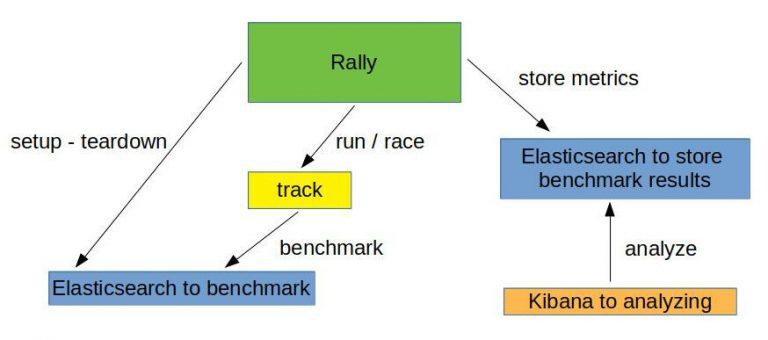
    So once we have OCSS up and running and enough time has passed to gather a representative number of searches, we can use the script to create a track using production data. For more information, please take a look here. The picture below is a good representation of what we’re looking at:

    Make sure you have all requirements installed before running the following commands.

    First off: identify the data index within OCSS:

    				
    					(/tmp/blog)➜  test_track$ curl http://localhost:9200/_cat/indices
    green open ocs-1-blog kjoOLxAmTuCQ93INorPfAA 1 1 52359 0 16.9mb 16.9mb


    Once you have the index and the searches.log you can run the following script:

    				
    					(open-commerce-stack)➜  esrally$ ./create-es-rally-track.sh -i ocs-1-blog -f ./../../../search-service/searches.log -o /tmp -v -s 127.0.0.1:9200
    Creating output dir /tmp ...
    Output dir /tmp created.
    Creating rally data from index ocs-1-blog ...
        ____        ____
       / __ ____ _/ / /_  __
      / /_/ / __ `/ / / / / /
     / _, _/ /_/ / / / /_/ /
    /_/ |_|__,_/_/_/__, /
                    /____/
    [INFO] Connected to Elasticsearch cluster [ocs-es-default-1] version [7.5.2].
    Extracting documents for index [ocs-1-blog]...       1001/1000 docs [100.1% done]
    Extracting documents for index [ocs-1-blog]...       2255/2255 docs [100.0% done]
    [INFO] Track ocss-track has been created. Run it with: esrally --track-path=/tracks/ocss-track
    --------------------------------
    [INFO] SUCCESS (took 25 seconds)
    --------------------------------
    Rally data from index ocs-1-blog in /tmp created.
    Manipulate generated /tmp/ocss-track/track.json ...
    Manipulated generated /tmp/ocss-track/track.json.
    Start with generating challenges...
    Challenges from search log created.


    If the script is finished, the folder ocss-track is created in the output location /tmp/. Let’s get an overview using tree:

    				
    					(/tmp/blog)➜  test_track$ tree /tmp/ocss-track 
    /tmp/ocss-track
    ├── challenges
    │   ├── index.json
    │   ├── search.json
    │   └── search-while-index.json
    ├── custom_runner
    │   └── ocss_search_runner.py
    ├── ocs-1-blog-documents-1k.json
    ├── ocs-1-blog-documents-1k.json.bz2
    ├── ocs-1-blog-documents.json
    ├── ocs-1-blog-documents.json.bz2
    ├── ocs-1-blog.json
    ├── rally.ini
    ├── searches.json
    ├── track.json
    └── track.py
    2 directories, 13 files


    OCSS output

    As you can see, we have 2 folders and 13 files. The challenges folder contains 3 files where each file contains one of our identified cases. The 3 files in the challenges folder are loaded in track.json.

    OCSS Outputs JSON Tracks

    The custom_runner folder contains the ocss_search_runner.py. This is where our custom operation is stored. It controls the iterations across searches.json. This same operation fires each Elasticseach query to be benchmarked against Elasticsearch. The custom runner must be registered in track.py. The ocs-1-blog.json contains the index settings. The files ocs-1-blog-documents-1k.json and ocs-1-blog-documents.json include the index documents; and are available as .bz2 files. The last file we have is the rally.ini file; it contains all Rally settings and, in the event a more detailed export is required, beyond a simple summary like in the example below, this file specifies where the metrics should be outputted. The following section of rally.inidefines that the result data should be stored in Elasticsearch:

    				
    					[reporting]
    datastore.type = elasticsearch
    datastore.host = 127.0.0.1
    datastore.port = 9400
    datastore.secure = false
    datastore.user = 
    datastore.password = 


    Overview of what we want to do:

    Run the benchmark challenges

    Now that the track is generated, it’s time to run the benchmark. But, first, we have to initiate Elasticsearch and Kibana for the benchmark results. This is what docker-compose-results.yaml is for. You can find here.

    				
    					(open-commerce-stack)➜  esrally$ docker-compose -f docker-compose-results.yaml up -d
    Starting esrally_kibana_1 ... done
    Starting elasticsearch    ... done
    (open-commerce-stack)➜  esrally$ docker ps
    CONTAINER ID        IMAGE                                                       COMMAND                  CREATED             STATUS              PORTS                              NAMES
    b3ebb8154df5        docker.elastic.co/elasticsearch/elasticsearch:7.9.2-amd64   "/tini -- /usr/local…"   15 seconds ago      Up 3 seconds        9300/tcp, 0.0.0.0:9400->9200/tcp   elasticsearch
    fc454089e792        docker.elastic.co/kibana/kibana:7.9.2                       "/usr/local/bin/dumb…"   15 seconds ago      Up 2 seconds        0.0.0.0:5601->5601/tcp             esrally_kibana_1


    Benchmark Challenge #1

    Once the Elasticsearch/Kibana stack is ready for the results, we can begin with our first benchmark challenge by sending indexthe following command:

    				
    					docker run -v "/tmp/ocss-track:/rally/track" -v "/tmp/ocss-track/rally.ini:/rally/.rally/rally.ini" --network host  
        elastic/rally race --distribution-version=7.9.2 --track-path=/rally/track --challenge=index --pipeline=benchmark-only --race-id=index


    Now would be a good time to have a look at the different parameters available to start Rally:

    • –distribution-version=7.9.2 -> The version of Elasticsearch Rally should use for benchmarking
    • –track-path=/rally/track -> The path where we mounted our track into the rally docker-container
    • –challenge=index -> The name of the challenge we want to perform
    • –pipeline=benchmark-only the pipeline rally should perform
    • –race-id=index -> The race-id which to use instead of a generated id (helpful for analyzing)

    Benchmark Challenge #2

    Following the index challenge we will continue with the search-while-index challenge:

    				
    					docker run -v "/tmp/ocss-track:/rally/track" -v "/tmp/ocss-track/rally.ini:/rally/.rally/rally.ini" --network host  
        elastic/rally race --distribution-version=7.9.2 --track-path=/rally/track --challenge=search-while-index --pipeline=benchmark-only --race-id=search-while-index


    Benchmark Challenge #3

    Last but not least the search challenge:

    				
    					docker run -v "/tmp/ocss-track:/rally/track" -v "/tmp/ocss-track/rally.ini:/rally/.rally/rally.ini" --network host  
        elastic/rally race --distribution-version=7.9.2 --track-path=/rally/track --challenge=search --pipeline=benchmark-only --race-id=search


    Review the benchmark results

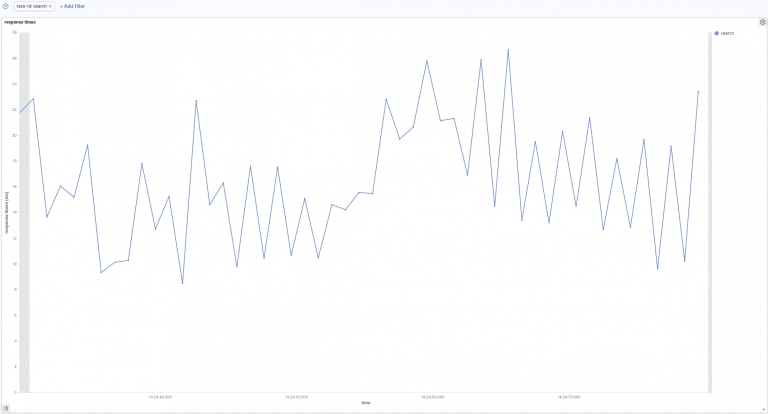
    Let’s have a look at the benchmark results in Kibana. A few special dashboards exist for our use cases, but you’ll have to import them into Kibana. For example, have a look at either this one or this one here. Or, you can create your own visualization as I did:

    Search:

    In the above picture, we can see the search response times over time. Our searches take between 8ms and 27ms to be processed. Next, let’s go to the following picture. Here we see how search times are influenced by indexation.

    Search-while-index:

    The above image shows search response times over time while indexing. In the beginning, indexing while simultaneously searching increases the response time to 100ms. This later decreases to 10ms and 40ms.

    Summary

    This post gave you a more complete understanding of how benchmarking your site-search within Rally looks. Additionally, you learned about the unique OCSS application to trigger tracks within Rally. Not only that, you now have a better practical understanding of Rally benchmarking, which will help you create your own system even without OCSS.

    Thanks for reading!

    References

    https://github.com/elastic/rally

    https://esrally.readthedocs.io/en/stable/

    https://github.com/Abmun/rally-apm-search/blob/master/Rally-Results-Dashboard.ndjson

    https://github.com/elastic/rally/files/4479568/dashboard.ndjson.txt

  • From Search Analytics to Search Insights – Part 1

    From Search Analytics to Search Insights – Part 1

    From Search Analytics to Search Insights – Part 1

    Over the last 15 years, I have been in touch with tons of Search Analytics vendors and services regarding Information Retrieval. They all have one thing in common: to measure either the value or the problems of search systems. In fact, in recent years, almost every Search Vendor has jumped on board, adding some kind of Search Analytics functionality in the name of offering a more complete solution.

    How to Make Search Analytics Insights Actionable

    However, this doesn’t change the truth of the matter. To this day, almost all customers with whom I’ve worked over the years massively struggle to transform the data exposed by Search Analytics Systems into actionable insights that actively improve the search experiences they offer to their users. No matter how great the marketing slides or how lofty the false promises are, new tech can’t change that fact.

    The reasons for this behavior are anything but obvious for most people. To this end, the following will shed some light on these problems and offer recommendations on how best to fix them.

    Query Classifier

    First of all, regardless of the system you are using, the data that gets collected needs to be contextual, clean, and serve a well-defined purpose. I can’t overstate the significance of the maintenance and assurance of data accuracy and consistency over its entire lifecycle. It follows that if you or your system collect, aggregate, and analyze wrong data, the insights you might extract from it are very likely fundamentally wrong.

    As always, some examples to help frame these thoughts in terms of your daily business context. The first one refers to zero-result searches and the second deals with Event-Attribution.

    Zero-Results

    It’s common knowledge among Search-Professionals that improving your zero-result-queries is the first thing to consider when optimizing search. But what they tend to forget to mention is that understanding the context of zero-result queries is equally essential.

    There are quite a few different reasons for zero-result queries. However, not all of them are equally insightful when maintaining and optimizing your search system. So let’s dig a bit deeper into the following zero-result cases.

    Symptom Reason Insightfulness

    Continuous zero-result

    Search system generally lacks suitable content.

    Language gap between users and content or information

    Search system generally lacks suitable content.

    Language gap between users and content or information

    Temporary zero-result


    The search system temporarily lacks suitable content.
    a) Filtered out content that is currently unavailable.
    b) Possible inconsistency during re-indexation.
    c) Search-Service Time-Outs (depending on the type of tracking integration and technology)

    a) partially helpful – show related content.
    b) not very helpful

    c) not very helpful

    Context is King

    As you can see, the context (time, type, emitter) is quite essential to distinguish between different zero-result buckets. Context allows you to see the data in a way conducive to furthering search system optimization. We can use this information to unfold the zero-result searches and discover which offer real value acting as the baseline for continued improvements.

    Human Rate

    Almost a year ago, we started considering context in our Query Insights Module. One of our first steps was to introduce the so-called “human rate” of zero results. As a result, our customers can now distinguish between zero results from bots and those originating from real users. This level of differentiation lends more focus to their zero results optimization efforts.

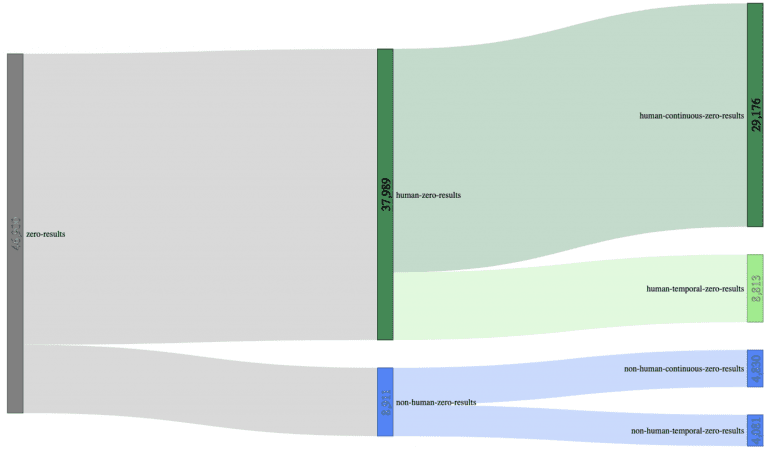
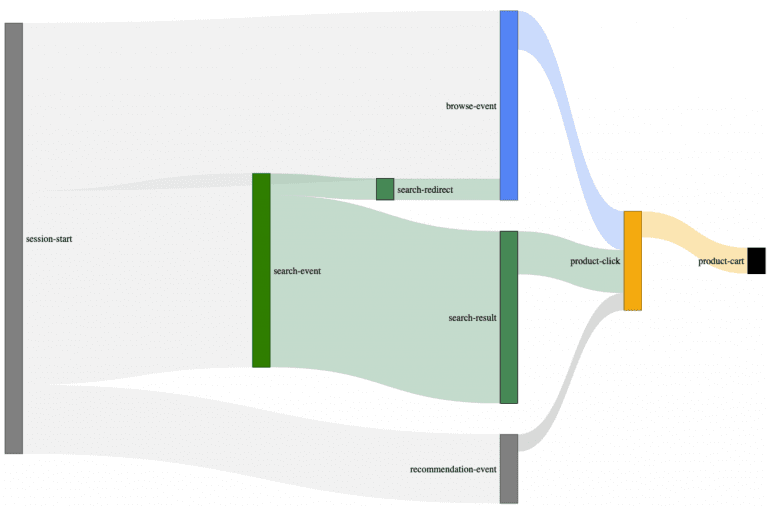
    Let’s use a Sankey-diagram, with actual customer data (700.000 unique searches) to illustrate this better:

    Using a sample size of 700.000 unique searches, we can decrease the initial 46.900 zero-results (6.7% zero-result-rate) to 29.176 zero-results made by humans (4.17% zero-result-rate); a reduction of almost 40% compared to the original sample size, just by adding context.

    Session Exits

    Another helpful dimension to add is session exits. Once you’ve distinguished between zero-results that lead to Session-Exits, from those ending successfully, what remains is a strong indicator for high-potential zero-result queries in desperate need of some optimization.

    And don’t forget:

    “it’s only honest to come to terms with the fact that not every zero-result is a dead-end for your users, and sometimes it is the best you can do.”

    Event Attribution Model

    Attribution modeling gets into some complex territory. Breaking down its fundamentals is easy enough, but understanding how they relate can make your head spin.

    Let’s begin by first trying to understand what attribution modeling is.

    Attribution modeling seeks to assign value to how a customer engaged with your site.

    Site interactions are captured as events that, over time, describe how a customer got to where they are at present. In light of this explanation, attribution modeling aims to assign value to the touch-points or event-types on your site that influence a customer’s purchase.

    For example: every route they take to engage with your site is a touch-point. Together, these touch-points are called a conversion path. It follows that the goal of understanding your conversion paths is to locate which elements or touch-points of your site strongly encourage purchases. Additionally, you may also gain insights into which components are weak, extraneous, or need re-working.

    You can probably think of dozens of possible routes a customer might take in an e-commerce purchase scenario. Some customers click through content to the product and purchase quickly. Others comparison shop, read reviews, and make dozens of return visits before making a final decision.

    Unfortunately, the same attribution models are often applied to Site Search Analytics as well. It is no wonder then that hundreds of customers have told me their Site-Search-Analytics is covered by Google, Adobe, Webtrekk, or other analytics tools. However, whereas this might be suitable for some high-level web analytics tasks, it turns problematic when researching the intersection of search and items related to site navigation and how these play a role in the overall integrity of your data.

    Increase Understanding of User Journey Event Attribution

    To increase the level of understanding around this topic, I usually do a couple of things to illustrate what I’m talking about.

    Step 1: Make it Visual

    To do this, I make a video of me browsing around their site just like a real user would using different functionalities like Site-Search, selecting Filters, clicking through the Navigation, triggering Redirects, clicking on Recommendations. At the same time, I ensure we can see how the Analytics System records the session and the underlying data that gets emitted.

    Step 2: Make it Collaborative

    Then, we collaboratively compare the recording and the aggregated data in the Analytics System.

    Walk your team through practical scenarios. Let them have their own “Aha” Experience

    What Creates an Event Attribution “Aha” Effect?

    More often than not, this type of practical walk-through produces an immediate “Aha” experience for the customer when he discovers the following:

    1. search-related events like clicks, views, carts, orders might be incorrectly attributed to the initial search if multiple paths are used (i.e., redirects or recommendations)
    2. Search redirects are not attributed to a search event at all.
    3. Sometimes buy events and their related revenue are attributed to a search event, even when a correlation between buy and search events is missing.

    How to Fix Event Attribution Errors

    You can overcome these problems and remove most of the errors discussed but you will need to be lucky enough to have some tools.

    Essential Ingredients for Mitigating Event Attribution Data Errors:

    1. Raw data
    2. A powerful Data-Analytics-System
    3. Most importantly: more profound attribution knowledge.

    From here, it’s down to executing a couple of complex query statements on the raw data points.

    The Most User-Friendly Solution

    But fortunately, another more user-friendly solution exists. A more intelligent Frontend Tracking technology will identify and split user-sessions into smaller sub-sessions (trails) that contextualize the captured events.

    That’s the main reason why we developed and open-sourced our search-Collector. It uses the so-called trail concept to contextualize the different stages in a user session, radically simplifying accurate feature-based-attribution efforts.

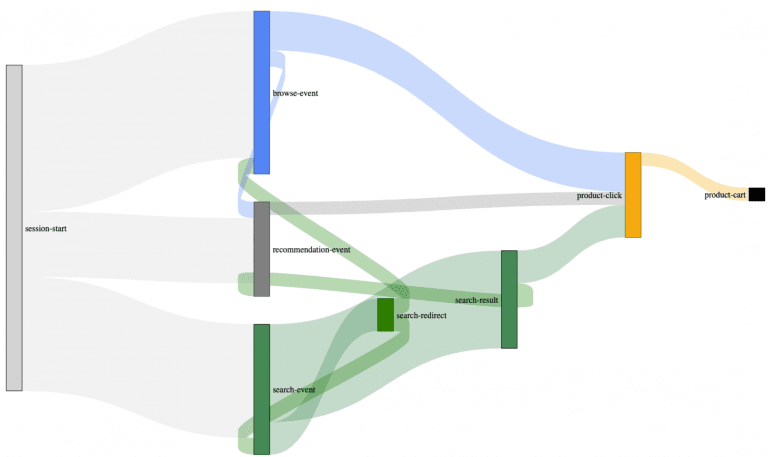
    Example of an actual customer journey map built with our search-collector.

    You may have already spotted these trail connections between the different event types. Most user sessions are what we call multi-modal trails. Multi-modal, in this case, describes the trail/path your users take to interact with your site’s features(search, navigation, recommendations) as a complex interwoven data matrix. As you can see from the Sankey diagram, by introducing trails (backward connections), we can successfully reconstruct the user’s paths.

    Without these trails, it’s almost impossible to understand to which degree your auxiliary e-commerce systems: like your site-search, contribute to these complex scenarios.

    This type of approach safeguards against overly focusing on irrelevant functionalities or missing other areas more in need of optimization.

    Most of our customers already use this type of optimization filtering to establish more accurate, contextualized insight regarding site search.

  • Find Your Application Development Bottleneck

    Find Your Application Development Bottleneck

    Find Your Application
    Development Bottleneck

    A few months ago, I wrote about how hard it is to auto-scale people. Come to think of it, it’s not hard. It’s impossible. But, fortunately, it works pretty well for our infrastructure.

    When I started my professional life more than 20 years ago, it became more and more convenient to rent a hosted server infrastructure. Usually, you had to pick from a list of potential hardware configurations your favorite provider was supplying. At that time, moving all your stuff from an already running server to a new one wasn’t that easy. As a result, the general rule-of-thumb was to configure more MHz, MB, or Mbit than was needed during peak times to prepare for high season. In the end, lots of CPUs were idling around most of the year. It’s a bit like feeding your 8-month-old using a bucket. Your kid certainly won’t starve, but the mess will be enormous.

    Nowadays, we take more care to efficiently size and scale our systems. With that, I mean we do our best to find the right-sized bottle with a neck broad enough to meet our needs. The concept is familiar. We all know the experiments from grade school comparing pipes with various diameters. Let’s call them “bottlenecks.” The smallest diameter always limits the throughput.

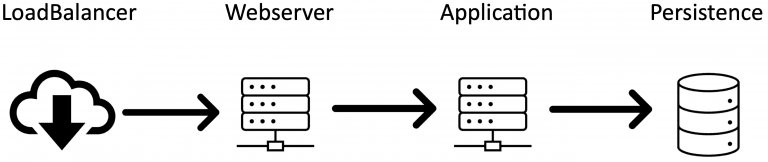
    A typical set of bottlenecks looks like this:

    Of course, this is oversimplified. There’s also likely to be a browser, maybe an API-Gateway, some firewall, and various NAT-ting components as well in a real-world setting. All these bottlenecks directly impact your infrastructure. Therefore, it’s crucial for your application that you find and broaden your bottlenecks in a way that enough traffic can fluently run through them. So let me tell you three of my favorite bottlenecks of the last decade:

    My Three Favorite Application Development Bottlenecks

    1. Persistence:

    Most server systems run on a Linux derivative. When an application creates data (regular files, logfiles, search indexes) to some kind of persistence in a Linux system, it is not written immediately. Instead, the Linux kernel will tell your application: “alright, I’m done,” although it isn’t. Instead, the data is temporarily kept in memory – which may be 1000 times faster than actually writing it to a physical disk. That’s why it’s no problem at all if another component wants to access that same data only microseconds later. The Linux kernel will serve it from memory as if read from the disk. That’s one of the main breakthroughs Linus Torvalds achieved with his “virtual machine architecture” in the Linux kernel (btw: Linus’ MSc thesis is a must-read for everyone trying to understand what a server is actually doing. In the background, the kernel will, of course, physically write the data to the disk. You’ll never notice this background process as long as there is a good balance between data input and storage performance. Yet, at some point, the kernel is forced to tell your application: “wait a second, my memory is full. I need to get rid of some of that stuff.” But when exactly does this happen?

    Execute the following on your machine: sysctl -a | grep -P “dirty_.*_ratio”

    Most likely you’ll see something like vm.dirty_background_ratio = 10
vm.dirty_ratio = 20_

    These are the defaults in most distributions. vm.dirty_ratio is the percentage of RAM that may be filled with unwritten data before it is forced to be written to disk. These values were introduced many years ago when servers had far less than 1 GB of RAM. Imagine a 64GB server system and an application that is capable of generating vast amounts of data in a short time. Not that unusual for a search engine running a full update on an index or some application exporting data. As soon as there are 12.8GB of unwritten data, the kernel will more or less stop your system and write 6.4GB physically to the disk until the vm.dirty_background_ratio limit is reached again. Have you ever noticed a simple “ls” command in your shell randomly taking several seconds or even longer to run? If so, you’re most likely experiencing this “stop-the-world! I-need-to-sync-this-data-first.” How to avoid such behavior and adequately tune your system to keep it from coming back again may be crucial in fixing this random bottleneck. Read more in Bob Planker’s excellent post – it dates a few years back yet still fresh as ever: I often find myself coming back to it. You may want to set a reasonably low value for dirty_ratio to avoid long suspension times in many cases.

    BTW: want to tune your dev machine? Bear in mind that your IDE’s most significant task is to write temporary files (.class files to run a unit-test, write .jar files that will be recreated later anyway, node packages, and so on), so you can increase the vm.dirty_ratio to 50 or more. On a system with enough memory, this will render your slow IDE into a blazingly fast in-memory-IDE.

    2. Webserver:

    I love web servers. They are the Swiss Army Knife of the internet. Any task you can think of they can do. I’ve even seen them perform tasks that you don’t think about. For example, they can tell you that they are not the coffee machine, and you mistakenly sent your request to the teapot. Webservers accomplish one thing extraordinarily well: they act as an interface for an application server. Quite a typical setup is an Apache Webserver in front of an Apache Tomcat. Arguably, this is not the most modern of software stacks, but you’ll be surprised how many companies still run it.

    In an ideal world, the developer team manages the entire request lifecycle. After all, they are the ones who know their webserver and develop the application that runs inside the tomcat appserver. As a result, they have sufficient access to the persistence layer. Our practical experience, however, leaves us confronted with horizontally cut responsibilities. In such cases, Team 1 is webserver; Team 2 takes care of the Tomcat; Team 3 develops the application, and Team 4 is the database engineers. I forgot about the load balancer, you say? Right, nobody knows precisely how this works, we’ve outsourced it.

    One of my most favorite bottlenecks, in this scenario, looks something like the following. All parties did a great job developing a lightning-fast application that only sporadically has to execute long-running requests. Further, the database has been fine-tuned and set up with the appropriate indexes. All looks good, so you start load-testing the whole setup. The CPU-load on your application slowly ramps up; everything is relaxed. Then, suddenly, the load-balancer starts throwing health-check errors and begins marking one service after the other as unresponsive. After much investigation, tuning the health-check timeout, and repeatedly checking the application, you find out that the Apache cannot possibly serve more than 400 parallel requests. Why not? Because nobody thought to configure its limits so it’s still running on the default value:

    Find your bottlenecks! Hard to find and easy to fix

    3. Application:

    Let’s talk about Java. Now, I’m sure you’ve already learned a lot about garbage collection (GC) in Java. If not – do so before trying to run a high-performance-low-latency application. There are tons of documents describing the differences between the built-in GCs – I won’t recite them all here. But there is one tiny detail I haven’t seen or heard of almost anywhere:

    The matrix-like beauty of GC verbose logging

    Have you ever asked yourself whether we live in a simulation? Although GC verbose logging cannot answer this for your personal life, at least it can answer it for your Java application. Imagine a Java application running on a VM or inside a cloud container. Usually, you have no idea what’s happening outside. It’s like Neo before swallowing the pill (was it the red one? I always mix it up). Only now, there is this beautiful GC log line:

    2021-02-05T20:05:35.401+0200: 46226.775: [Full GC (Ergonomics) [PSYoungGen: 2733408K->0K(2752512K)] [ParOldGen: 8388604K->5772887K(8388608K)] 11122012K->5772887K(11141120K), [Metaspace: 144739K->144739K(1179648K)], 3.3956166 secs] [Times: user=3.39 sys=0.04, real=23.51 secs]

    Did you see it? There is an error in the matrix. I am not talking about a full GC running longer than 3 seconds (which is unacceptable in a low-latency environment. If you’re experiencing this behavior, consider using another GC). I am talking about the real-world aging 23.51 seconds while your GC doesn’t do anything. How is that even possible? Time elapses identically for host and VM as long as they travel through the universe at the same speed. However, if your (J)VM says: “Hey, I only spent 3.39 seconds in GC while the kernel took 0.04 seconds. But wait a minute, in the end, 23.51 seconds passed. Whaa? Did I miss the party?” In this case, you’ll know quite for sure that your host system suspended your JVM for over 20 seconds. Why? Well I can’t begin to answer the question for your specific situation, but I have experienced the following reasons:

    • Daily backup of ESX cluster set to always start at 20:00 hrs.
    • Transparent Hugepages stalling the whole host to defrag memory (described first here)
    • Kernel writing buffered data to disk (see: Persistence)

    Additionally, there are other expedient use cases for using the GC logs for analysis (post-mortem analysis, tracking down suspension times in the GC, etc.). Before you start spending money on application performance monitoring tools, activate GC logging – it’s for free: -verbose:gc -XX:+PrintGCDateStamps -XX:+PrintGCDetails -Xloggc:/my/log/path/gclog.txt

    Rest assured, finding and eliminating your bottlenecks is an ongoing process. Once you’ve increased the diameter of one bottle, you have to check the next one. Some call it a curse; I call it progress. And, it’s the most efficient use of our limited resources. Much better than feeding your kid from a bucket.


  • How To DIY Site Search Analytics Using Athena – Part 2

    How To DIY Site Search Analytics Using Athena – Part 2

    This article continues the work on our analytics application from Part 1. You will need to read Part 1 to understand the content of this post. “How To DIY Site search analytics — Part 2” will add the following features to our application:

    How-To Site-Search Analytics follow these steps

    1. Upload CSV files containing our E-Commerce KPIs in a way easily readable by humans.
    2. Convert the CSV files into Apache Parquet format for optimal storage and query performance.
    3. Upload Parquet files to AWS S3, optimized for partitioned data in Athena.
    4. Make Athena aware of newly uploaded data.

    CSV upload to begin your DIY for Site Search Analytics

    First, create a new Spring-Service that manages all file operations. Open your favorite IDE where you previously imported the application in part 1 and create a new class called FileService in the package com.example.searchinsightsdemo.service and paste in the following code:

    				
    					@Service
    public class FileService {
        private final Path uploadLocation;
        public FileService(ApplicationProperties properties) {
            this.uploadLocation = Paths.get(properties.getStorageConfiguration().getUploadDir());
        }
        public Path store(MultipartFile file) {
            String filename = StringUtils.cleanPath(file.getOriginalFilename());
            try {
                if (file.isEmpty()) {
                    throw new StorageException("Failed to store empty file " + filename);
                }
                if (filename.contains("..")) {
                    // This is a security check, should practically not happen as
                    // cleanPath is handling that ...
                    throw new StorageException("Cannot store file with relative path outside current directory " + filename);
                }
                try (InputStream inputStream = file.getInputStream()) {
                    Path filePath = this.uploadLocation.resolve(filename);
                    Files.copy(inputStream, filePath, StandardCopyOption.REPLACE_EXISTING);
                    return filePath;
                }
            }
            catch (IOException e) {
                throw new StorageException("Failed to store file " + filename, e);
            }
        }
        public Resource loadAsResource(String filename) {
            try {
                Path file = load(filename);
                Resource resource = new UrlResource(file.toUri());
                if (resource.exists() || resource.isReadable()) {
                    return resource;
                }
                else {
                    throw new StorageFileNotFoundException("Could not read file: " + filename);
                }
            }
            catch (MalformedURLException e) {
                throw new StorageFileNotFoundException("Could not read file: " + filename, e);
            }
        }
        public Path load(String filename) {
            return uploadLocation.resolve(filename);
        }
        public Stream<Path> loadAll() {
            try {
                return Files.walk(this.uploadLocation, 1)
                        .filter(path -> !path.equals(this.uploadLocation))
                        .map(this.uploadLocation::relativize);
            }
            catch (IOException e) {
                throw new StorageException("Failed to read stored files", e);
            }
        }
        public void init() {
            try {
                Files.createDirectories(uploadLocation);
            }
            catch (IOException e) {
                throw new StorageException("Could not initialize storage", e);
            }
        }


    That’s quite a lot of code. Let’s summarize the purpose of each relevant method and how it helps To DIY Site Search Analytics:

    • store: Accepts a MultipartFile passed by a Spring Controller and stores the file content on disk. Always pay extra attention to security vulnerabilities when dealing with file uploads. In this example, we use Spring’s StringUtils.cleanPath to guard against relative paths, to prevent someone from navigating up our file system. In a real-world scenario, this would not be enough. You’ll want to add more checks for proper file extensions and the like.
    • loadAsResource: Returns the content of a previously uploaded file as a Spring Resource.
    • loadAll: Returns the names of all previously uploaded files.

    To not unnecessarily inflate the article, I will refrain from detailing either the configuration of the upload directory or the custom exceptions. As a result, please review the packages com.example.searchinsightsdemo.config, com.example.searchinsightsdemo.service and the small change necessary in the class SearchInsightsDemoApplication to ensure proper setup.

    Now, let’s have a look at the Spring Controller. Using the newly created service, create a Class FileController in the package com.example.searchinsightsdemo.rest and paste in the following code:

    				
    					@RestController
    @RequestMapping("/csv")
    public class FileController {
        private final FileService fileService;
        public FileController(FileService fileService) {
            this.fileService = fileService;
        }
        @PostMapping("/upload")
        public ResponseEntity<String> upload(@RequestParam("file") MultipartFile file) throws Exception {
            Path path = fileService.store(file);
            return ResponseEntity.ok(MvcUriComponentsBuilder.fromMethodName(FileController.class, "serveFile", path.getFileName().toString()).build().toString());
        }
        @GetMapping("/uploads")
        public ResponseEntity<List<String>> listUploadedFiles() throws IOException {
            return ResponseEntity
                    .ok(fileService.loadAll()
                            .map(path -> MvcUriComponentsBuilder.fromMethodName(FileController.class, "serveFile", path.getFileName().toString()).build().toString())
                            .collect(Collectors.toList()));
        }
        @GetMapping("/uploads/{filename:.+}")
        @ResponseBody
        public ResponseEntity<Resource> serveFile(@PathVariable String filename) {
            Resource file = fileService.loadAsResource(filename);
            return ResponseEntity.ok()
                    .header(HttpHeaders.CONTENT_DISPOSITION, "attachment; filename="" + file.getFilename() + """).body(file);
        }
        @ExceptionHandler(StorageFileNotFoundException.class)
        public ResponseEntity<?> handleStorageFileNotFound(StorageFileNotFoundException exc) {
            return ResponseEntity.notFound().build();
        }
    }


    Nothing special. We just provided request mappings to;

    1. Upload a file
    2. List all uploaded files
    3. Serve the content of a file

    This will ensure the appropriate use of the service methods. Time to test the new functionality, start the Spring Boot application and run the following commands against it:

    				
    					# Upload a file:
    curl -s http://localhost:8080/csv/upload -F file=@/path_to_sample_application/sample_data.csv
    # List all uploaded files
    curl -s http://localhost:8080/csv/uploads
    # Serve the content of a file
    curl -s http://localhost:8080/csv/uploads/sample_data.csv


    The sampledata.csv file can be found within the project directory. However, you can also use any other file.

    Convert uploaded CSV files into Apache Parquet

    We will add another endpoint to our application which expects the name of a previously uploaded file that should be converted to Parquet. Please note that AWS also offers services to accomplish this; however, I want to show you how to DIY.

    Go to the FileController and add the following method:

    				
    					@PatchMapping("/convert/{filename:.+}")
        @ResponseBody
        public ResponseEntity<String> csvToParquet(@PathVariable String filename) {
            Path path = fileService.csvToParquet(filename);
            return ResponseEntity.ok(MvcUriComponentsBuilder.fromMethodName(FileController.class, "serveFile", path.getFileName().toString()).build().toString());
        }


    As you might have already spotted, the code refers to a method that does not exist on the FileService. Before adding that logic though, we first need to add some new dependencies to our pom.xml which enable us to create Parquet files and read CSV files:

    				
    					<dependency>
            <groupId>org.apache.parquet</groupId>
            <artifactId>parquet-hadoop</artifactId>
            <version>1.12.0</version>
        </dependency>
        <dependency>
            <groupId>org.apache.hadoop</groupId>
            <artifactId>hadoop-common</artifactId>
            <version>3.3.0</version>
        </dependency>
        <dependency>
            <groupId>org.apache.hadoop</groupId>
            <artifactId>hadoop-core</artifactId>
            <version>1.2.1</version>
        </dependency>
        <dependency>
            <groupId>org.apache.commons</groupId>
            <artifactId>commons-csv</artifactId>
            <version>1.8</version>
        </dependency>


    After updating the maven dependencies, we are ready to implement the missing part(s) of the FileService:

    				
    					public Path csvToParquet(String filename) {
            Resource csvResource = loadAsResource(filename);
            String outputName = getFilenameWithDiffExt(csvResource, ".parquet");
            String rawSchema = getSchema(csvResource);
            Path outputParquetFile = uploadLocation.resolve(outputName);
            if (Files.exists(outputParquetFile)) {
                throw new StorageException("Output file " + outputName + " already exists");
            }
            org.apache.hadoop.fs.Path path = new org.apache.hadoop.fs.Path(outputParquetFile.toUri());
            MessageType schema = MessageTypeParser.parseMessageType(rawSchema);
            try (
                    CSVParser csvParser = CSVFormat.DEFAULT
                            .withFirstRecordAsHeader()
                            .parse(new InputStreamReader(csvResource.getInputStream()));
                    CsvParquetWriter writer = new CsvParquetWriter(path, schema, false);
            ) {
                for (CSVRecord record : csvParser) {
                    List<String> values = new ArrayList<String>();
                    Iterator<String> iterator = record.iterator();
                    while (iterator.hasNext()) {
                        values.add(iterator.next());
                    }
                    writer.write(values);
                }
            }
            catch (IOException e) {
                throw new StorageFileNotFoundException("Could not read file: " + filename);
            }
            return outputParquetFile;
        }
        private String getFilenameWithDiffExt(Resource csvResource, String ext) {
            String outputName = csvResource.getFilename()
                    .substring(0, csvResource.getFilename().length() - ".csv".length()) + ext;
            return outputName;
        }
        private String getSchema(Resource csvResource) {
            try {
                String fileName = getFilenameWithDiffExt(csvResource, ".schema");
                File csvFile = csvResource.getFile();
                File schemaFile = new File(csvFile.getParentFile(), fileName);
                return Files.readString(schemaFile.toPath());
            }
            catch (IOException e) {
                throw new StorageFileNotFoundException("Schema file does not exist for the given csv file, did you forget to upload it?", e);
            }
        }


    That’s again quite a lot of code, and we want to relate it back to How best To DIY Site Search Analytics. So let’s try to understand what’s going on. First, we load the previously uploaded CSV file Resource that we want to convert into Parquet. From the resource name, we derive the name of an Apache Parquet schema file that describes the data types of each column of the CSV file. This results from Parquet’s binary file structure, which allows encoded data types. Based on the definition we provide in the schema file, the code will format the data accordingly before writing it to the Parquet file. More information can be found in the official documentation.

    The schema file of the sample data can be found in the projects root directory:

    				
    					message m { 
        required binary query; 
        required INT64 searches; 
        required INT64 clicks; 
        required INT64 transactions; 
    }


    It contains only two data types:

    1. binary: Used to store the query — maps to String
    2. INT64: Used to store the KPIs of the query — maps to Integer

    The content of the schema file is read into a String from which we can create a MessageType object that our custom CsvParquetWriter, which we will create shortly, needs to write the actual file. The rest of the code is standard CSV parsing using Apache Commons CSV, followed by passing the values of each record to our Parquet writer.

    It’s time to add the last missing pieces before we can create our first Parquet file. Create a new class CsvParquetWriter in the package com.example.searchinsightsdemo.parquet and paste in the following code:

    				
    					...
    import org.apache.hadoop.fs.Path;
    import org.apache.parquet.hadoop.ParquetWriter;
    import org.apache.parquet.hadoop.metadata.CompressionCodecName;
    import org.apache.parquet.schema.MessageType;
    public class CsvParquetWriter extends ParquetWriter<List<String>> {
        public CsvParquetWriter(Path file, MessageType schema) throws IOException {
            this(file, schema, DEFAULT_IS_DICTIONARY_ENABLED);
        }
        public CsvParquetWriter(Path file, MessageType schema, boolean enableDictionary) throws IOException {
            this(file, schema, CompressionCodecName.SNAPPY, enableDictionary);
        }
        public CsvParquetWriter(Path file, MessageType schema, CompressionCodecName codecName, boolean enableDictionary) throws IOException {
            super(file, new CsvWriteSupport(schema), codecName, DEFAULT_BLOCK_SIZE, DEFAULT_PAGE_SIZE, enableDictionary, DEFAULT_IS_VALIDATING_ENABLED);
        }
    }



    Our custom writer extends the ParquetWriter class, which we pulled in with the new maven dependencies. I added some imports to the snippet to visualize it. The custom writer does not need to do much; just call some super constructor classes with mostly default values, except that we use the SNAPPY codec to compress our files for optimal storage and cost reduction on AWS. What’s noticeable, however, is the CsvWriteSupport class that we also need to create ourselves. Create a class CsvWriteSupport in the package com.example.searchinsightsdemo.parquet with the following content:

    				
    					...
    import org.apache.hadoop.conf.Configuration;
    import org.apache.parquet.column.ColumnDescriptor;
    import org.apache.parquet.hadoop.api.WriteSupport;
    import org.apache.parquet.io.ParquetEncodingException;
    import org.apache.parquet.io.api.Binary;
    import org.apache.parquet.io.api.RecordConsumer;
    import org.apache.parquet.schema.MessageType;
    public class CsvWriteSupport extends WriteSupport<List<String>> {
        MessageType             schema;
        RecordConsumer          recordConsumer;
        List<ColumnDescriptor>  cols;
        // TODO: support specifying encodings and compression
        public CsvWriteSupport(MessageType schema) {
            this.schema = schema;
            this.cols = schema.getColumns();
        }
        @Override
        public WriteContext init(Configuration config) {
            return new WriteContext(schema, new HashMap<String, String>());
        }
        @Override
        public void prepareForWrite(RecordConsumer r) {
            recordConsumer = r;
        }
        @Override
        public void write(List<String> values) {
            if (values.size() != cols.size()) {
                throw new ParquetEncodingException("Invalid input data. Expecting " +
                        cols.size() + " columns. Input had " + values.size() + " columns (" + cols + ") : " + values);
            }
            recordConsumer.startMessage();
            for (int i = 0; i < cols.size(); ++i) {
                String val = values.get(i);
                if (val.length() > 0) {
                    recordConsumer.startField(cols.get(i).getPath()[0], i);
                    switch (cols.get(i).getType()) {
                        case INT64:
                            recordConsumer.addInteger(Integer.parseInt(val));
                            break;
                        case BINARY:
                            recordConsumer.addBinary(stringToBinary(val));
                            break;
                        default:
                            throw new ParquetEncodingException(
                                    "Unsupported column type: " + cols.get(i).getType());
                    }
                    recordConsumer.endField(cols.get(i).getPath()[0], i);
                }
            }
            recordConsumer.endMessage();
        }
        private Binary stringToBinary(Object value) {
            return Binary.fromString(value.toString());
        }
    }


    Here we extend WriteSupport where we need to override some more methods. The interesting part is the write method, where we need to convert the String values, read from our CSV parser, into the proper data types defined in our schema file. Please note that you may need to extend the switch statement should you require more data types than in the example schema file.

    Turning on the Box

    Testing time, start the application and run the following commands:

    				
    					# Upload the schema file of the example data
    curl -s http://localhost:8080/csv/upload -F file=@/path_to_sample_application/sample_data.schema
    # Convert the CSV file to Parquet
    curl -s -XPATCH http://localhost:8080/csv/convert/sample_data.csv


    If everything worked correctly, you should find the converted file in the upload directory:

    				
    					[user@user search-insights-demo (⎈ |QA:ui)]$ ll /tmp/upload/
    insgesamt 16K
    drwxr-xr-x  2 user  user   120  4. Mai 10:34 .
    drwxrwxrwt 58 root  root  1,8K  4. Mai 10:34 ..
    -rw-r--r--  1 user  user   114  3. Mai 15:44 sample_data.csv
    -rw-r--r--  1 user  user   902  4. Mai 10:34 sample_data.parquet
    -rw-r--r--  1 user  user    16  4. Mai 10:34 .sample_data.parquet.crc
    -rw-r--r--  1 user  user   134  4. Mai 10:31 sample_data.schema


    You might be wondering why the .parquet file size is greater than the .csv file. As I said, we are optimizing the storage size as well. The answer is pretty simple. Our CSV file contains very little data, and since Parquet stores the data types and additional metadata in the binary file, we don’t gain the benefit of compression. However, your CSV file will have more data, so things will look different. The raw CSV data of a single day from a real-world scenario is 11.9 MB whereas the converted Parquet file only weights 1.4 MB! That’s a reduction of 88% which is pretty impressive.

    Upload the Parquet files to S3

    Now that we have the parquet files locally, it’s time to upload them to AWS S3. We already created our Athena database, in part one, where we enabled partitioning by a key called dt:

    				
    					...
    PARTITIONED BY (dt string)
    STORED AS PARQUET
    LOCATION 's3://search-insights-demo/'


    this means we need to upload the files into the following bucket structure:

    				
    					├── search-insights-demo
    │   └── dt=2021-05-04/
    │       └── analytics.parquet


    Each parquet file needs to be placed in a bucket with the prefix dt= followed by the date relative to the corresponding KPIs. The name of the parquet file does not matter as long as its extension is .parquet.

    It’s Hack Time

    So let’s start coding. Add the following method to the FileController:

    				
    					@PatchMapping("/s3/{filename:.+}")
        @ResponseBody
        public URL uploadToS3(@PathVariable String filename) {
            return fileService.uploadToS3(filename);
        }


    and to the FileService respectively:

    				
    					public URL uploadToS3(String filename) {
            Resource parquetFile = loadAsResource(filename);
            if (!parquetFile.getFilename().endsWith(".parquet")) {
                throw new StorageException("You must upload parquet files to S3!");
            }
            try {
                AmazonS3 s3 = AmazonS3ClientBuilder.standard().build();
                File file = parquetFile.getFile();
                long lastModified = file.lastModified();
                LocalDate partitionDate = Instant.ofEpochMilli(lastModified)
                        .atZone(ZoneId.systemDefault())
                        .toLocalDate();
                String bucket = String.format("search-insights-demo/dt=%s", partitionDate.toString());
                s3.putObject(bucket, "analytics.parquet", file);
                return s3.getUrl(bucket, "analytics.parquet");
            }
            catch (SdkClientException | IOException e) {
                throw new StorageException("Failed to upload file to s3", e);
            }
        }


    The code won’t compile before adding another dependency to our pom.xml:

    				
    					<dependency>
        <groupId>com.amazonaws</groupId>
        <artifactId>aws-java-sdk-s3</artifactId>
        <version>1.11.1009</version>
    </dependency>


    Please don’t forget that you need to change the base bucket search-insights-demo to the one you used when creating the database!

    Testing time:

    				
    					# Upload the parquet file to S3
    curl -s -XPATCH http://localhost:8080/csv/s3/sample_data.parquet


    The result should be the S3 URL where you can find the uploaded file.

    Make Athena aware of newly uploaded data

    AWS Athena does not constantly scan your base bucket for newly uploaded files. So if you’re attempting to DIY Site Search Analytics, you’ll need to execute an SQL statement that triggers the rebuild of the partitions. Let’s go ahead and add the necessary small changes to the FileService:

    				
    					...
    private static final String QUERY_REPAIR_TABLE = "MSCK REPAIR TABLE " + ANALYTICS.getName();
        private final Path          uploadLocation;
        private final DSLContext    context;
        public FileService(ApplicationProperties properties, DSLContext context) {
            this.uploadLocation = Paths.get(properties.getStorageConfiguration().getUploadDir());
            this.context = context;
        }
    ...
    				
    			
    1. First, we add a constant repair table SQL snippet that uses the table name provided by JOOQ’s code generation.
    2. Secondly, we autowire the DSLContext provided by Spring into our service.
    3. For the final step, we need to add the following lines to the public URL uploadToS3(String filename) method, right before the return statement:
    				
    					...
    context.execute(QUERY_REPAIR_TABLE);


    That’s it! With these changes in place, we can test the final version of part 2

    				
    					curl -s -XPATCH http://localhost:8080/csv/s3/sample_data.parquet
    # This time, not only was the file uploaded, but the content should also be visible for our queries. So let's get the count of our database
    curl -s localhost:8080/insights/coun`


    The response should match our expected value 3 — which matches the number of rows in our CSV file — and you should be able to see the following log message in your console:

    				
    					Executing query          : select count(*) from "ANALYTICS"
    Fetched result           : +-----+
                             : |count|
                             : +-----+
                             : |    3|
                             : +-----+                                                                  
    Fetched row(s)           : 1   


    Summary

    In part two of this series, we showed how to save storage costs and gain query performance by creating Apache Parquet files from plain old CSV files. Those files play nicely with AWS Athena, especially when you further partition them by date. E-Commerce KPIs can be partitioned precisely by a single day. After all, the most exciting queries span a range, e.g., show me the top queries of the last X days, weeks, months. This is the exact functionality we will add in the next part, where we extend our AthenaQueryServiceby some meaningful queries. Stay tuned and join us soon for part three of this series, coming soon!

    By the way: The source code for part two can be found on GitHub.

  • How-To Solr E-Commerce Search

    How-To Solr E-Commerce Search

    Solr Ecommerce Search –

    A Best Practice Guide — Part 1

    How-To Do Solr E-Commerce Search just right? Well, imagine you want to drive to the mountains for a holiday. You take along your husband or wife and your two children (does it get any more stereotypical?) — what kind of car would you take? The two-seater sports car or the station wagon? Easy choice, you say? Well, choosing Solr as your e-commerce search engine is a bit like taking the sports car on the family tour.

    Part of the issue is how Solr was originally conceived. Initially, Solr was designed to perform as a full-text search engine for content, not products. Although it has evolved “a little” since then, there are still a few pitfalls that you should avoid.

    That said, I’d like to show you some best practices and tips from one of my projects. In the end, I think Solr is good at getting the job done after all. 😉

    How to Not Reinvent the Wheel When Optimizing Solr for E-commerce Search

    First, don’t reinvent the wheel when integrating basic things like synonyms and boostings on the Lucene level. These can be more easily managed using open-source add-ons like Querqy.

    If you want to perform basic tasks such as eliminating specific keywords from consideration, replacing words with alternatives better matching your product data, or simply setting up synonyms and boostings… Querqy does the job with a minimal of effort.Solr, by default, uses a scoring model called TF/IDF (Term Frequency/Inverse Document Frequency). In short, it scores documents higher with more occurrences of a search term. And lower if fewer documents contain the search term.

    For general use cases, how often a search term resides in a text document may be important; for e-commerce search, however, this is most often not the case.

    E-Commerce does not concern itself with search term frequency but rather with where, in which field, the search term is found.

    How-To Teach Solr to Think Like an E-Commerce Search Manager

    To help Solr account for this, simply set the “tie” option for your request handler to 0.0. This will have the positive effect of only considering the best matching field. It will not sum up all fields, which could adversely result in a scenario where the sum of the lower weighted fields is greater than your best matching most important field.

    How-To Fix Solr’s Similarity Issues for E-Commerce Search

    Secondly, turn off the similarity scoring by setting uq.similarityScore to “off.”

    				
    					<float name="tie">0.0</float> <str name="uq.similarityScore">off</str>


    This will ensure a more usable scoring for e-commerce scenarios. Moreover, by eliminating similarity scoring, result sorting is more customer-centric and understandable. This more logical sorting results from product name field matches leading to higher scores than matches found in the description texts. Don’t forget to set up your field boostings correctly as well!

    Give my previous blog post about search relevancy a read for more advice on what to consider for good scores.

    Even with the best scoring and result sorting, the number of items returned can be overwhelming for the user. Especially for generic queries like “smartphone,” “washing machine,” or “tv.”

    How-To Do Facets Correctly in Solr

    The logical answer to this problem is, of course — faceting.

    Enabling your visitors to drill down to their desired products is critical.

    While it may be simple to know upfront which facets are relevant to a particular category within a relatively homogenous result-set, the more heterogeneous search results become, the greater the challenge. And, of course, you don’t want to waste CPU power and time for facets that are irrelevant to your current result set, especially if you have hundreds or even thousands of them.

    So, wouldn’t it be nice to know which fields Solr should use as facets — before calling it? After all, it’s not THAT easy. You need to take a two-step approach.

    For this to work, you have to store all relevant facet field names for a single product in a special field. Let’s call it, e.g., “facet_fields.” It will contain an array of field names, e.g.

    Facets For Product 1 (tablet):

    				
    					"category", "brand", "price", "rating", "display_size", "weight""category", "brand", "price", "rating", "display_size", "weight"


    Facets For Product 2 (freezer):

    				
    					"category", "brand", "price", "width", "height", "length", "cooling_volume”


    Facets For Product 3 (tv):

    				
    					"category", "brand", "price", "display_size", "display_technology", "vesa_wall_mount"


    If a specific type, e.g., “televisions,” is searched, you can now make an initial call to Solr with just ONE facet, based on the “facet_fields” field, which will return available facets restricted to the found televisions.

    Additionally, it’s possible to significantly reduce overhead by holding off requesting untimely product data at this stage.

    It may also be the right time to run a check confirming whether you get back any matches at all or if you ended up on the zero result page.

    If that is the case, you can either try the “spellcheck” component of Solr to fix typos in your query or implement our SmartQuery technology to avoid these situations in most cases right from the start.

    Now, you use the information collected in the first call to request facets based on “category”, “brand”, “price”, “display_size”, “display_technology” and “vesa_wall_mount”, in the second call to Solr.

    How-To Reduce Load with Intelligent Facet-Rules !

    You might argue that some of these facets are so general in nature that there isn’t a need to store and request them each time—things like category, brand, and price. And you would be right. So if you want to save memory, use a whitelist for the generic facets and combine them with the special facets from your initial request.

    Let’s have a look at an example. Imagine someone searches for “Samsung.” This will return a very mixed set of results with products across all 3 areas of the above facets example. Nevertheless, you can use the information from the first call to Solr to filter out facets that do not apply to a significant sample of the result.

    A note of caution: the additional effort of filtering out facets with low coverage may prove more useful, at a later stage, once additionally applied filters — on the category, for example — reveal a particular relevance for a given facet, which was not evident initially. Once the user decides to go for “Smartwatches” following a search for “Samsung,” the “wrist size” suddenly gains importance. This makes clear why we only drop facets that are not present in our result set at all.

    Now that the result has facets, it might make sense to offer the user a multi-select option for the values. This allows them to choose, side by side, whether the TV is from LG, Samsung, or Sony.

    How-To Exclude Erroneous Facet Results

    The good news is that Solr has a built-in option to ignore set filters for generating a specific facet.

    				
    					facet.field={!ex=brand}brand fq={!tag=brand}brand:("SAMSUNG" OR "LG" OR "SONY")


    This is how we tag the facet field to exclude it during filtering. Then using the filter query, we have to pass that tag again, so Solr knows what to exclude.

    You can also use other tags. Just be sure to keep track of which tag you use for which facet! So, something like this also works (using “br” instead of the full field name “brand” — this is useful, if you have more structured

    field names like “facet_fields.brand”):

    				
    					facet.field={!ex=br}facet_fields.brand fq={!tag=br}facet_fields.brand:("SAMSUNG" OR "LG" OR "SONY")


    Define Constraints for Numeric Fields for Slider-Facets

    But what about numeric fields like price or measurements like width, height, etc.?

    Using these fields to gather the required data to create a slider facet is fairly easy.

    Just enable the stats component and name which details you require:

    				
    					stats=true stats.field={!ex=price min=true max=true count=true}pric


    The response includes the minimum and maximum values respective to your result. These form the absolute borders of your slider.

    Additionally, use the count to also filter out irrelevant facets by a coverage factor.

    				
    					stats": {
        "stats_fields": {
            "price": {
                "min": 89.0,
                "max": 619.0,
                "count": 188
            }
        }
    }


    Remember, if you filter on price, to set the slider’s lower and upper touch-points to correspond to the actual filter values!

    Otherwise, your customers have to repeatedly select it 😉

    So from the stats response, you have the absolute minimum and maximum. And you’ve set the minimum and maximum of the filter.

    Solr E-Commerce Search – Not Bad After All

    Congratulations! You now know how to tune your Solr basic scoring algorithm to perform best in e-commerce scenarios. Not only that, you know how to make the best use of your facets within Solr.

    In the next episode of this best practices guide, I would like to dive deeper into how to correctly weight and boost your products. At the same time, I want to pull back the curtain on how to master larger multi-channel environments without going to Copy/Paste hell. So stay tuned!

  • Simple, Simpler, Perfect – Finding Complexity in Simplicity

    Simple, Simpler, Perfect – Finding Complexity in Simplicity

    How to frame simple, simpler, perfect? A drum teacher once told me – “To play a simple beat really well, you must first master the complex stuff; practice a lot. Then revisit the simple beat”. At the time, I was not particularly convinced. I mean, how hard could an AC/DC drum pattern be? Actually, really simple. But the drum teacher was wise, and I guarantee you, even with an untrained ear, in a blind test, you’ll vote for AC/DC’s drummer above my playing any day of the week and twice on Sunday. Because simple things like how you attack the note, the timing precision of each stroke, sum up to playing a simple beat perfectly vs. “kind of ok.”

    How the K.I.S.S. Concept Applies to Software Development

    This concept applies to software as well. Like music, you compose software, combining different components and functionality, then interface into something a client can understand. As in music, you can’t expect easy adoption if you’re composing avant-garde techno-folk-jazz music.

    Simple

    Previously I wrote about dumb services architecture, but the application of the “simplicity concept” is tied most strongly to the client experience. If your core client experience is simple to understand, you’ll appeal to a much wider audience.

    To restate: your product improves, congruent to your focus on polishing the simple things in your software. Perhaps even simpler (pun intended). Simplicity = Scale.

    Simpler

    Scaling your software and business is more manageable when you focus on the core client experience. In the case of software, though, unlike music, the effects of this concept are multiplied.

    • Users will intuitively pick your polished product over the competition.
    • No need to educate users on how to use the software
    • Users can show and persuade others to use your software. With a strong core experience, users can build a mental model of your product, creating natural advocates for you.
    • Your software is easier to maintain and deploy. Now, this may not always be true, especially if you leverage a simple user experience to hide a lot of complexity. Nevertheless, at least at the UI level, it still has merit.

    Perfect

    Last week an event occurred that offers the perfect example for the above. Coinbase IPOed at $100b valuation. Now, you may or may not follow cryptocurrencies, but here’s the essence of the story. They beat all the competition within the crypto-industry by creating a simple, polished, core client experience. Everything else was secondary for them.

    Simply Complex Perfection

    In conclusion: before building, ask yourself a few questions. Is this client functionality necessary? Even if they insist, will it bring value to your core experience? Are 3 layers of backend frameworks essential to make an SQL query? These decisions are hard to make. Paradoxically, building simply is more arduous than building complexly. But it pays off.

  • How-To Setup Elasticsearch Benchmarking with Rally

    How-To Setup Elasticsearch Benchmarking with Rally

    How to set up Elasticsearch benchmarking, using Elastic’s own tools, is a necessity in today’s eCommerce. In my previous articles, I describe how to operate Elasticsearch in Kubernetes and how to monitor Elasticsearch. It’s time now to look at how Elastic’s homegrown benchmarking tool, Rally, will increase your performance, while saving you unnecessary cost, and headaches.

    This article is part one of a series. This first part provides you with:

    • a short overview of Rally
    • a short sample track

    Why to Benchmark in Elasticsearch with Rally?

    Surely, you’re thinking, why should I benchmark Elasticsearch, isn’t there a guide illustrating the best cluster specs for Elasticsearch, eliminating all my problems?

    The answer: a resounding “no”. There is no guide to tell you how the “perfect” cluster should look.

    After all, the “perfect” cluster highly depends on your data structure, your amount of data, and your operations against Elasticsearch. As a result, you will need to perform benchmarks relevant to your unique data and processes to find bottlenecks and tune your Elasticsearch cluster.

    What does Elastic’s Benchmarking Tool Rally Do?

    Rally is the macro-benchmarking framework for Elasticsearch from elastic itself. Developed for Unix, Rally runs best on Linux and macOS but also supports Elasticsearch clusters running Windows. Rally can help you with the following tasks:

    • Setup and teardown of an Elasticsearch cluster for benchmarking
    • Management of benchmark data and specifications even across Elasticsearch versions
    • Running benchmarks and recording results
    • Finding performance problems by attaching so-called telemetry devices
    • Comparing performance results and export them (e.g., to Elasticsearch itself)


    Because we are talking about benchmarking a cluster, Rally also needs to fit the requirements to benchmark clusters. For this reason, Rally has special mechanisms based on the Actor-Model to coordinate multiple Rally instances, like a “cluster” to benchmark a cluster.

    Basics about Rally Benchmarking

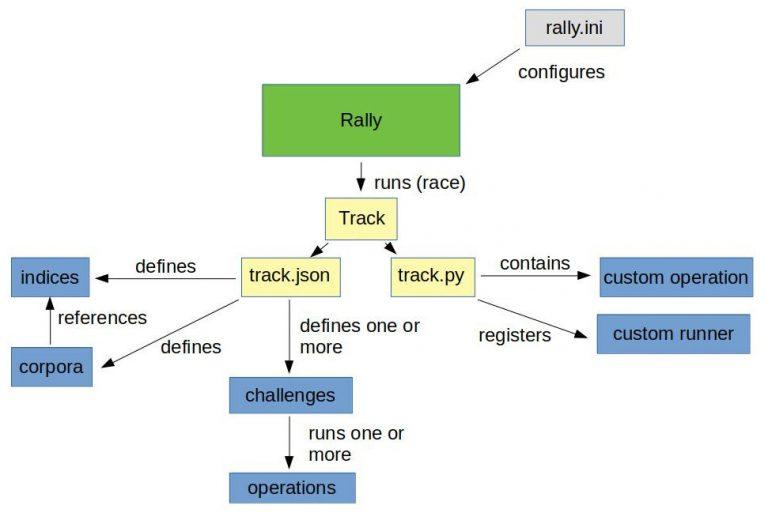
    Configure Rally using the rally.ini file. Take a look here to get an overview of the configuration options.

    Within Rally, benchmarks are defined in tracks. A track contains one or multiple challenges and all data needed for performing the benchmark.

    Data is organized in indices and corporas. The indices include the index name and index settings against which the benchmark must perform. Additionally, the indices include the corpora, which contains the data to be indexed.

    And, sticking with the “Rally” theme, if we run a benchmark, we call it a race.

    Every challenge has one or multiple operations applied in a sequence or parallel to the Elasticsearch.

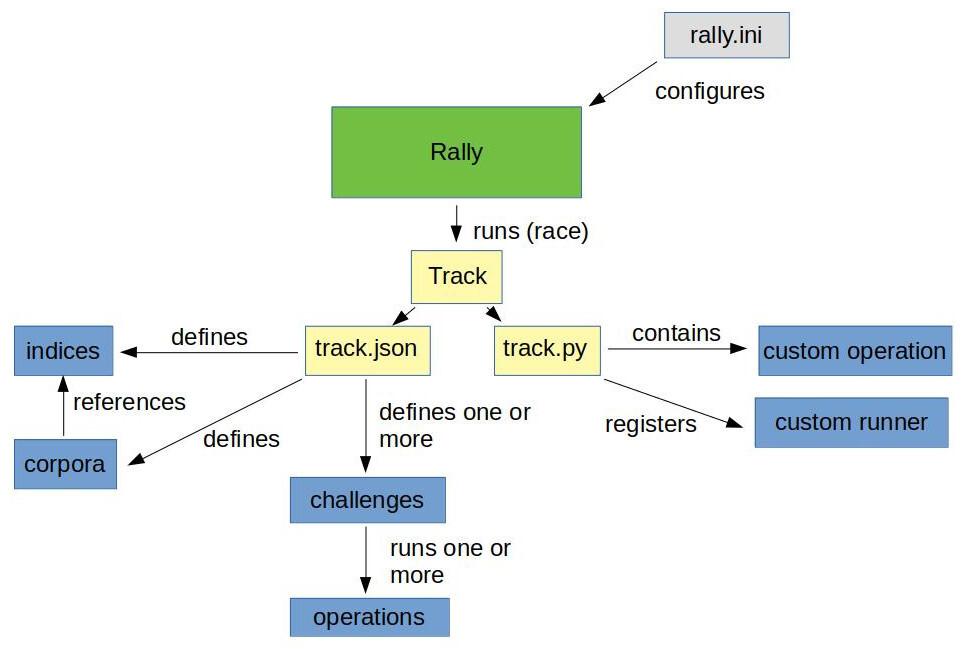
    An operation, for example, could be a simple search or a create-index. It’s also possible to write simple or more complex operations called custom runners. However, there are pre-defined operations for the most common tasks. My illustration below will give you a simple overview of the architecture of a track:

    Note: the above image supplies a sample of the elements within a track to explain how the internal process looks.

    Simple sample track

    Below, an example of a track.json and an index-with-one-document.json for the index used in the corpora:

    				
    					{
      "version": 2,
      "description": "Really simple track",
      "indices": [
        {
          "name": "index-with-one-document"
        }
      ],
      "corpora": [
        {
          "name": "index-with-one-document",
          "documents": [
            {
              "target-index": "index-with-one-document",
              "source-file": "index-with-one-document.json",
              "document-count": 1
            }
          ]
        }
      ],
      "challenges": [
        {
          "name": "index-than-search",
          "description": "first index one document, then search for it.",
          "schedule": [
            {
              "operation": {
                "name": "clean elasticsearch",
                "operation-type": "delete-index"
              }
            },
            {
              "name": "create index index-with-one-document",
              "operation": {
                "operation-type": "create-index",
                "index": "index-with-one-document"
              }
            },
            {
              "name": "bulk index documents into index-with-one-document",
              "operation": {
                "operation-type": "bulk",
                "corpora": "index-with-one-document",
                "indices": [
                  "index-with-one-document"
                ],
                "bulk-size": 1,
                "clients": 1
              }
            },
            {
              "operation": {
                "name": "perform simple search",
                "operation-type": "search",
                "index": "index-with-one-document"
              }
            }
          ]
        }
      ]
    }


    index-with-one-document.json:

    				
    					{ "name": "Simple test document." }


    The track above contains one challenge, one index, and one corpora. The corpora refers to the index-with-one-document.json, which includes one document for the index. The challenge has four operations:

    delete-index → delete the index from Elasticsearch so that we have a clean environment create-index → create the index we may have deleted before Bulk → bulk index our sample document from index-with-one-document.json. Search → perform a single search against our index

    Taking Rally for a Spin

    Let’s race this simple track and see what we get:

    				
    					(⎈ |qa:/tmp/blog)➜  test_track$ esrally --distribution-version=7.9.2 --track-path=/tmp/blog/test_track     
        ____        ____
       / __ ____ _/ / /_  __
      / /_/ / __ `/ / / / / /
     / _, _/ /_/ / / / /_/ /
    /_/ |_|__,_/_/_/__, /
                    /____/
    [INFO] Preparing for race ...
    [INFO] Preparing file offset table for [/tmp/blog/test_track/index-with-one-document.json] ... [OK]
    [INFO] Racing on track [test_track], challenge [index and search] and car ['defaults'] with version [7.9.2].
    Running clean elasticsearch                                                    [100% done]
    Running create index index-with-one-document                                   [100% done]
    Running bulk index documents into index-with-one-document                      [100% done]
    Running perform simple search                                                  [100% done]
    ------------------------------------------------------
        _______             __   _____
       / ____(_)___  ____ _/ /  / ___/_________  ________
      / /_  / / __ / __ `/ /   __ / ___/ __ / ___/ _ 
     / __/ / / / / / /_/ / /   ___/ / /__/ /_/ / /  /  __/
    /_/   /_/_/ /_/__,_/_/   /____/___/____/_/   ___/
    ------------------------------------------------------
    |                                                         Metric |                                              Task |       Value |   Unit |
    |---------------------------------------------------------------:|--------------------------------------------------:|------------:|-------:|
    |                     Cumulative indexing time of primary shards |                                                   | 8.33333e-05 |    min |
    |             Min cumulative indexing time across primary shards |                                                   | 8.33333e-05 |    min |
    |          Median cumulative indexing time across primary shards |                                                   | 8.33333e-05 |    min |
    |             Max cumulative indexing time across primary shards |                                                   | 8.33333e-05 |    min |
    |            Cumulative indexing throttle time of primary shards |                                                   |           0 |    min |
    |    Min cumulative indexing throttle time across primary shards |                                                   |           0 |    min |
    | Median cumulative indexing throttle time across primary shards |                                                   |           0 |    min |
    |    Max cumulative indexing throttle time across primary shards |                                                   |           0 |    min |
    |                        Cumulative merge time of primary shards |                                                   |           0 |    min |
    |                       Cumulative merge count of primary shards |                                                   |           0 |        |
    |                Min cumulative merge time across primary shards |                                                   |           0 |    min |
    |             Median cumulative merge time across primary shards |                                                   |           0 |    min |
    |                Max cumulative merge time across primary shards |                                                   |           0 |    min |
    |               Cumulative merge throttle time of primary shards |                                                   |           0 |    min |
    |       Min cumulative merge throttle time across primary shards |                                                   |           0 |    min |
    |    Median cumulative merge throttle time across primary shards |                                                   |           0 |    min |
    |       Max cumulative merge throttle time across primary shards |                                                   |           0 |    min |
    |                      Cumulative refresh time of primary shards |                                                   | 0.000533333 |    min |
    |                     Cumulative refresh count of primary shards |                                                   |           3 |        |
    |              Min cumulative refresh time across primary shards |                                                   | 0.000533333 |    min |
    |           Median cumulative refresh time across primary shards |                                                   | 0.000533333 |    min |
    |              Max cumulative refresh time across primary shards |                                                   | 0.000533333 |    min |
    |                        Cumulative flush time of primary shards |                                                   |           0 |    min |
    |                       Cumulative flush count of primary shards |                                                   |           0 |        |
    |                Min cumulative flush time across primary shards |                                                   |           0 |    min |
    |             Median cumulative flush time across primary shards |                                                   |           0 |    min |
    |                Max cumulative flush time across primary shards |                                                   |           0 |    min |
    |                                             Total Young Gen GC |                                                   |       0.022 |      s |
    |                                               Total Old Gen GC |                                                   |       0.033 |      s |
    |                                                     Store size |                                                   | 3.46638e-06 |     GB |
    |                                                  Translog size |                                                   | 1.49012e-07 |     GB |
    |                                         Heap used for segments |                                                   |  0.00134659 |     MB |
    |                                       Heap used for doc values |                                                   | 7.24792e-05 |     MB |
    |                                            Heap used for terms |                                                   | 0.000747681 |     MB |
    |                                            Heap used for norms |                                                   | 6.10352e-05 |     MB |
    |                                           Heap used for points |                                                   |           0 |     MB |
    |                                    Heap used for stored fields |                                                   | 0.000465393 |     MB |
    |                                                  Segment count |                                                   |           1 |        |
    |                                                 Min Throughput | bulk index documents into index-with-one-document |         7.8 | docs/s |
    |                                              Median Throughput | bulk index documents into index-with-one-document |         7.8 | docs/s |
    |                                                 Max Throughput | bulk index documents into index-with-one-document |         7.8 | docs/s |
    |                                       100th percentile latency | bulk index documents into index-with-one-document |     123.023 |     ms |
    |                                  100th percentile service time | bulk index documents into index-with-one-document |     123.023 |     ms |
    |                                                     error rate | bulk index documents into index-with-one-document |           0 |      % |
    |                                                 Min Throughput |                             perform simple search |       16.09 |  ops/s |
    |                                              Median Throughput |                             perform simple search |       16.09 |  ops/s |
    |                                                 Max Throughput |                             perform simple search |       16.09 |  ops/s |
    |                                       100th percentile latency |                             perform simple search |     62.0082 |     ms |
    |                                  100th percentile service time |                             perform simple search |     62.0082 |     ms |
    |                                                     error rate |                             perform simple search |           0 |      % |
    --------------------------------
    [INFO] SUCCESS (took 39 seconds)
    --------------------------------


    Parameters we used:

    • distribution-version=7.9.2 → The version of Elasticsearch Rally should start/use for benchmarking.
    • track-path=/tmp/blog/test_track → The path to our track location.

    As you can see, Rally provides us a summary of the benchmark and information about each operation and how they performed.

    Rally Benchmarking in the Wild

    This part-one introduction to Rally Benchmarking hopefully piqued your interest for what’s to come. My next post will dive deeper into a more complex sample. I’ll use a real-world benchmarking scenario within OCSS (Open Commerce Search Stack) to illustrate how to export benchmark-metrics to Elasticsearch, which can then be used in Kibana for analysis.

    References

  • Artificial Stupidity – How To Avoid it before it’s too late

    Artificial Stupidity – How To Avoid it before it’s too late

    The realization struck me while holding the hand of my seven-year-old son, standing at the precipice of the most giant cliff I had ever looked over. At this moment, his boundless freedom to explore his surroundings took a back seat to his safety. In that precarious and volatile moment, my natural intelligence as a human outweighed philosophical notions of parenting. Anything less would have been artificially stupid.

    Machine Learning and Real-World Consequences

    Assuming my parental judgment, described above, is sound, we could safely say that most parents, placed in a similar situation, would make a similar judgment call. Suppose it is true that we can make intelligent, rational decisions in the interest of posterity. Why are we so sluggish about transferring this embedded natural intelligence to the machine learning algorithms we develop and implement into, arguably, equally precarious business situations?

    When AI is your lover — you extrapolate all over the place

    Our infatuation with artificial intelligence leads to a mindless disregard for natural intelligence. Unsurprisingly, in the words of Vincent Warmerdam this makes our machine learning algorithms artificially stupid.

    Algorithms merely automate, approximate, and interpolate. Extrapolation is the dangerous part.

    Vincent Warmerdam, 2019

    Image by Gerd Altmann from Pixabay

    The danger of getting emotionally involved

    This post pays open homage to Vincent’s enlightening talk from 2019 entitled “How to Constrain Artificial Stupidity”– a topic increasingly deserving of a more watchful eye. What follows is part 1 of a series, in which we will take a closer look at several of Vincent’s fixes for Artificial Stupidity in the field of machine learning.

    Artificial Stupidity: the lack of real-world consensus (or natural intelligence) reflected in machine learning algorithms.

    This complacency around natural intelligence and how to implement it in our machine learning models results in dumbing down the output of our otherwise ingenious AI creations, resulting in disastrous real-world consequences.

    Example of Artificial Stupidity in the Wild

    The Boston Housing Data Set used broadly to run probability tests on the housing market. One of the data columns delineates the “number of black people in your town.” If unquestioned, running probabilities against this data set will ironically reinforce a preexisting bias within the same data thought to provide a “fair” estimation of housing trends.

    This example makes strikingly clear how important remaining curious about your database’s sources and content is before reporting any algorithmic successes.

    Artificial: Made or produced by human beings rather than occurring naturally, especially as a copy of something natural.1

    Stupidity: Behavior that shows a lack of good sense or judgment.

    How wrong can an AI Model be?

    There are usually two things that can go HorriblyWrong™ with models.

    1. Models don’t perform well on a metric people are attached to.
    2. Models do something that you don’t want them to.

    My thesis is that the industry is too focused on the performance; we need to worry more about what happens when models fail.

    Vincent Warmerdam, 2019

    Image by succo from Pixabay

    Avoiding the AS (Artificial Stupidity) — “Love is Blind” Trap

    If the above thesis is confirmed, a stronger focus on understanding why models fail and taking necessary steps to fix them is in order. It would better serve us if we began approaching machine learning like people in physics: study a system until it becomes clear which model will explain everything.

    The following is the first in a set of four suggested fixes. The remaining three will follow in future posts.

    Fix #1: Predict Less, and more carefully

    We must be honest about what AI does. AI does not, in fact, deliver a probability. Honestly put, AI gives us an approximation of a proxy, given certain known factors.

    AI cannot determine how unknown factors will influence what we do know. As a result, any missing data or data we are unaware of will dramatically affect our model’s output. Without all the data, we are unable to illustrate at which point the AI model will fail.

    This wouldn’t be a problem if machine learning models weren’t always designed to return a result. We need to build safeguards to constrain when a model returns a result. And determine at which threshold the constraints will prevent an artificially stupid prediction.

    In short: If we don’t know, don’t predict!

    Missing data or wrong data means unwittingly solving for the wrong problem. In the real world, our model will fail. It’s okay to approach failure with humility, take a step back, and use natural human-intelligence to evaluate if we can come to a more valuable human solution. This humility will help us better articulate what we are solving for. Maybe this will lead to us realizing that we missed something in or asked the wrong questions of the data.

    Algorithms merely automate, approximate, and interpolate. Extrapolation is the dangerous part.

    Try not to report an AI miracle until we understand when the model will fail.

    Fairness at the cost of privacy?

    What are the practical implications? If I am looking to build a model to grant the highest possible fairness across my data set, I will need to calculate at what point the model is unfair. Having information like gender, race, and income within the data set will provide more transparency into how fairness is defined within a specific dataset. Baffling as it may be, without being honest about how this type of data influences our models, hiding instead behind good-intentioned data-privacy conventions, businesses can legitimately refuse transparency into their algorithmic predictions on the grounds of anti-discrimination.

    In this way, an algorithm whose original purpose was, for example, to generate greater fairness among demographics in the housing market could become the basis for intensified segregation and systemic racism.

    This is ethically debased and begs a solution. Something this post is far from providing. Suffice it to say: honest digital business looks different.

    At the very least, we need to identify sensitive variables and do our best to correct for them. This means we must do everything we can to understand better the data going into our models.

    If the predictions coming out of your model are your responsibility, so too should be the data going into the model.

    Rediscover a Whole new World — Design-Thinking

    Having this knowledge raises the stakes of machine learning! Simultaneously, approaching machine learning and AI in this way redeems our whole world around design–thinking (Read Andreas Wagner’s interpretation of a findability score to get an idea of what I mean!). Suddenly, we are once again the creators of our own design. No longer blindly plugging data into models whose outcomes we are powerless to influence. Understanding and giving merit to the human intelligence behind the models we use positions us to ask critical questions of the data we plug into the model.

    As a result, we can move away from a OneSizeForAll().fit() or model().fit, and toward more meaningful bespoke models tailor.model().

    In this way, we increase how articulate a system is while at the same time answering questions about assumptions without resorting to basic metrics.

    From this perspective, making a model is: learning from data x whatever constraints I have.

    Maybe we should start learning to accept that model.fit()is incredibly naive. Perhaps we would be better served if we began approaching machine learning like people in physics: study a system until it becomes clear which model will explain everything.

    Vincent Warmerdam

    Most importantly

    Take a step back and consider for which use case your model should be a proxy. Does it mimic its real-word naturally intelligent counterpart? Or is your model out-to-lunch concerning real-world application? Beware: you don’t want to be the person designing an algorithm responsible for quoting less than fair housing rates due to the number of black people in a neighborhood! Which natural thinking person would do that?

    Natural Intelligence isn’t such a bad thing

    Grant yourself the creative freedom to understand the problem. Your solution design will be better as a result.

    Check out Vincent’s open-source project called scikit-lego (an environment to play around with these different types of strategies in real-world scenarios) and his YouTube video which inspired this blog post.

    Summary

    Artificial Intelligence isn’t such a bad thing if we are willing to bestow credit on the beautiful, natural intelligence which is human. This approach is lacking in our Machine Learning models today. If intelligently implemented into our models, the potential for this natural intelligence approach to deliver more meaningful results is excellent.

    We’ll be talking more about the remaining three fixes for artificial stupidity in future posts. Stay with us!!

  • Quick-Start with OCSS – Creating a Silver Bullet

    Quick-Start with OCSS – Creating a Silver Bullet

    Last week, I took pains to share with you my experience building Elasticsearch Product Search Queries. I explained there is no silver bullet. And if you want excellence, you’ll have to build it. And that’s tough. Today, I want to show how our OCSS Quick-Start endeavors to do just that. So, here you have it: a Quick-Start framework to ensure Elasticsearch Product Search performs at an exceptional level, as it ought.

    How-To Quick-Start with OCSS

    Do you have some data you can get your hands on? Let’s begin by indexing and try working with it. To quickly start with OCSS, you need docker-compose. Find the “operations” folder of the project, at a minimum, and run docker-compose up inside the “docker-compose” folder. It might also be necessary to run docker-compose restart indexer since it will fail to set up properly if the Elasticsearch container is not ready at the start.

    You’ll find a script to index CSV data into OCSS in the “operations” folder. Run it without parameters to view all options. Now, use this script to push your data into Elasticsearch. With the “preset” profile in the docker-compose setup active by default, data fields like “EAN,” “title,” “brand,” “description,” and “price” are indexed respectively for search and facet usage. Have a look at the “preset” configuration if more fields need to be indexed for search or facetting.

    Configure Query Relaxation

    True to the OCSS Quick-Start philosophy, the “preset” configuration already comes with various query stages. Let’s take a look at it; afterward, you should be able to configure your own query logic.

    How to configure “EAN-search” and “art-nr-search”

    The first two query configurations “EAN-search” and “art-nr-search” are very similar:

    				
    					ocs:
      default-tenant-config:
        query-configuration:
          ean-search:
            strategy: "ConfigurableQuery"          1️⃣
            condition:                             2️⃣
              matchingRegex: "\s*\d{13}\s*(\s+\d{13})*"
              maxTermCount: 42
            settings:                              3️⃣
              operator: "OR"
              tieBreaker: 0
              analyzer: "whitespace"
              allowParallelSpellcheck: false
              acceptNoResult: true
            weightedFields:                        4️⃣
              "[ean]": 1
          art-nr-search:
            strategy: "ConfigurableQuery"          1️⃣
            condition:                             2️⃣
              matchingRegex: "\s*(\d+\w?\d+\s*)+"
              maxTermCount: 42
            settings:                              3️⃣
              operator: "OR"
              tieBreaker: 0
              analyzer: "whitespace"
              allowParallelSpellcheck: false
              acceptNoResult: true
            weightedFields:                        4️⃣
              "[artNr]": 2
              "[masterNr]": 1.5


    1️⃣ OCSS distinguishes between several query strategies. The “ConfigurableQuery” is the most flexible and exposes several Elasticsearch query options (more to come). See further query strategies below.

    2️⃣ The condition clause configures when to use a query. These two conditions (“matchingRegex” and “maxTermCount“) specify that a specific regular expression must match the user input. These are then used for a maximum of 42 terms. (A user query is split by whitespaces into separate “terms” in order to verify this condition).

    3️⃣ The “settings” govern how the query is built and how it should be used. These settings are documented in the QueryBuildingSettings. Not all settings are supported by all strategies, and some are still missing – this is subject to change. The “acceptNoResult” is essential here because if a numeric string does not match the relevant fields, no other query is sent to Elasticsearch, and no results are returned to the client.

    4️⃣ Use the “weightedFields” property to specify which fields should be searched with a given query. Non-existent fields will be ignored with a minor warning in the logs.

    How to configure “default-query” the OCSS Quick-Start way

    Next, the “default-query” is available to catch most queries:

    				
    					ocs:
      default-tenant-config:
        query-configuration:
          default-query:
            strategy: "ConfigurableQuery"
            condition:                            1️⃣
              minTermCount: 1
              maxTermCount: 10
            settings:
              operator: "AND"
              tieBreaker: 0.7
              multimatch_type: "CROSS_FIELDS"
              analyzer: "standard"                2️⃣
              isQueryWithShingles: true           3️⃣
              allowParallelSpellcheck: false      4️⃣
            weightedFields:
              "[title]": 3
              "[title.standard]": 2.5             5️⃣
              "[brand]": 2
              "[brand.standard]": 1.5
              "[category]": 2
              "[category.standard]": 1.7


    1️⃣ “Condition” is used for all queries with up to 10 terms. This is an arbitrary limit and can, naturally, be increased – depending on users’ search patterns.

    2️⃣ “Analyzer” uses the “standard” analyzer on search terms. This means it applies stemming and stopwords. These analyzed terms are then searched within the various fields and subfields (see point #5 below). Simultaneously, the “quote analyzer” is set to “whitespace” to match search phrases exactly.

    3️⃣ The option “isQueryWithShingles” is a unique feature we implemented into OCSS. It combines neighboring terms and searches, combined with their individual variations, but set at nearly double the weight. The goal is to find compound words in the data as well.

    Example: “living room lamp” will result in “(living room lamp) OR (livingroom^2 lamp)^0.9 OR (living roomlamp^2)^0.9”.

    4️⃣ “allowParallelSpellcheck” is set to false here because this requires extra time, which we don’t want to waste in most cases wherever users pick the correct spelling. If enabled, a parallel “suggest query” is sent to Elasticsearch. If the first try yields no results and it’s possible to correct some terms, the same query will be fired again using the corrected words.

    5️⃣ As you can see here, subfields can be uniquely applied congruent to their function.

    How to configure additional query strategies

    I will not go into any great detail regarding the following query stages configured within the “preset” configuration. They are all quite similar — here just a few notes concerning additionally available query strategies.

    • DefaultQueryBuilder: This query tries to balance precision and recall using a minShouldMatch value of 80% and automatic fuzziness. Use if you don’t have the time to configure a unique default query.
    • PredictionQuery: This is a special implementation that necessitates a blog post all its own. Simply put, this query performs an initial query against Elasticsearch to determine which terms match well. The final query is built based on the returned data. As a result, it might selectively remove terms that would, otherwise, lead to 0 results. Other optimizations are also performed, including shingle creation and spell correction. It’s most suitable for multi-term requests.
    • NgramQueryBuilder: This query builder divides the input terms into short chunks and searches them within the analyzed fields in the same manner. In this way, even partial matches can return results. This is a very sloppy approach to search and should only be used as a last resort to ensure products are shown instead of a no-results page.

    How to configure my own query handling

    Now, use the “application.search-service.yml” to configure your own query handling:

    				
    					ocs:
      tenant-config:
        your-index-name:
          query-configuration:
            your-first-query:
              strategy: "ConfigurableQuery"
              condition:
                # ..
              settings:
                #...
              weightedFields:
                #...


    As you can see, we are trying our best to give you a quick-start with OCSS. It already comes pre-packed with excellent queries, preset configurations, and the ability to use query relaxation without touching a single line of code. And that’s pretty sick! I’m looking forward to increasing the power behind the configuration and leveraging all Elasticsearch options.

    Stay tuned for more insights into OCSS.

    And if you haven’t noticed already, all the code is freely available. Don’t hesitate to get your hands dirty! We appreciate Pull Requests! 😀