Category: Open Commerce Search Stack

  • How to Approach Search Problems with Querqy and searchHub

    How to Approach Search Problems with Querqy and searchHub

    How to approach search problems
    with Querqy and searchHub

    Limits of rule based query optimization

    Some time ago, I wrote how searchHub boosts onsite search query parsing with Querqy. Now, with this blog post I want to go into much more detail by introducing new problems and how to address them. To this end, I will also consider the different rewriters that come with Querqy. However, I won’t cover details already well described in the Querqy documentation. Additionally, I will illustrate where our product searchHub fits into the picture and which tools are most suited for problem solving.

    First: Understanding Term-Matching

    In a nutshell the big challenge with site search, or the area of Information Retrieval more generally, is mapping user input to existing data.

    The most common approach is term matching. The basic idea is to split text into small, easy-to-manage pieces or “terms”. This process is called “tokenization”. Eventually these terms are transformed using “analyzers” and “filters”, in a process known as “analyzing”. Finally, this process is applied to the source data during “indexing” and the results are stored in an “inverted index”. This index stores the relationship of the newly produced terms to the fields and the documents they appear in.

    This same processing is done for every incoming user query. Newly produced terms are looked up in an inverted index and the corresponding document ids become the queries’ result set. Of course this is a simplified picture, but it helps to understand the basic idea. Under the hood, considerably more effort is necessary in order to support partial matches, get proper relevance calculation etc.

    Be aware that, in addition to everything described above, rules too must be applied during query preprocessing. The following visualization illustrates the relationship and impact of synonyms on query matching.
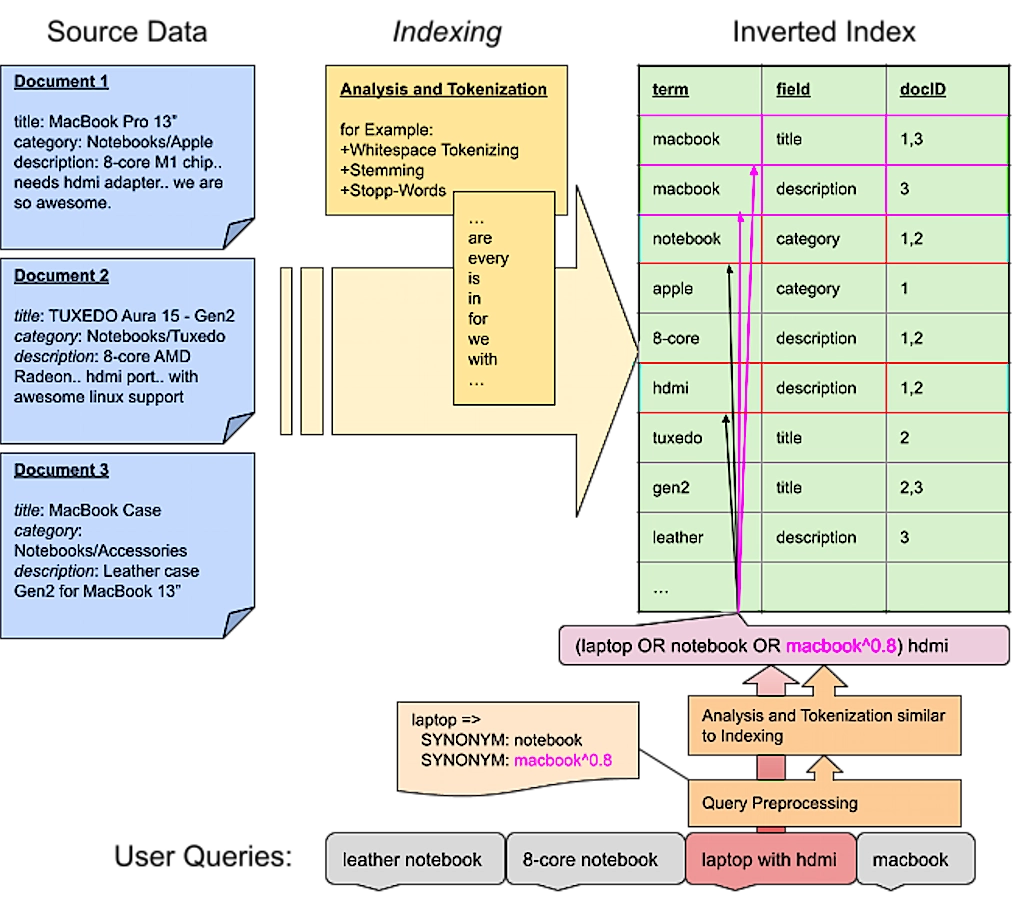
    Term matching is also the approach of Lucene – the core used inside Elasticsearch and Solr. On that note: most search-engines work this way, though many new approaches are gaining acceptance across the market.

    A Rough Outline of Site Search Problems

    Term matching seems rather trivial if the terms match exactly: The user searches for “notebook” and gets all products that contain the term “notebook”. If you’re lucky, all these products are relevant for the user.

    However, in most cases, the user – or rather we, as the ones who built search and are interested in providing excellent user experiences – is not so lucky. Let’s classify some problems that arise with that approach and how to fix them.

    Unmitigated order turns to chaos

    What is Term Mismatch?

    In my opinion, this is the most common problem: One or more terms the user entered aren’t used in the data. For example the user searches for “laptop” but the relevant products within the data are titled “notebook”.

    This is solved easily by creating a “synonym” rewrite rule. This is how that rule looks in Querqy:

    				
    					laptop => 
      SYNONYM: notebook


    With that rule in place, each search for “laptop” will also search for “notebook”. Additionally, a search for “laptop case” is handled accordingly so the search will also find “notebook case”. You can also apply a weight to your synonym. This is useful when other terms are also found and you want to rank them lower:

    				
    					laptop =>
    SYNONYM: notebook
    SYNONYM: macbook^0.8


    Another special case of term mismatching are numeric attributes: users search for ‘13 inch notebook’ but some of the relevant products, for example, might have the attribute set to a value of ‘13.5’. Querqy helps with rules that make it easy to apply filter ranges and even normalize numeric attributes. For example, by recalculating inches into centimeters, in case there are product attributes that are searched in both units. Check out the documentation of the “Number Unit Rewriter” for detailed and good examples.

    However there are several cases where such rules won’t fix the problem:

    • In the event the user makes a typo: the rule no longer matches.
    • In the event the user searches for the plural spelling “notebooks”: the rule no longer applies, unless an additional stemming filter is used prior to matching.
    • The terms might match irrelevant products, like accessories or even other products using those same terms (e.g. the “paper notebook” or “macbook case”)

    With searchHub preprocessing, we ensure user input is corrected before applying Querqy matching rules. At least this way the first two problems are mitigated.

    How to Deal with Non-Specific Product Data?

    The “term mismatch problem” is worse, if the products have no explicit name. Assume all notebooks are classified only by their brand and model names. For example: “Surface Go 12”, and put together with accessories and other product-types into a “computers & notebooks” category.

    First of all some analysis needs to stem the plural term “notebooks” to “notebook” in the data and also in potential queries. This is something your search engine has to support. An alternative approach is to just search fuzzily through all the data, making it easier to match such minor differences. However, this may lead to other problems, for example not all stems have a low edit distance (e.g. cacti/cactus). Or yet another issue: other similar but unrelated words might match (shirts/shorts). More about that below, when I talk about typos.

    Nevertheless, a considerable amount of irrelevant products will still match. Even ranking can’t help you here. You see, with ranking you’re not just concerned with relevance, but mostly looking for the greatest possible impact of your business rules. The only solution within Querqy is to add granular filters for that specific query:

    				
    					"notebook" => 
      SYNONYM: macbook^0.9
      SYNONYM: surface^0.8
      FILTER: * price:[400 TO 3000]
      FILTER: * -title:pc


    A little explanation:

    • First of all this “rule set” only applies to the exact query “notebook”. That’s what the quotes signify.
    • The synonym rules also include matches for “macbook” and “surface” in descending order.
    • Then we use filters to ensure only mid to high price products are shown excluding those with “pc” in the title field.

    Noticeably, such rules get really complicated. Oftentimes there are products that can’t be matched at all. And what’s more: rules only fix the search for a specific query. Even if searchHub could handle all the typos etc. a shop with such bad data quality will never escape manual rule hell.

    This makes the solution obvious: fix your data quality! Categories and product names are the most important data for term-matching search:

    • Categories should not contain combinations of words. Or if they do, don’t use such categories for searching. Also at least the final category level should name the “things” it contains (use “Microsoft Notebooks” instead of a category hierarchy “Notebook” > “Microsoft”) Also be as specific as possible (use “computer accessories” instead of “accessories”, or even “mice” and “keyboards”).
    • Similar for product names: they should contain the most specific product type possible and attributes that only matter for that product.

    searchHub’s analysis tool “SearchInsights” helps by analyzing which terms are searched most often and which attributes are relevant for associated product types.

    How to Deal with Typos

    The problem is obvious: User queries with typos need a more tenable solution. Correcting them all with rules would actually be insane. However, handling prominent typos or “alternative spellings” using Querqy’s “Replace Rewriter” still might make sense. Querqy has a minimalistic syntax easily allowing the configuration of lots of rules. It also allows substring correction using a simple wildcard syntax.

    Example rule file:

    				
    					leggins; legins; legings => leggings
    tshirt; t shirt => t-shirt


    Luckily, all search engines support some sort of fuzzy matching as well. Most of them use a variation of the “Edit Distance” algorithm that accepts a match of another term if only one or two characters differ. Nevertheless fuzzy matching is also mismatch prone. Even more so if used for every incoming term. For example, depending on the algorithm used, “shirts” and “shorts” have a low edit distance to each other but mean different things.

    For this reason Elasticsearch offers the option to limit the maximum edit distance based on query length. This means, no fuzzy search will be initiated for short terms due to their propensity for fuzzy mismatches. Our project OCSS (Open Commerce Search Stack) moves fuzzy search to a later stage during query relaxation. This means we first try exact and stemmed terms, and only if there are no matches do we use fuzzy search. Also running spell-correction in parallel fixes typos in single words of a multi-term query. (some details are described in this post)

    With searchHub we use extensive algorithms to achieve greater precision for potential misspellings. We calculate them once, then store the results for significantly faster real-time correction.

    Unfortunately, if there are typos in the product data the problem gets awkward. In these cases, the correctly spelled queries won’t find potentially relevant products. Even if such typos can consistently be fixed, the hardest part is detecting which products weren’t found. Feel free to contact us if you need help with this!

    Cross-field Matches

    Best case scenario: users search for “things”. These are terms that name the searched items, for example “backpack” instead of “outdoor supplies”. Such specific terms are mostly found in the product title. If the data is formatted well, most queries can be matched to the product’s titles. But if the user searches more generic terms or adds more context to the query, things might get difficult.

    Normally, a search index is set up to search in all available data fields, e.g. titles, categories, attributes and even long descriptions – which often have quite noisy data. Of course matches in those fields must be scored differently, nevertheless it happens that terms do get matched in the descriptions of irrelevant products. For example, the term “dress” can be part of many description texts for accessory products, that describe how good they might be combined with your next “dress”.

    With Querqy you can set up rules for single terms and restrict them to a certain data field. That way you can avoid such matches:

    Example rule file:

    				
    					dress => 
      FILTER: * title:dress


    But you should also be careful with such rules, since they would also match for multi-term queries like “shoes for my dress”. Here query understanding is key to mapping queries to the proper data terms. More about this below under “Terms in Context”.

    Structures require supreme organization

    Decomposition

    This problem arises mostly for several European languages, like Dutch, Swedish, Norwegian, German etc. where words can be combined for new, mostly more specific words. For example the German word “federkernmatratze” (box spring mattress) is a composite of the words “feder” (spring), “kern” (core/inner) and “matratze” (mattress).

    First problem with compound words: There are no specific rules about how words can be combined and what that means for semantics, only that the last word in a series determines the “subject” classification. Is a compound word made of many words, then each word in the series needs to be placed before the “subject” which always has to appear at the end.

    The following German example makes this clear: “rinderschnitzel” is a “schnitzel” made of beef (Rinder=Beef – meaning that it’s a beef schnitzel) but a “putenschnitzel” is a schnitzel made of turkey (puten=turkeys). Here the semantics come from the implicit context. And you can even say “rinderputenschnitzel” meaning a turkey schnitzel with beef. But you wouldn’t say “putenrinderschnitzel” because the partial compound word “putenrinder” would mean “beef of a turkey” – no one says that. 🙂

    By the way, that concept or even some of those words have swapped over into English. For example: “kindergarden” or “basketball”, however in German, for many generic compound words, it’s possible to also use the words separately: “Damenkleid” (women’s dress) can also be named “Kleid für Damen” (dress for women).

    The impending problem with these types of words is bidirectional though: these cases exist both inside the data, and come from users searching for them. Let’s distinguish between the two cases:

    The Problem When Users Enter Compound Words

    The problem occurs when the user searches for the compound word but the relevant products contain the single words. In English that doesn’t make sense (e.g. no product title would have “basket-ball” written separately. In German however the query “damenschuhe” (women’s shoes) must also match “schuhe” (“shoes”) in the category “damen” (“women”) or “schuhe für damen” (shoes for women).

    Querqy’s “Word Break Rewriter” is good for such cases. It uses your indexed data as a dictionary to split up compound words. You can even control it by defining a specific data field as a dictionary. This can either be a field with known precise and good data or a field that you artificially fill with proper data.

    In the slightly different case where the user searches for the decompounded version (“comfort mattress”) and the data contains the compound word (“comfortmattress”) Querqy helps with the “Shingle Rewriter”. It simply takes adjacent words and combines the terms. These are called “shingles”. It’s then possible to match them optionally in the data as well. A query could look like this:


    If decompounding with tools like Wordbreak fails, you’re left with only one option: rewrite such queries. For this use case Querqy’s “Replace Rewriter” was developed. However, because searchHub picks the spelling with the better KPIs: like queries with low exitRates or high clickRates, we solve such problems automatically.

    Dealing with Compound Words within the Data

    Assume “basketball” is the term of the indexed products. Now if a user searches for “ball” he would most likely see the basketball inside the result as well. In this case the decomposition has to take place during indexing in order to have the term “ball” indexed for all the basketball products. This is where neither Querqy nor searchHub can help you (yet). Instead you have to use a decompounder during indexing and make sure to index all decompounded terms with those documents as well.

    In both cases however, typos and partial singular/plural words might lead to undesirable results. This is handled automatically with searchHub’s query analysis.

    How to Handle Significant Semantic Terms

    Terms like “cheap”, “small”, and “bright” most likely won’t match any useful product related terms inside the data. Of course they also have different meanings depending on their context. A “small notebook” means a display size of 10 to 13 inches, while a small shirt means size S.

    With Querqy you can specify rules that apply filters depending on the context of such semantic terms.

    				
    					small notebook => 
      FILTER: * screen_size:[10 TO 14]
    small shirt => 
      FILTER: * size:S


    But as you might guess, such rules easily become unmanageable due to thousands of edge cases. As a result, you’ll most likely only run these kinds of rules for your top queries.

    Solutions like Semknox try to solve this problem by using a highly complex ontology that understands query context and builds such filters or sortings automatically based on attributes that are indexed within your data.

    With searchHub we recommend redirecting users to curated search result pages, where you filter on the relevant facets and even change the sorting. For example: order by price if someone searches for “cheap notebook”.

    Terms in Context

    A lot of terms have different meanings depending on their context. Like a notebook could be an electronic device or a paper device to take notes. A similar case for the word “mobile”: on its own the user is most likely searching for a smartphone. But in the context of the words “disk”, “notebook” or “home” , completely different things are meant.

    Also brands tend to use common words for special products, like the label “orange” from “Hugo Boss”. In a fashion store this might become problematic if someone actually searches for the color “orange” in combination with other terms.

    Next, broad queries like “dress” need more context to get more fitting results. For example a search for “standard women’s dresses” should not deliver the same types of results as a search for “dress suit”.

    There is no specific problem about it and thus also no specific way to solve it. Just keep it in mind when writing rules. With Querqy you can use quotes on the input query to restrict it to be only for term beginnings, endings or full query matches.

    With quotes around the input, the rule only matches the exact query ‘dress’:

    				
    					"dress" =>
      FILTER: * title:dress


    With a quote at the beginning of the input, the rule only matches queries starting with ‘dress’:

    				
    					"dress =>
      FILTER: * title:dress


    With a quote at the end of the input, the rule only matches queries ending with ‘dress’:

    				
    					dress" =>
      FILTER: * title:dress


    Of course this may lead to even more rules, as you strive for more precision to ensure you’re not muddying or restricting your result set. But there’s really no way to prevent it, we’ve seen it in almost every project we’ve been involved: sooner or later the rules get out of control. At some point, there are so many queries with bad results that it makes more sense to delete rules rather than add new ones. The best option is to start fixing the underlying data to avoid “workaround rules” as much as possible.

    Gears improperly placed limit motion.

    Conclusion

    At first glance, term matching is easy. But language is difficult. And this post merely scratches the surface of it. Querqy, with all the different rule possibilities, helps you handle special cases. searchHub locates the most important issues with “SearchInsights”. It also helps reduce the amount of rules and increase the impact of the few rules you do build.


  • Benchmark Open Commerce Search Stack with Rally

    Benchmark Open Commerce Search Stack with Rally

    Benchmark Open Commerce Search Stack
    with Rally

    In my last article, we learned how to create and run a Rally-Track. In this article, we’ll take a deeper and look at a real-world Rally example. I’ve chosen to use OCSS, where we can easily have more than 50.000 documents in our index and about 100.000 operations per day. So let’s begin by identifying which challenges make sense for our sample project.

    Identify what you want to test for your benchmarking

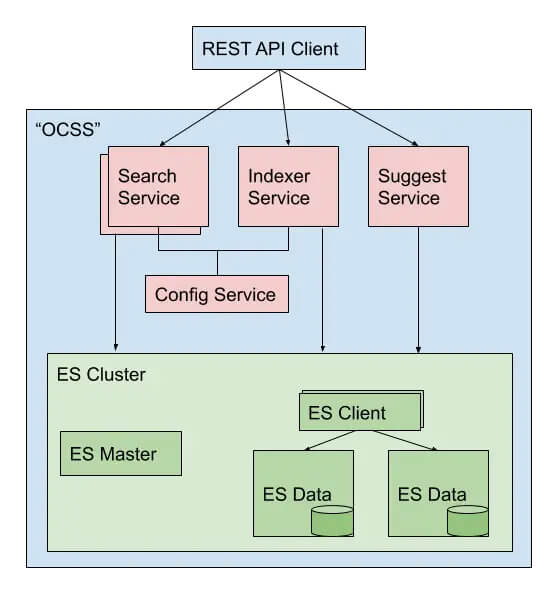
    Before benchmarking, it must be clear what we want to test. This is needed to prepare the Rally tracks and determine which data to use for the benchmark. In our case, we want to benchmark the user’s perspective on our stack. The open-commerce search stack, or OCSS, uses ElasticSearch for a commerce search engine. In this context, a user has two main tasks within ElasticSearch:

    • searching
    • indexing

    We can now divide these two operations into three cases. Below, you will find them listed in order of importance for the project at hand:

    1. searching
    2. searching while indexing
    3. indexing

    Searching

    In the context of OCSS, search performance has a direct impact on usability. As a result, search performance is the benchmark we focus on most in our stack. Furthermore, [OCSS] does more than transforming the user query into a simple ElasticSearch query. OCSS goes a step further and uses a single search query to generate one or more complex ElasticSearch queries (take a look here for more detailed explanation). For this reason, our test must account for this as well.

    Searching while Indexing

    Sometimes it’s necessary to simultaneously search and index your complete product data. The current [OCSS] search index is independent of the product data. This architecture was born out of Elasticsearch’s lack of native standard tools (not requiring hackarounds over snapshots) to clearly and permanently define nodes for indexing and nodes for searching. As a result, the indexing load influences the whole cluster performance. This must be benchmarked.

    Indexing

    The impact of indexing time to the user within OCSS is marginal. However, in the interest of a comprehensive understanding of the data, we will also test indexing times independently. And rounding off our index tests: we want to determine how long a complete product index could possibly take to run.

    What data should be used for testing and how to get it

    For our benchmark, we will need two sets of data. The index data itself, with the index settings and the search queries from OCSS to ElasticSearch. The index data and settings within Elasticsearch are easily extracted using the Rally create-track command. Enabling the spring-profile: trace-searches allows us to retrieve the Elasticsearch queries generated by the OCSS based on the user query. Then configure the logback function in OCSS so that each search records to the searches.log. This log contains both the raw user query and the generated Elasticsearch query from OCSS.

    How to create a track under normal circumstances

    After we have the data and basic track (generated by the create-track command) without challenges, it’s time to execute our challenges from above. However, because Rally has no operation to iterate and subsequently render every file line as a search, we would have to create a custom runner to provide this operation.

    Do it the OCSS way

    We will not do this by hand in our sample but rather enable the trace-searches profile and use the OCSS bash script to extract the index data and settings. This will generate a track based on the index and search data outlined in the cases above.

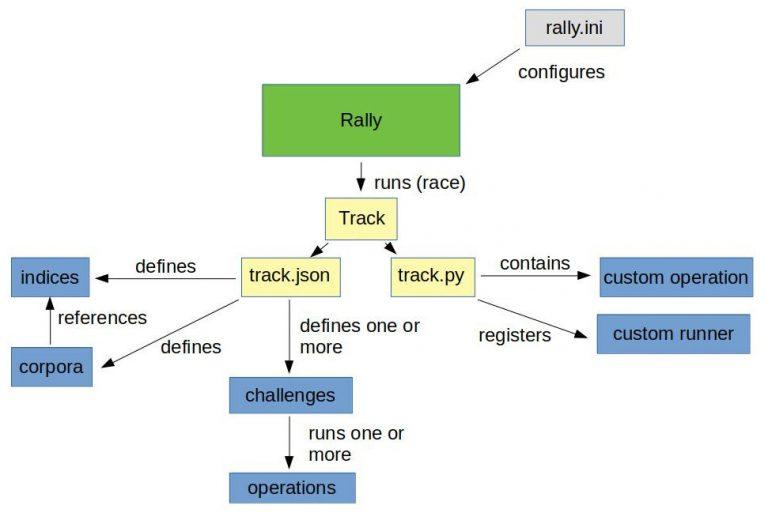
    So once we have OCSS up and running and enough time has passed to gather a representative number of searches, we can use the script to create a track using production data. For more information, please take a look here. The picture below is a good representation of what we’re looking at:

    Make sure you have all requirements installed before running the following commands.

    First off: identify the data index within OCSS:

    				
    					(/tmp/blog)➜  test_track$ curl http://localhost:9200/_cat/indices
    green open ocs-1-blog kjoOLxAmTuCQ93INorPfAA 1 1 52359 0 16.9mb 16.9mb


    Once you have the index and the searches.log you can run the following script:

    				
    					(open-commerce-stack)➜  esrally$ ./create-es-rally-track.sh -i ocs-1-blog -f ./../../../search-service/searches.log -o /tmp -v -s 127.0.0.1:9200
    Creating output dir /tmp ...
    Output dir /tmp created.
    Creating rally data from index ocs-1-blog ...
        ____        ____
       / __ ____ _/ / /_  __
      / /_/ / __ `/ / / / / /
     / _, _/ /_/ / / / /_/ /
    /_/ |_|__,_/_/_/__, /
                    /____/
    [INFO] Connected to Elasticsearch cluster [ocs-es-default-1] version [7.5.2].
    Extracting documents for index [ocs-1-blog]...       1001/1000 docs [100.1% done]
    Extracting documents for index [ocs-1-blog]...       2255/2255 docs [100.0% done]
    [INFO] Track ocss-track has been created. Run it with: esrally --track-path=/tracks/ocss-track
    --------------------------------
    [INFO] SUCCESS (took 25 seconds)
    --------------------------------
    Rally data from index ocs-1-blog in /tmp created.
    Manipulate generated /tmp/ocss-track/track.json ...
    Manipulated generated /tmp/ocss-track/track.json.
    Start with generating challenges...
    Challenges from search log created.


    If the script is finished, the folder ocss-track is created in the output location /tmp/. Let’s get an overview using tree:

    				
    					(/tmp/blog)➜  test_track$ tree /tmp/ocss-track 
    /tmp/ocss-track
    ├── challenges
    │   ├── index.json
    │   ├── search.json
    │   └── search-while-index.json
    ├── custom_runner
    │   └── ocss_search_runner.py
    ├── ocs-1-blog-documents-1k.json
    ├── ocs-1-blog-documents-1k.json.bz2
    ├── ocs-1-blog-documents.json
    ├── ocs-1-blog-documents.json.bz2
    ├── ocs-1-blog.json
    ├── rally.ini
    ├── searches.json
    ├── track.json
    └── track.py
    2 directories, 13 files


    OCSS output

    As you can see, we have 2 folders and 13 files. The challenges folder contains 3 files where each file contains one of our identified cases. The 3 files in the challenges folder are loaded in track.json.

    OCSS Outputs JSON Tracks

    The custom_runner folder contains the ocss_search_runner.py. This is where our custom operation is stored. It controls the iterations across searches.json. This same operation fires each Elasticseach query to be benchmarked against Elasticsearch. The custom runner must be registered in track.py. The ocs-1-blog.json contains the index settings. The files ocs-1-blog-documents-1k.json and ocs-1-blog-documents.json include the index documents; and are available as .bz2 files. The last file we have is the rally.ini file; it contains all Rally settings and, in the event a more detailed export is required, beyond a simple summary like in the example below, this file specifies where the metrics should be outputted. The following section of rally.inidefines that the result data should be stored in Elasticsearch:

    				
    					[reporting]
    datastore.type = elasticsearch
    datastore.host = 127.0.0.1
    datastore.port = 9400
    datastore.secure = false
    datastore.user = 
    datastore.password = 


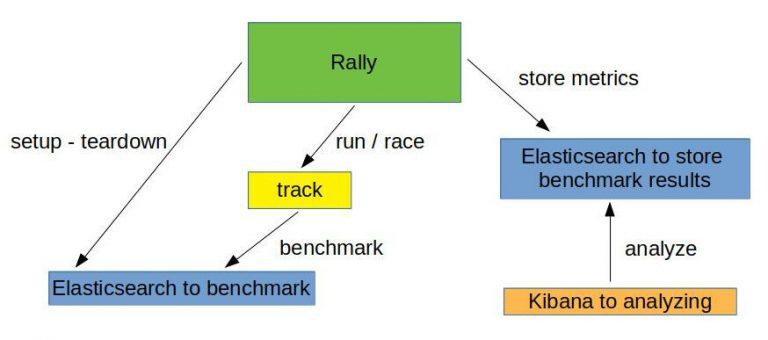
    Overview of what we want to do:

    Run the benchmark challenges

    Now that the track is generated, it’s time to run the benchmark. But, first, we have to initiate Elasticsearch and Kibana for the benchmark results. This is what docker-compose-results.yaml is for. You can find here.

    				
    					(open-commerce-stack)➜  esrally$ docker-compose -f docker-compose-results.yaml up -d
    Starting esrally_kibana_1 ... done
    Starting elasticsearch    ... done
    (open-commerce-stack)➜  esrally$ docker ps
    CONTAINER ID        IMAGE                                                       COMMAND                  CREATED             STATUS              PORTS                              NAMES
    b3ebb8154df5        docker.elastic.co/elasticsearch/elasticsearch:7.9.2-amd64   "/tini -- /usr/local…"   15 seconds ago      Up 3 seconds        9300/tcp, 0.0.0.0:9400->9200/tcp   elasticsearch
    fc454089e792        docker.elastic.co/kibana/kibana:7.9.2                       "/usr/local/bin/dumb…"   15 seconds ago      Up 2 seconds        0.0.0.0:5601->5601/tcp             esrally_kibana_1


    Benchmark Challenge #1

    Once the Elasticsearch/Kibana stack is ready for the results, we can begin with our first benchmark challenge by sending indexthe following command:

    				
    					docker run -v "/tmp/ocss-track:/rally/track" -v "/tmp/ocss-track/rally.ini:/rally/.rally/rally.ini" --network host  
        elastic/rally race --distribution-version=7.9.2 --track-path=/rally/track --challenge=index --pipeline=benchmark-only --race-id=index


    Now would be a good time to have a look at the different parameters available to start Rally:

    • –distribution-version=7.9.2 -> The version of Elasticsearch Rally should use for benchmarking
    • –track-path=/rally/track -> The path where we mounted our track into the rally docker-container
    • –challenge=index -> The name of the challenge we want to perform
    • –pipeline=benchmark-only the pipeline rally should perform
    • –race-id=index -> The race-id which to use instead of a generated id (helpful for analyzing)

    Benchmark Challenge #2

    Following the index challenge we will continue with the search-while-index challenge:

    				
    					docker run -v "/tmp/ocss-track:/rally/track" -v "/tmp/ocss-track/rally.ini:/rally/.rally/rally.ini" --network host  
        elastic/rally race --distribution-version=7.9.2 --track-path=/rally/track --challenge=search-while-index --pipeline=benchmark-only --race-id=search-while-index


    Benchmark Challenge #3

    Last but not least the search challenge:

    				
    					docker run -v "/tmp/ocss-track:/rally/track" -v "/tmp/ocss-track/rally.ini:/rally/.rally/rally.ini" --network host  
        elastic/rally race --distribution-version=7.9.2 --track-path=/rally/track --challenge=search --pipeline=benchmark-only --race-id=search


    Review the benchmark results

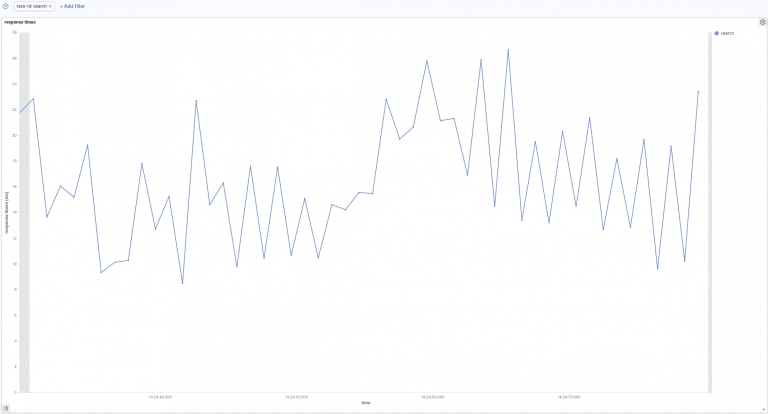
    Let’s have a look at the benchmark results in Kibana. A few special dashboards exist for our use cases, but you’ll have to import them into Kibana. For example, have a look at either this one or this one here. Or, you can create your own visualization as I did:

    Search:

    In the above picture, we can see the search response times over time. Our searches take between 8ms and 27ms to be processed. Next, let’s go to the following picture. Here we see how search times are influenced by indexation.

    Search-while-index:

    The above image shows search response times over time while indexing. In the beginning, indexing while simultaneously searching increases the response time to 100ms. This later decreases to 10ms and 40ms.

    Summary

    This post gave you a more complete understanding of how benchmarking your site-search within Rally looks. Additionally, you learned about the unique OCSS application to trigger tracks within Rally. Not only that, you now have a better practical understanding of Rally benchmarking, which will help you create your own system even without OCSS.

    Thanks for reading!

    References

    https://github.com/elastic/rally

    https://esrally.readthedocs.io/en/stable/

    https://github.com/Abmun/rally-apm-search/blob/master/Rally-Results-Dashboard.ndjson

    https://github.com/elastic/rally/files/4479568/dashboard.ndjson.txt

  • Why Your Source Code is Less Important than You Think

    Why Your Source Code is Less Important than You Think

    Why Your Source Code is
    Less Important than You Think

    Have you ever thought of publishing the code you built for your company? Or even tried to convince your project lead to do so? Assume you created a remarkable and successful product. Maybe an excellent app in the app store. Now go and publish the source code!

    Why Open-Source is the Right Thing To Do

    It feels dangerous. Maybe even insane!

    Other than the obvious that you should only do it for a good reason, I don’t believe anything would happen. Let me tell you why I think your source code is less important than you think.

    A puzzle is more than its pieces.

    As you might know, we build and provide a SaaS optimization solution for e-commerce search. Lately, we have had several discussions about several algorithms and features. I found it remarkable how much background knowledge everyone in the team has piled up in their brain! If we were to give you all our source code, and none of the context we carry around with us every day, I bet you would have a hard time building a business around it. Not because the code quality is so bad or poorly documented. Even if you know the technology stack and understand what we do, you still would be hard-pressed to wrap your head around it. Why is that?

    No pain, no gain

    First of all, I think it has to do with you not being part of our journey! If no one explains it to you, you would not understand why we did several things the way we did.

    Last week a colleague wanted to reimplement a part of some complicated and faulty algorithm. I encouraged him to use an approach I tried and failed before. “Why will it work this time?” He asked. Good question. “Some of the conditions changed; that’s why it should work this time.”

    After some more discussions, we agreed on another approach.

    You see: Just having some technology or some fancy algorithm in place won’t make it work. You may end up building strange-looking code just because you imagine the problem in a very unique and specific way. That’s not bad. It’s just important that it works. At the very least, you and your mates must understand it. But for others, on the outside, it might get hard to follow. You will only ever comprehend the code if you grasp the same “mental model” we have.

    No passion, just bytes

    The problem described is a very particular example. Let’s take a step back. Assuming you understood it all and managed to make it run, what’s missing? Users. Customers. How will you get them? Do you have the same passion for presenting it? Have you understood the actual problem we solve and all the use-cases we see?

    A product is just as good as the weakest part of the people providing it. You can have the best source code, but in lack of people representing it, the product will stay what it is: some bytes in oblivion. However, it’s also the other way around. You can have fantastic marketing and excellent sales, but if your product is shit, its documentation hated, and your support team sucks (read more about why you should solve that), you can’t hold the customers for long.

    No vision, no mission

    Also, while you might be busy wrapping your head around it and making it run, we are already several steps ahead. You can’t imagine how many ideas we have. The more we work on solving this specific problem in e-commerce search, the more potential we see in it. With every change and every tiny new feature, we solve another problem – some of them the users haven’t even seen before. And they like it. It feels like being on the fast track. And the longer we are, the more speed we gain.

    Can you get on that track as well? Not just by taking parts of it.

    Prove me wrong!

    Still not convinced? Last few months, I was working on Open Commerce Search. I had the honor of being part of a great project with it. Guess what: it went live a few weeks ago. I still can’t believe it. It works! 😉

    So. Around 90% of the code I wrote is open source. I already wrote several times about it, producing a sweeping guideline that was the backbone for it. It is ready to use.

    Will you be able to build a successful e-commerce site search solution with it? No? Let me guess – you need more than just source code.

    Nevertheless, you should try and experience the potential of how OCSS simplifies and compensates for major flaws of using Elasticsearch for document and product search.

    But generally speaking, I hope to have encouraged you to take the plunge into releasing your source code when the time is right. Many projects reap tremendous rewards once made public. And remember, the final product is always more than the sum of its parts.

    Want to become a part of our great team and the thrilling products we create? We are hiring!

  • E-Commerce Site Search Overhaul – Super “selection” year 2021?

    E-Commerce Site Search Overhaul – Super “selection” year 2021?

    It’s not just politics that will be exciting this year. Changes are also on the horizon for e-commerce. The evaluation of an optimal e-commerce site search overhaul – make or buy a solution is quickly becoming a TOP trend in 2021.

    But how thorough to prepare an e-commerce search solution overhaul?
    Increasing the economic performance (e.g., CTR, CR) and improving the user experience (e.g., faster loading times, discovery features, and content integration.) Both are issues that undoubtedly concern all e-commerce retailers and will need to be dealt with to prevail against the competition.
    Reducing the manual effort required to maintain and control on-site search is an essential task in this regard.
    Beyond that, however, some other important questions need to be answered in advance within the organization.
    The following is a summary of the most critical points.

    E-Commerce Search Overhaul — Make or Buy?

    Algorithmic:

    How good is the search relevance model in full-text search, semantic correlations, long-tail keywords, languages?

    Discovery Features:

    How well are topics like complex price & availability dependencies, as well as guided selling and recommendations covered?

    Content Integration:

    What opportunities exist in terms of the controllable blending of products and promotional content?

    Merchandising Features & Analytics:

    How well can different sales-promoting strategies (including ranking) be combined with business KPIs and evaluated?

    Customization:

    How easily are individual requirements implemented?

    Intellectual Property:

    How can it be ensured that contributed domain knowledge and other forms of intellectual property remain in house?

    Deployment Model & Architecture:

    How flexible are the deployment model and system architecture?

    Integration & Ease of Use:

    How apt is the system integration, use, and operation?

    Which solution is the right one? Whether a commercial solution (such as Algolia, Attraqt, FACT-Finder, Findologic) or an open-source framework (such as OCSS https://blog.searchhub.io/introducing-open-commerce-search-stack-ocss) — the decision must be well-prepared.

    Conditions for the selection of an E-Com on-site search

    Before making an informed decision about selecting a new on-site solution/technology, it is vital to understand the implications, dependencies, and scope of such a decision.

    The deployment of such a solution quite often influences future business functions and strategic decisions without this being directly apparent in advance. Therefore, I examine the three most important influencing factors in more detail below.

    The Influence on corporate strategy:

    The core functions responsible for the broader business strategy’s economic success are a natural product of the medium- to long-term corporate strategy.

    The answers to the following questions about corporate strategy are particularly relevant when preparing for a vendor selection:

    1. Is a marketplace game plan a part of the corporate strategy in the next 2-5 years?
    2. To what extent do diversified local prices and corresponding availability need to be mapped via the on-site search solution?
    3. How will you divide your focus across customer channels in the mid-term? How will the ratios look?
    4. Which unique selling points/functionalities provide an anchor for your corporate strategy? Content leadership, expansion of digital advisor functionalities.
    5. What are midterm geographic growth markets already known?
    6. Is strategic ownership of core technological competencies and technologies part of the corporate strategy?
    7. Are there strategic requirements in terms of technological infrastructure (on-premise, private cloud, open cloud)?
    8. How large is the internal team (professional and technical) available to operate the on-site search?

    Influence of the IT architecture

    On-site search has to support many core functionalities of a digital enterprise. E-Commerce Search consumes, processes, or makes available for further processing, various data streams. As a result, an agile integration into existing IT-enterprise architecture is elementary for success.

    Suppose there is no acknowledgment of these foundational provisions. In that case, marred by lengthy, risky, and costly follow-up projects, subsequent adjustments, or even fundamental changes to the system landscape are often DOA (Dead on Arrival).

    In terms of the IT-organization, the answers to the following questions are particularly relevant when preparing a vendor selection:

    1. Which source and target systems integrations with on-site search currently exist, and which will be considered within the midterm?
    2. What are the data-security requirements? How often does this data need to be updated?
    3. Are there defined requirements concerning service-level agreements?
    4. Are there defined requirements in terms of deployment and infrastructure?
    5. Should the on-site search system-integration reside exclusively at the data level (headless architecture), or are rendering functionalities must-have requirements?
    6. From a technical perspective, should the on-site search system also be used as a product API?
    7. Are there complementary functionalities? For example, recommendation engines, personalization, or guided selling systems that need to be functionally linked or even combined with on-site search?

    Influence of operational resources and organization

    On-Site Search requires constant maintenance and must react to internal and external factors agily. For this reason, the selection, implementation, and operation of an on-site search is always only part of the solution. On the one hand, the system must be continuously managed and maintained by data-driven external systems (e.g., SearchHub.io) and operational staff with the appropriate domain knowledge.

    For the planning of operational resources and team organization, the following questions are essential for the professional selection of an on-site search solution:

    1. Does a dedicated team of employees already exist to maintain the on-site search manually? If so, how many?
    2. Does the team have developers, testers, and analysts? If not, is there a plan to expand the team’s skill set in these areas?
    3. Is the On-Site Search Team organized as a vertical business function in itself? I.e., does the team have all the necessary resources and skills to develop the On-Site Search business function on its own?

    Conclusion – E-Commerce Site Search Overhaul:

    Strategic internal deliberations significantly influence the evaluation of a new on-site search solution (make or buy). Answering these questions reveals their far-reaching and strategic nature. Naturally, thorough preparation will take time, and all necessary stakeholders will need to arrive at a consensus about the objective. This process leads to greater clarity regarding the next steps. Even if that means the best approach may be to keep the current, well-integrated platform and instead work on mitigating its weaknesses.

    There’s More than One Way to Skin a Cat

    There are often several ways to fix an on-site search-related deficiency. Resorting to blind action for the hell of it should never be one of them. Regardless of the euphoric high associated with onboarding a new complex piece of kit, if you haven’t done your homework, you’ll inevitably be trading fruit-flies for maggots. Like hoping to exchange your partner for a younger, less judgmental model, if you haven’t come to grips with your own shortcomings, you’re damned to take them with you to the next relationship.

    Know When to Hold ‘em, Know When to Fold ‘em

    I get it. Every so often, there’s nothing left to salvage. It’s best to cut ties and move on. However, between you and me, there are massive benefits in using software like searchHub to boost an existing system quickly. Furthermore, setting up searchHub affords more forward flexibility. This kind of software runs independently of any search solution. Meaning, you can use the logic you built with us and take it to any other search provider you migrate to in the future.

    • Best-case scenario: you turn your current solution into a searchandizing powerhouse.
    • Worst-case scenario: you now clearly understand what type of e-commerce search solution your business requires. And because your search-engine logic is not married to your on-site search, you’re able to migrate to a new solution with next to zero downtime.


    searchHub.io offers data-driven support and helps optimize existing search applications without making a corresponding system change.

  • Quick-Start with OCSS – Creating a Silver Bullet

    Quick-Start with OCSS – Creating a Silver Bullet

    Last week, I took pains to share with you my experience building Elasticsearch Product Search Queries. I explained there is no silver bullet. And if you want excellence, you’ll have to build it. And that’s tough. Today, I want to show how our OCSS Quick-Start endeavors to do just that. So, here you have it: a Quick-Start framework to ensure Elasticsearch Product Search performs at an exceptional level, as it ought.

    How-To Quick-Start with OCSS

    Do you have some data you can get your hands on? Let’s begin by indexing and try working with it. To quickly start with OCSS, you need docker-compose. Find the “operations” folder of the project, at a minimum, and run docker-compose up inside the “docker-compose” folder. It might also be necessary to run docker-compose restart indexer since it will fail to set up properly if the Elasticsearch container is not ready at the start.

    You’ll find a script to index CSV data into OCSS in the “operations” folder. Run it without parameters to view all options. Now, use this script to push your data into Elasticsearch. With the “preset” profile in the docker-compose setup active by default, data fields like “EAN,” “title,” “brand,” “description,” and “price” are indexed respectively for search and facet usage. Have a look at the “preset” configuration if more fields need to be indexed for search or facetting.

    Configure Query Relaxation

    True to the OCSS Quick-Start philosophy, the “preset” configuration already comes with various query stages. Let’s take a look at it; afterward, you should be able to configure your own query logic.

    How to configure “EAN-search” and “art-nr-search”

    The first two query configurations “EAN-search” and “art-nr-search” are very similar:

    				
    					ocs:
      default-tenant-config:
        query-configuration:
          ean-search:
            strategy: "ConfigurableQuery"          1️⃣
            condition:                             2️⃣
              matchingRegex: "\s*\d{13}\s*(\s+\d{13})*"
              maxTermCount: 42
            settings:                              3️⃣
              operator: "OR"
              tieBreaker: 0
              analyzer: "whitespace"
              allowParallelSpellcheck: false
              acceptNoResult: true
            weightedFields:                        4️⃣
              "[ean]": 1
          art-nr-search:
            strategy: "ConfigurableQuery"          1️⃣
            condition:                             2️⃣
              matchingRegex: "\s*(\d+\w?\d+\s*)+"
              maxTermCount: 42
            settings:                              3️⃣
              operator: "OR"
              tieBreaker: 0
              analyzer: "whitespace"
              allowParallelSpellcheck: false
              acceptNoResult: true
            weightedFields:                        4️⃣
              "[artNr]": 2
              "[masterNr]": 1.5


    1️⃣ OCSS distinguishes between several query strategies. The “ConfigurableQuery” is the most flexible and exposes several Elasticsearch query options (more to come). See further query strategies below.

    2️⃣ The condition clause configures when to use a query. These two conditions (“matchingRegex” and “maxTermCount“) specify that a specific regular expression must match the user input. These are then used for a maximum of 42 terms. (A user query is split by whitespaces into separate “terms” in order to verify this condition).

    3️⃣ The “settings” govern how the query is built and how it should be used. These settings are documented in the QueryBuildingSettings. Not all settings are supported by all strategies, and some are still missing – this is subject to change. The “acceptNoResult” is essential here because if a numeric string does not match the relevant fields, no other query is sent to Elasticsearch, and no results are returned to the client.

    4️⃣ Use the “weightedFields” property to specify which fields should be searched with a given query. Non-existent fields will be ignored with a minor warning in the logs.

    How to configure “default-query” the OCSS Quick-Start way

    Next, the “default-query” is available to catch most queries:

    				
    					ocs:
      default-tenant-config:
        query-configuration:
          default-query:
            strategy: "ConfigurableQuery"
            condition:                            1️⃣
              minTermCount: 1
              maxTermCount: 10
            settings:
              operator: "AND"
              tieBreaker: 0.7
              multimatch_type: "CROSS_FIELDS"
              analyzer: "standard"                2️⃣
              isQueryWithShingles: true           3️⃣
              allowParallelSpellcheck: false      4️⃣
            weightedFields:
              "[title]": 3
              "[title.standard]": 2.5             5️⃣
              "[brand]": 2
              "[brand.standard]": 1.5
              "[category]": 2
              "[category.standard]": 1.7


    1️⃣ “Condition” is used for all queries with up to 10 terms. This is an arbitrary limit and can, naturally, be increased – depending on users’ search patterns.

    2️⃣ “Analyzer” uses the “standard” analyzer on search terms. This means it applies stemming and stopwords. These analyzed terms are then searched within the various fields and subfields (see point #5 below). Simultaneously, the “quote analyzer” is set to “whitespace” to match search phrases exactly.

    3️⃣ The option “isQueryWithShingles” is a unique feature we implemented into OCSS. It combines neighboring terms and searches, combined with their individual variations, but set at nearly double the weight. The goal is to find compound words in the data as well.

    Example: “living room lamp” will result in “(living room lamp) OR (livingroom^2 lamp)^0.9 OR (living roomlamp^2)^0.9”.

    4️⃣ “allowParallelSpellcheck” is set to false here because this requires extra time, which we don’t want to waste in most cases wherever users pick the correct spelling. If enabled, a parallel “suggest query” is sent to Elasticsearch. If the first try yields no results and it’s possible to correct some terms, the same query will be fired again using the corrected words.

    5️⃣ As you can see here, subfields can be uniquely applied congruent to their function.

    How to configure additional query strategies

    I will not go into any great detail regarding the following query stages configured within the “preset” configuration. They are all quite similar — here just a few notes concerning additionally available query strategies.

    • DefaultQueryBuilder: This query tries to balance precision and recall using a minShouldMatch value of 80% and automatic fuzziness. Use if you don’t have the time to configure a unique default query.
    • PredictionQuery: This is a special implementation that necessitates a blog post all its own. Simply put, this query performs an initial query against Elasticsearch to determine which terms match well. The final query is built based on the returned data. As a result, it might selectively remove terms that would, otherwise, lead to 0 results. Other optimizations are also performed, including shingle creation and spell correction. It’s most suitable for multi-term requests.
    • NgramQueryBuilder: This query builder divides the input terms into short chunks and searches them within the analyzed fields in the same manner. In this way, even partial matches can return results. This is a very sloppy approach to search and should only be used as a last resort to ensure products are shown instead of a no-results page.

    How to configure my own query handling

    Now, use the “application.search-service.yml” to configure your own query handling:

    				
    					ocs:
      tenant-config:
        your-index-name:
          query-configuration:
            your-first-query:
              strategy: "ConfigurableQuery"
              condition:
                # ..
              settings:
                #...
              weightedFields:
                #...


    As you can see, we are trying our best to give you a quick-start with OCSS. It already comes pre-packed with excellent queries, preset configurations, and the ability to use query relaxation without touching a single line of code. And that’s pretty sick! I’m looking forward to increasing the power behind the configuration and leveraging all Elasticsearch options.

    Stay tuned for more insights into OCSS.

    And if you haven’t noticed already, all the code is freely available. Don’t hesitate to get your hands dirty! We appreciate Pull Requests! 😀

  • My Journey Building Elasticsearch for Retail

    My Journey Building Elasticsearch for Retail

    If, like me, you’ve taken the journey that is building an Elasticsearch retail project, you’ve inevitably experienced many challenges. Challenges like, how do I index data, use the query API to build facets, page through the results, sorting, and so on? One aspect of optimization that frequently receives too little attention is the correct configuration of search analyzers. Search analyzers define the architecture for a search query. Admittedly, it isn’t straightforward!

    The Elasticsearch documentation provides good examples for every kind of query. It explains which query is best for a given scenario. For example, “Phrase Match” queries find matches where the search terms are similar. Or “Multi Match” with “most field” type are “useful when querying multiple fields that contain the same text analyzed in different ways”.

    All sounds good to me. But how do I know which one to use, based on the search input?

    Elasticsearch works like cogs within a Rolex

    Where to Begin? Search query examples for Retail.

    Let’s pretend we have a data feed for an electronics store. I will demonstrate a few different kinds of search inputs. Afterward, I will briefly describe how search should work in each case.

    Case #1: Product name.

    For example: “MacBook Air

    Here we want to have a query that matches both terms in the same field, most likely the title field.

    Case #2: A brand name and a product type

    For example: “Samsung Smartphone”

    In this case, we want each term to match a different field: brand and product type. Additionally, you want to find both terms as a pair. Modifying the query in this way prevents other smartphones or Samsung products from appearing in your result.

    Case #3: The specific query that includes attributes or other details

    For example: “notebook 16 GB memory”

    This one is tricky because you want “notebook” to match the product type, or maybe your category is named such. On the other hand, you want “16 GB” to match the memory attribute field as a unit. The number “16” shouldn’t match some model number or other attribute.

    For example: “MacBook Pro 16 inch“ is also in the “notebook” category and has some “GB” of “memory“. To further complicate matters, search texts might not contain the term “memory”, because it’s the attribute name.

    As you might guess, there are many more. And we haven’t even considered word composition, synonyms, or typos yet. So how do we build one query that handles all cases?

    Know where you come from to know where you’re headed

    Preparation

    Before striving for a solution, take two steps back and prepare yourself.

    Analyze your data

    First, take a closer look at the data in question.

    • How do people search on your site?
    • What are the most common query types?
    • Which data fields hold the required content?
    • Which data fields are most relevant?

    Of course, it’s best if you already have a site search running and can, at least, collect query data there. If you don’t have a site search analytics, even access-logs will do the trick. Moreover, be sure to measure which queries work well and which do not provide proper results. More specifically, I recommend taking a closer look at how to implement tracking, the analysis, and evaluation.

    You are welcome to contact us if you need help with this step. We enjoy learning new things ourselves. Adding searchHub to your mix gives you a tool that combines different variations of the same queries (compound & spelling errors, word order variations, etc.). This way, you get a much better view of popular queries.

    Track your progress

    You’ll achieve good results for the respective queries once you begin tuning them. But don’t get complacent about the ones you’ve already solved! More recent optimizations can break the ones you previously solved.

    The solution might simply be to document all those queries. Write down the examples you used, what was wrong with the result before, and how you solved it. Then, perform regression tests on the old cases, following each optimization step.

    Take a look at Quepid if you’re interested in a tool that can help you with that. Quepid helps keep track of optimized queries and checks the quality after each optimization step. This way, you immediately see if you’re about to break something.

    The fabled, elusive silver-bullet.

    The Silver-Bullet Query

    Now, let’s get it done! Let me show you the perfect query that solves all your problems…

    Ok, I admit it, there is none. Why? Because it heavily depends on the data and all the ways people search.

    Instead, I want to share my experience with these types of projects and, in so doing, present our approach to search with Open Commerce Search Stack (OCSS):

    Similarity Setting

    When dealing with structured data, the scoring algorithms of Elasticsearch “TF/IDF” and BM25 will most likely screw things up. These approaches work well for full-text search, like Wikipedia articles or other kinds of content. And, in the unfortunate case where your product data is smashed into one or two fields, you might also find them helpful. However, with OCSS (Open Commerce Search Stack), we took a different approach and set the similarity to “boolean”. This change makes it much easier to comprehend the scores of retrieved results.

    Multiple Analyzers

    Let Elasticsearch analyze your data using different types of analyzers. Do as little normalization as possible and as much as necessary for your base search-fields. Use an analyzer that doesn’t remove information. What I mean with this is no stemming, stop-words, or anything like that. Instead, create sub-fields with different analyzer approaches. These “base fields” should always have a greater weight during search time than their analyzed counterparts.

    The following shows how we configure search data mappings within OCSS:

    				
    					{
      "search_data": {
        "path_match": "*searchData.*",
        "mapping": {
          "norms": false,
          "fielddata": true,
          "type": "text",
          "copy_to": "searchable_numeric_patterns",
          "analyzer": "minimal",
          "fields": {
            "standard": {
              "norms": false,
              "analyzer": "standard",
              "type": "text"
            },
            "shingles": {
              "norms": false,
              "analyzer": "shingles",
              "type": "text"
            },
            "ngram": {
              "norms": false,
              "analyzer": "ngram",
              "type": "text"
            }
          }
        }
      }
    }
    				
    			
    Analyzers used above explained

    Let’s break down the different types of analyzers used above.

    • The base field uses a customized “minimal” analyzer that removes HTML tags, non-word characters, transforms the text to lowercase, and splits it by whitespaces.
    • With the subfield “standard”, we use the “standard analyzer” responsible for stemming, stop words, and the like.
    • With the subfield “shingles”, we deal with unwanted composition within search queries. For example, someone searches for “jackwolfskin”, but it’s actually “jack wolfskin”.
    • With the subfield “ngram,” we split the search data into small chunks. We use that if our best-case query doesn’t find anything – more about that in the next section, “Query Relaxation”.
    • Additionally we copy the content to the “searchable_numeric_patterns” field which uses an analyzer that removes everything but numeric attributes, like “16 inch”.

    The most powerful Elasticsearch Query

    Use the “query string query” to build your final Elasticsearch query. This query type gives you all the features from all other query types. In this way, you can optimize your single query without the need to change to another query type. However, it would be best to strip “syntax tokens”; otherwise, you might get an invalid search query.

    Alternatively, use the “simple query string query,” which can also handle most cases if you’re uncomfortable with the above method.

    My recommendation is to use the “cross_fields” type. It’s not suitable for all kinds of data and queries, but it returns good results in most cases. Place the search text into quotes and use a different quote_analyzer to prevent the search input from being analyzed with the same analyzer. Also, if the quoted-string receives a higher weight, a result with a matching phrase is boosted. This is how the query-string could look: “search input “^2 OR search input.

    And remember, since there is no “one query to rule them all,” use query relaxation.

    How do I use Query Relaxation?

    After optimizing a few dozen queries, you realize you have to make some compromises. It’s almost impossible to find a single query that works for all searches.

    For this reason, most implementations I’ve seen opt for the “OR” operator, thus allowing a single term to match when multiple terms are in the search input. The issue here is that you still end up with results that only partially match. It’s possible to combine the “OR” operator with a “minimum_should_match” definition to boost more matches to the top and control the behavior.

    Nevertheless, this may have some unintended consequences. First, it could pollute your facets with irrelevant attributes. For example, the price slider might show a low price range just because the result contains unrelated cheap products. It may also have the unwanted effect of making ranking the results according to business rules more difficult. Irrelevant matches might rank toward the top simply because of their strong scoring values.

    So instead of the silver-bullet query – build several queries!

    Relax queries, divide the responsibility, use several

    The first query is the most accurate and works for most queries while avoiding unnecessary matches. Run a second query that is more sloppy and allows partial matches if the initial one leads to zero results. This more flexible approach should work for the majority of the remaining queries. Try using a third query for the rest. Within OCSS, at the final stage, we use the “ngram” query. Doing so allows for partial word matches.

    “But sending three queries to Elasticsearch will need so much time,” you might think. Well, yes, it has some overhead. At the same time, it will only be necessary for about 20% of your searches. Also, zero-matches are relatively fast in their response. They are calculated pretty quickly on 0 results, even if you request aggregations.

    Sometimes, it’s even possible to decide in advance which query works best. In such cases, you can quickly pick the correct query. For example, identifying a numeric search is easy. As a result, it’s simple only to search numeric fields. Also, as there is no need to analyze a second query, it’s easier to handle single-term searches uniquely. Try to improve this process even further by using an external spell-checker like SmartQuery and a query-caching layer.

    Conclusion

    I hope you’re able to learn from my many years of experience; from my mistakes. Frankly, praying your life away (e.g., googling till the wee hours of the morning), hoping, and waiting for a silver-bullet query, is entirely useless and a waste of time. Learning to combine different query analysis types and being able to accept realistic compromises will bring you closer, faster to your desired outcome: search results that convert more visitors, more of the time than what you previously had.

    We’ve shown you several types of analyzers and queries that will bring you a few steps closer to this goal today. Strap in and tune in next week to find out more about OCSS if you are interested in a more automated version of the above.

  • Part 2: Search Quality for Discovery & Inspiration

    Part 2: Search Quality for Discovery & Inspiration

    Series: Three Pillars of Search Quality in eCommerce

    In the first part of our series, we learned about Search Quality dimensions. We then introduced the Findability metric, and explained the relationship of this metric on search quality. This metric is helpful when considering how well your search engine handles the information retrieval step. Unfortunately, it completely disregards the emotionally important discovery phase. Essential for both eCommerce, as well as retail in general. In order to better grasp this relationship we need to understand how search quality influences discovery and inspiration.

    What is the Secret behind the Most Successful high-growth Ecommerce Shops?

    If we analyze the success of high-growth shops, three unique areas set them apart from their average counterparts.

    Photo by Sigmund on Unsplash – if retail could grow like plants

    What Separates High-Growth Retail Apart from the Rest?

    1. Narrative: The store becomes the story

    Your visitors are not inspired by the same presentation of trending products every time they land on your site. What’s the use of shopping if a customer already knows what’s going to be offered (merchandised) to them?

    Customers are intrigued by visual merchandising which is, in essence, brand storytelling. Done correctly, this will transform a shop into an exciting destination that both inspires, as well as entices shoppers. An effective in-store narrative emotionally sparks customers’ imagination, while leveraging store ambience to transmit the personality of the brand. Perhaps using a “hero” to focus attention on a high-impact collection of bold new items. Or an elaborate holiday display that nudges shoppers toward a purchase.

    Shopping is most fun, and rewarding, when it involves a sense of discovery or journey. Shoppers are more likely to return when they see new merchandise related to their tastes, and local or global trends.

    2. Visibility: What’s seen is sold (from pure retrieval to inspiration)

    Whether in-store or online, visibility encourages retailers to feature items that align with a unique brand narrative. All the while helping shoppers easily and quickly find the items they’re after. The principle of visibility prioritizes which products retailers push the most. Products with a high margin or those exclusive enough to drive loyalty, whether by word of mouth, or social sharing.

    Online, the e-commerce information architecture, and sitemap flow, help retailers prominently showcase products most likely to sell. This prevents items from being buried deep in the e-commerce site. Merchandisers use data analytics to know which products are most popular and trending. This influences which items are most prominently displayed. These will be the color palettes, fabrics, and cuts that will wow shoppers all the way to the checkout page.

    So why treat search simply as a functional information retrieval tool? Try rethinking it from the perspective of how a shopper might look for something in a brick and mortar scenario.

    3. Balance: Bringing buyer’s and seller’s interests together in harmony

    In stores and online, successful visual merchandising addresses consumers’ felt needs around things like quality, variety, and sensory appeal. However, deeper emotional aspects like trust are strongly encouraged through online product reviews. These inspire their wants: to feel attractive; to be confident, and hopeful. We can agree that merchandisers’ foremost task, is to attend to merchandise and the associated cues to communicate it properly. It’s necessary to showcase sufficient product variety, while at the same time remaining consistent with the core brand theme. This balancing act requires they strike a happy medium between neither overwhelming nor disengaging their audience.

    An example for the sake of clarity:

    Imagine you are a leading apparel company with a decently sized product catalog. Everyday, a few hundred customers come to your site and search for “jeans”. Your company offers over 140 different types of jeans, about 40 different jeans jackets and roughly 80 jeans shirts.

    Now the big question is: which products deserve the most prominent placement in the search result?

    Indeed this is a very common challenge for our customers. And yet all of them struggle addressing it. But why is it so challenging? Mainly because we are facing a multi-dimensional and multi-objective optimisation problem.

    1. When we receive a query like “jeans”, it is not 100% clear what the user is looking for. Trousers, jackets, shirts, we just don’t know. As a result, we have to make some assumptions. We present different paths for him to discover the desired information, or receive the inspiration she needs. In other words, for the most probable product types “k”, and the given query, we need to identify related products.
    2. Next we find the most probable set of product-types. Then, we need to determine which products are displayed at the top for each corresponding set of products. Which pairs of jeans, jeans jackets and jeans shirts? Or again in a more formal way: for each product type “k” find the top-”n” products related to this product-type and the given query.

    Or in simple words: diversify the result set into multiple result sets. Then, learn to rank them independently.

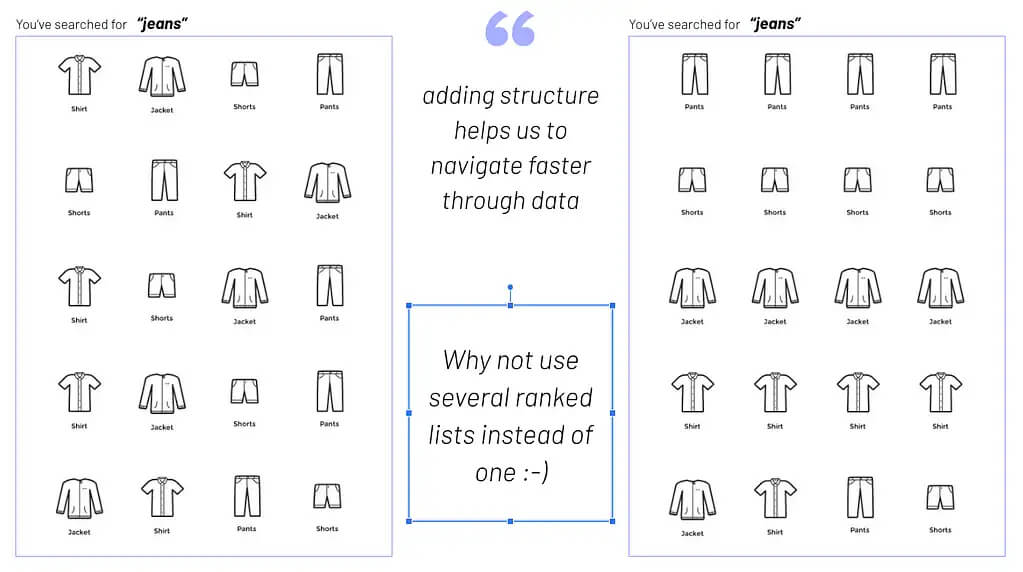
    Now, you may think this is exactly what a search & discovery platform was built for. But unfortunately, 99% of these platforms are designed to work as single-dimension-rank applications. They retrieve documents for a given query, assign weights to the retrieved documents, and finally rank these documents by weight. This dramatically limits your ability to rank the retrieved documents by your own set of, potentially, completely different dimensions. This is the reason most search results for generic terms tend to look messy. Let’s visualize this scenario to clarify what I mean by “messy”.

    You will agree, the image on the left-hand side, is pretty difficult for a user to process and understand. Even if the ranking is mathematically correct. The reason for this is simple: the underlying natural grouping of product types is lost to the user.

    Diversification of a search for “jeans”

    Now, let’s take a look at a different approach. On the right-hand side, you will notice, we diversify the search result while maintaining the natural product type grouping. Doesn’t this look more intuitive and visually appealing? I will assume you agree. After all, this is the most prominent type of product presentation retail has used over the last 100 years.

    Grouping products based on visual similarity

    You may argue that the customer could easily narrow the offering with facets/filters. Data reveals, however, that this is not always the case – even less so on mobile devices. The big conundrum is that you’ve no clue what the customer wants. To be inspired, to be guided in his buying process or just to quickly transact. Additionally, you never know for sure what type of customer you are dealing with. Even with the new, hot, latest and greatest, stuff called “personalization” – that unfortunately fails frequently. Using visual merchandising puts us into conversation with the customer. We ask her to confirm her interests by choosing a “product type”. Yet another reason why diversification is important.

    Still not convinced, this is what separates high-growth retail from the rest?

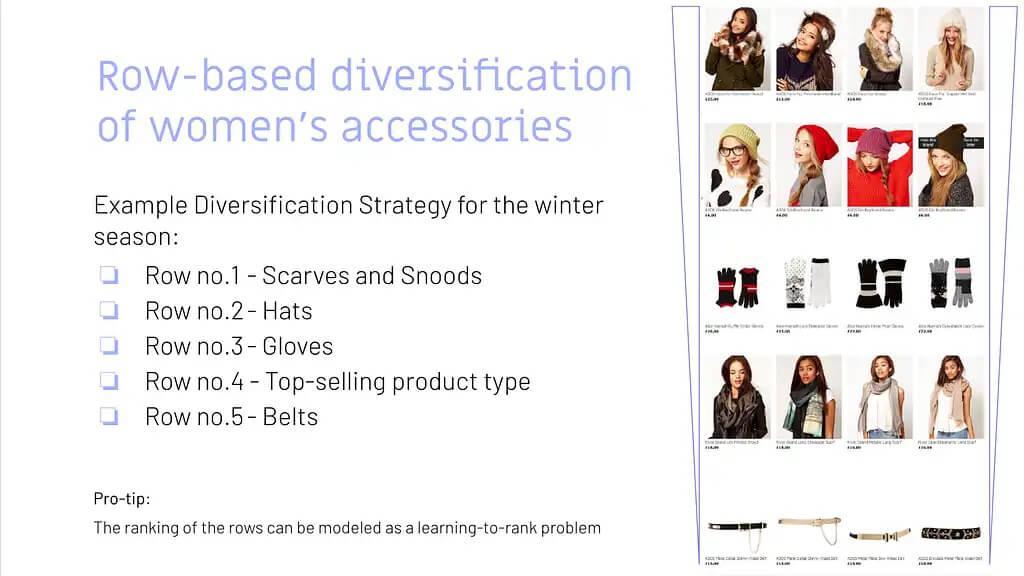
    Here is another brilliant example of how you could use the natural grouping by product type to diversify your result. Let’s take a look at a seasonal topic in this case. Another very challenging task. So we give customers the perfect starting point to explore your assortment.

    Row-based diversification – explore product catalog

    If you have ever tried creating such a page, with a single search request, you know this is almost an impossible task. Not to mention trying to maintain the correct facet counts, product stock values, etc.

    However, the approach I am presenting offers so much more. This type of result grouping also solves another well-known problem. The multi-objective optimization ranking problem. Making this approach truly game-changing.

    What’s a Multi-Objective Optimization Problem?

    Never heard of it? Pretend for a moment you are the customer. This time you’re browsing a site searching for “jeans”. The type you have in mind is something close to trousers. Unaware of all the different types of jeans the shop has to offer, you have to go rogue. This means navigating your way through new territory to the product you are most interested in. Using filters and various search terms for things like color, shape, price, size, fabric, and the like. Keep in mind that you can’t be interested in what you can’t see. At the same time, you may be keeping an eye on the best value for your money.

    We now turn the table and pick up from the seller’s perspective. As a seller, you want to present products ranked based on stock, margin, and popularity. If you run a well-oiled machine, you may even throw in some fancy Customer Lifetime Value models.

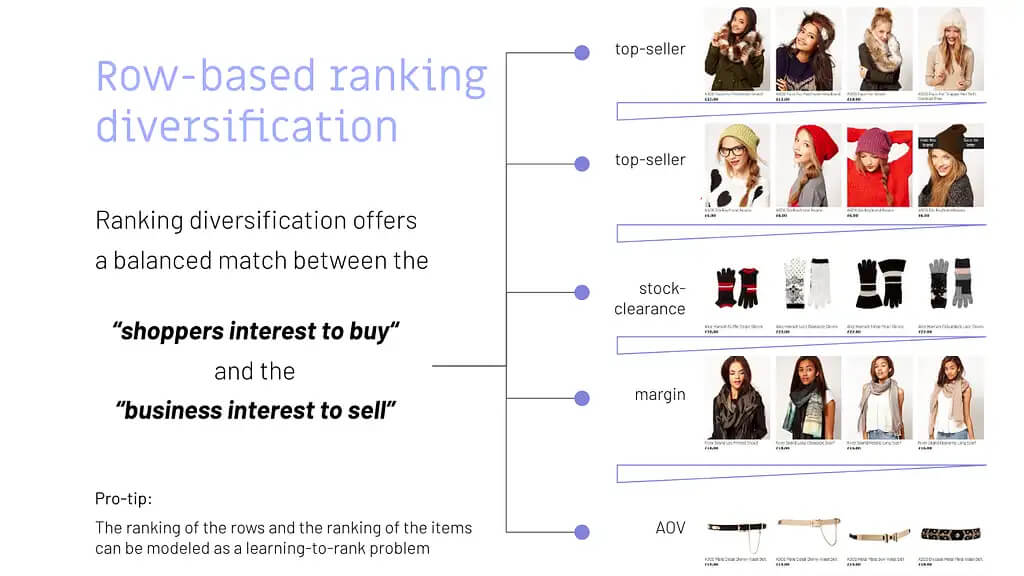
    So, our job is to strike the right balance between the seller’s goals and the customer’s desire. The methodology that attempts to strike such a balance is called the multi-objective optimization problem in ranking.

    Let’s use a visualization to illustrate a straightforward solution to the problem, by a diversified result-set grouping.

    Row-based ranking diversification

    Interested in how this approach could be integrated into your Search & Discovery Platform? Reach out to us @searchHub. Our Beta-Testphase for the Visual-Merchandising open-source module, for our OCSS (Open Commerce Search Stack), begins soon. We hope to use this to soon help deliver more engaging and joyful digital experiences.

    High-Street Visual Merchandising Wisdom Come Home to Roost

    This is all nothing new, rather it’s simply never found its way into digital retailing. For decades, finding the right diversified set of products to attract window shoppers, paired with the right location, was the undisputed most important skill in classical high street retail. Later, this type of shopping engagement was termed “Visual Merchandising”. The process of closing the gap between what the seller wants to sell and what the customer will buy. And of course, how best to manufacture that desire.

    Visual merchandising is one of the most sustainable, as well as differentiating, core assets of the retail industry. Nevertheless, it remains totally underrated.

    Still don’t believe in the value of Visual Merchandising? Give me a couple of sentences and one more Chart to validate my assumptions.

    Before I present the chart to make you believe, we need to align on some terminology.

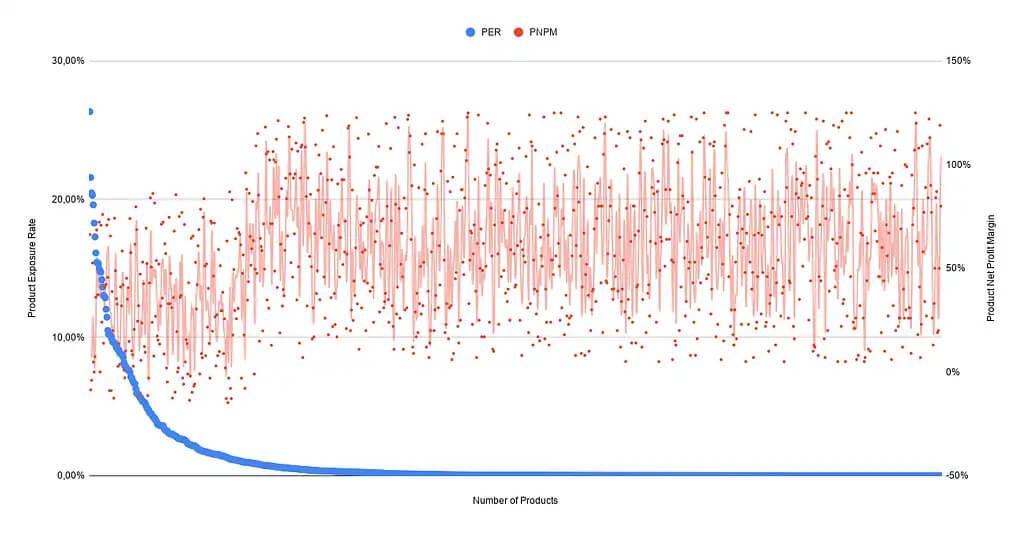
    Product Exposure Rate (PER): The goal of the product exposure rate is to measure if certain products are under- or over-exposed in our store. The product exposure rate is the “sum of all product views for a given product” divided by “the sum of all product views from all products”.

    Product Net Profit Margin (PNPM): With this metric, we try to find the products with the highest Net Profit Margin. Please be aware: it’s sensible to include all product related costs in your calculation. Customer Acquisition Costs, cost of Product returns, etc. The Product Net Profit Margin is the “Product Revenue” minus “All Product Costs” divided by the “Product Revenue”.

    Now that we have established some common ground, let’s continue calculating these metrics for all active products you sell. We will then visualize them in a graph.

    Product Exposure Rate vs. Product Net Profit Margin

    The data above represents a random sample of 10,000 products from our customers. It may look a bit different for your product data, but the overall tendency should be similar. Please reach out to me if this is not the case! According to the graph it seems that the products with high PER (Product Exposure Rate) tend to have a significantly lower PNPM (Product Net Profit Margin).

    We were able to spot the following two reasons as the most important for this behaviour:

    Two Reasons for Significantly Low Product Net Profit Margin

    1. Higher Customer Acquisition Costs for trending products mainly because of competition. Because of this you may even spot several products with a negative PNPM.
    2. Another reason is the natural tendency for low priced products to dominate the trending items. This type of over-exposure encourages high-value visitors, to purchase cheaper trending products with a lower PNPM. Customers to whom you would expect to sell higher margin products under normal circumstances.

    I simply can’t over-emphasize how crucial digital merchandising is for a successful and sustainable eCommerce business. This is the secret weapon for engaging your shoppers and guiding them towards making a purchase. To take full advantage of the breadth of your product catalog, you must diversify and segment. Done intelligently, shoppers are more likely to buy from you. Not only that, they’ll also enjoy engaging with, and handing over their hard-earned money to your digital store. For retailers, this means a significant increase in conversions, higher AOV, higher margins, and more loyal customers.

    Conclusion

    Initially, I was going to close this post right after describing how this problem can be solved, conceptually. However, I would have missed an essential, if not the most important part of the story.

    Yes, we all know that we live in a data-driven world. Believe me, we get it. At searchHub, we process billions of data points every day to help our customers understand their users at scale. But in the end, data alone won’t make you successful. Unless, of course, you are in the fortunate position of having a data monopoly.

    To be more concrete: data will/can help you spot or detect patterns and/or anomalies. It will also help you scale your operations more efficiently. But there are many areas where data can’t help. Especially when faced with sparse and biased data. In retail this is the kind of situation we are essentially dealing with 80% of the time. All digital Retailers, of which I am aware, with a product catalog greater than 10,000 SKUs, face the product exposure bias. This means, only 50-65% of the 10.000 SKUs will ever be seen (exposed) by their users. The rest remain hidden somewhere in the endless digital aisle. Not only does this cost money, it also means a lot of missed potential revenue. Simply put: you can’t judge the value of a product that has never been seen. Perhaps it could have been the Top-Seller you were always looking for were it only given the chance to shine?

    Keep in mind that retailers offer a service to their customers. Only two things make customers loyal to a service.

    What makes loyal customers?

    • deliver a superior experience
    • be the only one to offer a unique type of service

    Being the one that “also” offers the same type of service won’t help to differentiate.

    I’m one hundred percent sure that today’s successful retail & commerce players are the ones that:

    1. Grasp the importance of connecting brand and commerce
    2. Comprehend how shoppers behave
    3. Learn their data inside and out
    4. Develop an eye for the visual
    5. Connect visual experiences to business goals
    6. Predict what shoppers will search for
    7. Understand the customer journey and how to optimize for it
    8. Think differently when it comes to personalizing for customers
    9. Realize it’s about the consumer, not the device or channel

    I can imagine many eCommerce Managers might feel overwhelmed by the thought of delivering an eCommerce experience that sets their store apart. I admit, it’s a challenge connecting all those insights and capabilities practically. And while we’re not going to minimize the effort involved, we have identified an area that will elevate your digital merchandising to new levels and truly differentiate you from the competition.

  • The Art of Abstraction – Revisiting Webshop Architecture

    The Art of Abstraction – Revisiting Webshop Architecture

    Why Abstraction is Necessary for Modern Web Architecture

    Why abstraction, and why should I reconsider my web-shop architecture? In the next few minutes, I will attempt to lay clear the increase in architectural flexibility, and the associated profit gains. This is especially true when abstraction is considered foundational rather than cosmetic, operational, or even departmental.

    TL;DR

    Use Abstraction! It will save you money and increase flexibility!

    OK, that was more of a compression than an abstraction 😉

    The long story – abstraction a forgotten art

    The human brain is bursting with wonder all its own. Just think of the capabilities each of us has balanced between our shoulders.

    One such capability is the core concept of using abstraction to grasp the complex world around us and store it in a condensed way.

    This, in turn, makes it possible for us humans to talk about objects, structures, and concepts which would be impossible if we had to cope with all the details all the time.

    What is Abstraction?

    Abstraction is also one of the main principles of programming, making software solutions more flexible, maintainable and extensible.

    We programmers are notoriously lazy. As such, not reinventing the wheel is one of the major axioms by which each and every one of us guides our lives by.

    Besides saving time, abstraction also reduces the chance of bugs. As a result, should you find any crawling around inside your code, you simply need to squash them in one location, not multiple times over and over again, provided you’ve got your program structure right.

    Using abstract definitions to derive concrete implementations helps accomplish precisely this.

    Where have you forgotten to implement abstraction?

    Nevertheless, there is one location where you might not be adhering to this general concept of abstraction: the central interface between your shop and your underlying search engine. Here you may have opted for quick integration, over decoupled code. As a result, you’ve most likely directly linked these two systems, as in the image below. Search Engines sit atop Webshop architecture, which is most often abstracted.

    Perhaps you were lucky enough, when you opened the API documentation of your company’s proprietary site-search engine, to discover well-developed APIs making the integration easy like Sunday morning.

    However, I want to challenge you to consider what there is to gain, by adding another layer of abstraction between shop and search engine.

    Who needs more abstraction? Don’t make my life more complicated!

    At first, you might think, why should I add yet another program or service to my ecosystem. Isn’t that just one more thing I need to take care of?

    This depends heavily on what your overall system looks like. For a small pure player online shop, you may be right.

    However, the bigger you grow, the more consumers of search results you have. Naturally, this increases the number of search results and related variations across the board. It follows, that the need, within your company, to enhance or manipulate the results will grow congruently. A situation like this markedly increases the rate at which your business stands to profit from abstracted access to the search engine.

    One of the main advantages of structuring your system in this way is the greater autonomy you achieve from the site search engine.

    Why do I want search engine autonomy?

    At this point, it’s necessary to mention that site-search engines, largely, provide the same functionality. Each in its own unique way, of course. So, where’s the problem?

    Site-Search APIs are unlikely to be the same among different engines. Whether you compare open source solutions like Solr to Elasticsearch, or commercial solutions like Algolia, FACT-Finder, Fredhopper to whatever else. Switching between or migrating systems will be a bear.

    But why is that? All differences aside, the site-search engine use case is the same across the board. Core functionalities must be consistent:

    • searching
    • category navigation
    • filtering
    • faceting
    • sorting
    • suggesting

    Site-Search abstraction puts the focus on core functionalities – not APIs

    The flexibility you gain through an abstraction-based solution cannot be underplayed.

    Once you have created a layer to abstract out these functionalities and made them generally usable for every consumer of search within your company, it is simple to integrate any other solution and switch over just like that.

    And, since there is no need to deeply integrate the different adapters into your shop’s software, you can more easily enable simple A/B tests.

    Furthermore, if another department also integrates search functionalities, it could be easier for them to use your well-designed abstracted API without re-inventing the wheel locally. Details like, “how does Solr create facets”, or “how do I boost the matching terms in a certain field”, do not need to be rehashed by each department.

    Solve this once in your abstraction layer, and everyone profits.

    A real-world example worth having a look at is our Open Commerce Search Stack (OCSS). You can find an overview of the architecture in a previous blog post [https://blog.searchhub.io/introducing-open-commerce-search-stack-ocss]. The OCSS abstracts the underlying Elasticsearch component and makes it easier to use and integrate. And, because this adapter is Open Source, it can also be used for other search solutions.

    By the way, this method also gives the ability to add functionalities on top. An advantage which cannot be overstated. Let’s have a look at a couple.

    Examples of increased webshop flexibility with increased abstraction:

    • You want to add real-time prices from another data source to the results found? Just add this as a post-processing step after the search engine retrieved the list of products.
    • You want to map visitor queries to their best performing equivalent with our SmartQuery solution? Easy! Just plug in our JAR file, add a few lines of code, and BAAAM, you’re done.


    This also enables the use of our redirect module, getting your customers to the right target page with campaigns, content, or the category they are looking for.

    Oh, and if you simply want to version update your engine, any related API changes can be “hidden” from the consuming services, making it easy to stay up to date. Or at least making new features an optional enhancement that every department can start using whenever they have the time to integrate the necessary changes and switch to the new version of your centrally abstracted API.

    Conclusion

    Depending on the complexity of your webshop’s ecosystem and the variety of services you already use or plan to integrate, abstracting the architecture of your internal site-search solution and related connections can make a noticeable difference.

    In the long run, it can save you a lot of time, and headaches. And in the end increase profits without having to reinvent the wheel.

  • Introducing Open Commerce Search Stack – OCSS

    Introducing Open Commerce Search Stack – OCSS

    Why Open-Source (also) Matters in eCommerce

    There are plenty of articles already out there that dig into this question and list the different pros and cons. But as in most cases, the honest answer is “it depends”. So, I want to keep it short and pick – from my perspective – the biggest advantage and the main disadvantage of using open source in the context of eCommerce – or more specifically when it comes to a search solution. Along the way, I’m introducing the Open Commerce Search Stack (OCSS) and show, how it leverages that advantage and reduces the disadvantage. Let’s dig in!

    Pro: Don’t Reinvent the Wheel

    Search is quite a complex topic. Even for bigger players, it requires a lot of time to build something new. There are already outstanding open-source solutions available. No matter if you’re eager to use some fancy AI or just a standard search solution. However, your solution won’t make a difference as long as it hasn’t solved the basic issues.

    In the case of e-commerce search, these are things like data indexation, synonym handling, and faceting. Not to forget operational topics like high availability and scalability. Even companies with a strong focus on search have failed in this area. So why bother with that stuff, when you can get it for free?

    Solutions like Solr and Elasticsearch offer a good basis to get started with the essentials. In this way, you can implement the nice ideas and special features that differentiate your solution. In my opinion this is what matters in the end, and where SaaS solutions come to their limit: you can only ever get as good as the SaaS service you’re using.

    Con: Steep learning curve

    In contrast to a paid SaaS solution, an open-source solution requires you to take care of everything on your own. Without the necessary knowledge and experience, it will be hard to come to a comparable or competitive result. In most cases, it takes time to fully understand the technology and to get it up and running. And even after you have understood what you’re doing, you need take a long hard path to create an outstanding solution. Not to mention the operational side of things, which needs to be taken care of – like forever.

    Where we see demand for a search solution

    So, why are we building the next search solution? A few years ago, we started a proof of concept to see if and how we can build a product search solution with Elasticsearch. We found a very nice guideline and implemented most of it. But even with that guideline and some years of experience, it took us quite a few months to get to a feasible solution.

    The most significant difference to most SaaS solutions is the complex API of Elasticsearch. To get at least some relevant results, you have to build the correct elasticsearch-queries respective of the search query. The same applies to getting the correct facets and to implement filtering correctly and so on. It’s mostly the same case for Solr. As a result, someone unfamiliar with these topics, is going to need more time to get it right. In comparison, proprietary solutions come with impressive REST APIs that only require basic search and filter information.

    We are introducing Open Commerce Search Stack into this gap: a slim layer between your platform and existing open-source solutions. It comes with a simple API for indexation and searching. This way it hides all the complexity of search. Instead of reinventing the wheel, we care about building a nice tire – so to speak – for existing wheel rims out there. At the same time, we lower the learning curve. The result is a solution to get you up and running more quickly without having to mess with all the tiny details. Of course, it also comes with all the other advantages of open source, like flexibility and extendibility, so you always have the option to dive deeper.

    Our Goals for Open Commerce Search Stack

    To sum it up, these are the main goals we focused on when building the OCSS:

    • Extend what’s there: To this end, we take Elasticsearch off the shelf and use best practices to focus only on filling the gaps.
    • Lower the learning curve: With a simple API on top of our solution we hide the complexity of building the correct queries to achieve relevant results. We also prepared a default configuration, that should fit 80% of all use-cases.
    • Keep it flexible: All the crucial parts are configurable. But with batteries included: the stack already comes with a proved and tested default configuration.
    • Keep it extendible: We plan to implement some minimal plugin mechanics to run custom code for indexation, query creation, and faceting.
    • Open for change: With separated components and the API-first approach, we don’t bind to the usage of Elasticsearch. For example we used pure Lucene to build the Auto-Suggest functionality. So it is easy to adopt other search solutions (even proprietary ones) using that API.

    Open Commerce Search Stack – Architecture Overview

    We’re just at the start, so there are only basic components in place. But more are on the horizon. Already, it’s possible to fulfill the major requirements for a search solution.

    • Indexer Service: Takes care of transforming standard key-value data into the correct structure, perfectly prepared for the search service. All controlled by configuration – even some data wrangling logic.
    • Search Service: Hidden behind the simple Search API (you can start with “q=your+term”) a quite complex logic cares about the results. It analyzes the passed search terms and, depending on their characteristic, it uses different techniques to search the indexed data. It also contains “fallback queries” that try some query relaxation in case the first try didn’t succeed.
    • Auto-Suggest: With a data-pull approach, it’s independent of Elasticsearch and still scalable. We use the same service to build our SmartSuggest module, but with cleansed and enriched searchHub data.
    • Configuration Service: Since the Indexer and Search Service are built with Spring Boot, we use Spring Cloud Config to distribute the configuration to these services. However, we’re already planning to build a solution that also allows changing the configuration – of course with a nice REST API. 🙂


    You are welcome to take a look at the current state. In the next installment of this series, I will present a simple “getting started”, so you can get your hands dirty – well, only as much as necessary.