Blog

  • hmmh and searchHub Partnership Announcement

    hmmh and searchHub Partnership Announcement

    hmmh and searchhub Partnership
    Announcement

    searchhub partners with leading global agency

    hmmh and their parent, Serviceplan Group, are heralded as one of the most highly rated, privately owned agencies globally. For more than 25 years hmmh has been managing the in-house digital transformation, to the front end solutions and designs for the world’s most successful brands, along the way giving life and direction to what is known today as connected commerce.

    Adding to the core value of connected commerce searchhub.io allows hmmh to augment their brand development strategies by supplying a bolt-on software solution that opens the door to enhance every onsite search system across all of their brands without overly inflated project costs or having to strap their customers with large vendor changes. This ad-hoc flexibility allows hmmh to effortlessly increase customer engagement, and drive lifetime order value.

    “We welcome hmmh as a competent agency partner furthering both our journey’s along a more user centric approach to optimization that ensures brands and customers work more closely together as partners in the purchase funnel.”
    Markus Kehrer – searchhub.io

    About hmmh

    hmmh is Germany’s leading agency in connected commerce. Over 300 colleagues work at their offices in Bremen (headquarters), Berlin, Hamburg, and Munich. For more than 25 years, they have pioneered the development of digital business, watching the limits between on and offline fade away. The transformation from a multichannel business to connected commerce requires holistic, flexible and seamlessly interconnected strategies and processes. To this end, hmmh designs intelligent overarching business solutions. In line with their value proposition: “consult • create • care” hmmh offers comprehensive and individualized consultation, accompanying both national, and internationally successful businesses.

  • Why Getting Your Query Preprocessing Technique Right makes Onsite Search better?

    Why Getting Your Query Preprocessing Technique Right makes Onsite Search better?

    Why Getting Your Query Preprocessing Technique Right makes Onsite Search better?

    Query preprocessing

    In this post, I present how query preprocessing can make your on-site search better in multiple ways and why this process should be a separate step in your search optimization. Below I will present the following points:

    • What is query preprocessing and why should you use it?
    • What is the problem with common structures?
    • What are the benefits of externalizing the query preprocessing step from your search engine?

    What is Query Preprocessing and Why You Should Use It

    Your onsite search is basically an Information Retrieval (IR) System. Its goal is to ensure your customer (the user) is able to get the relevant information from it. In the case of an ecommerce shop this is typically products he searched for or wants to buy. Of course, there are many goals for your website, like using marketing campaigns to increase revenue and so on. However, the main goal is to show your customers the products and information they searched for. The problem is that the user approaches a search in your shop in his or her own personal way. Each customer speaks his or her own vernacular if you will. Therefore, it simply isn’t feasible to force customers to, or imply they should speak the language of your particular onsite-search. Especially, considering the overwhelming likelihood that your search engine will require some kind of technical speak to reach peak performance.

    In my experience, there are two extreme examples of why queries do not return the desired search results aside from the shop not stocking the right product or missing information the customer is looking for.

    1. Not enough information in the query -> short queries like “computer”
    2. Too much noise in the query -> queries like “mobile computer I can take with me”

    In the first case, we expand the query from “computer” to something like: “computer OR PC OR laptop OR notebook OR mobile computer”, to get the best results for our users.

    In the second case, we first have to shrink the query by removing the noise from “mobile computer I can take with me” to “mobile computer”, before expanding to something like: “laptop OR notebook OR mobile computer” to get the best results for our users.

    Of course, these aren’t the only query preprocessing tasks. The following is an overview of typical tasks performed to close the gap between the user’s language and the search engine to return better results:

    • Thesaurus and Synonyms entries
    • Stemming – reducing words to their root parts
    • Lower Casing
    • Asciifying
    • Decomposition
    • Stop-Words handling – eliminating non-essential words like (the, it, and, a, etc.)
    • Localization
    • etc.

    The Problem with Common Information Retrieval Structures

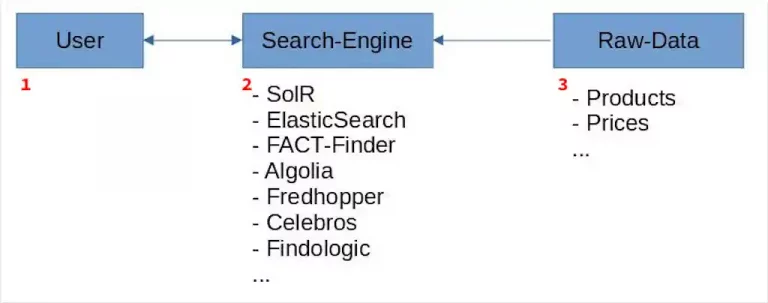
    The preprocessing described above is normally carried out and configured within your search engine. The following graphic shows an overly simplified common onsite search structure:

    1. Users search using their own language and context regarding your products. This means that they will not intuitively understand the language most preferable to your Information Retrieval (IR) System.
    2. In a nutshell your onsite search is a highly configurable IR which currently performs all preprocessing.
    3. The raw data used by your IR for searching.

    In addition to optimizations like correctly configuring fields and their meanings, or running high-return marketing campaigns, most optimizations to your onsite search are done by query preprocessing.

    So here’s my question: does it really make sense to do all this pre-processing within a search engine?

    Have a look at this overview of potential obstacles when pre-processing is handled within the search engine:

    • A deep knowledge of your search engine and its configuration is necessary.
    • Changing to a new onsite search technology means losing or having to migrate all previous knowledge.
    • Onsite search is not inherently able to handle all your pre-processing needs.
    • Debugging errors within a search result is unwieldy, then it’s necessary to audit both pre-processors as well as related parts of the onsite search configuration.

    The Benefits of Extracting the Query Preprocessing Step from Your Onsite Search Engine

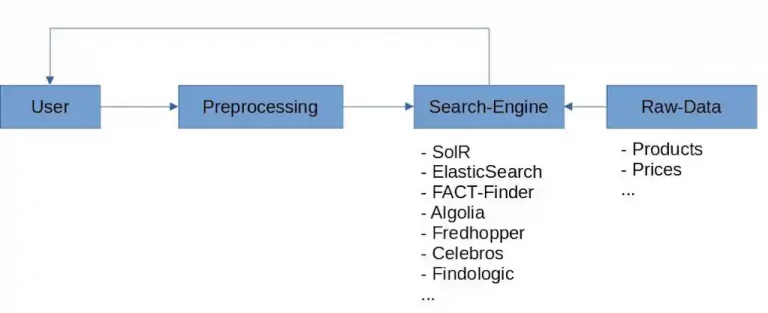
    Having illustrated what query preprocessing is, and which potential problems you could face when running this step inside your search engine, I want now to make a case for the benefits of externalizing this step in the optimization process. Have a look at the graphic below for a high-level illustration of the concept when preprocessing is done outside your search engine.

    • The effort it takes to configure your onsite search engine when migrating from one search vendor to another, can be dramatically decreased as a result of having externalized the query preprocessing. This also has the following benefits:
    • less time spent trying to understand complex search engine configurations.
    • Lower total cost of onsite search ownership
    • Your query preprocessing gains independence from your search engine’s main features.
    • Externalizing means you can cache the query preprocessing independently of your search engine which has a positive impact on related areas like total cost of ownership, the environment, and so on. Take a look at this article for more information.
    • Debugging search results is easier. The exact query string, used by the search engine, is always transparently visible.

    Now you know the benefits of query preprocessing and why it could make sense to externalize this step in your data pipeline optimizations.

  • Wie Produkte gefunden werden

    Wie Produkte gefunden werden

    Wie Produkte gefunden werden

    Kommentar

    Wer nicht direkt die komplette Suche in seinem Shop austauschen möchte (meist ein größeres Projekt das Wochen bis Monate dauert), kommt um intelligente Erweiterungen nicht herum. Deshalb geht searchhub – unser junges KI Startup aus Pforzheim – genau diesen Weg. Umso mehr freuen wir uns über den tollen Beitrag des Internetworld Business zum Thema “Suche” in dem wir auch prominent erscheinen.

    “Im Bereich Shopsuche setze man auf neue Produkte wie Searchhub oder die Headless-Lösung von Makaira” Anatolij von Kosmonaut.

    Als headless KI Erweiterung für alle Suchlösungen hilft Searchhub durch intelligente Clusterung von Suchbegriffen die Ergebnisqualität durchgängig zu erhöhen und gleichzeitig den manuellen Pflegeaufwand (Synonyme, Vertipper, etc) deutlich zu reduzieren.

    Vielen Dank Matthias Hell für die Erwähnung in deinem IWB Artikel in dem du dich mit Anatolij & Christian zu Suchen ausgetauscht hast.

    Und wer mehr wissen möchte >>> Mathias & Markus stehen gerne für einen unverbindlichen Blick hinter die Kulissen zur Verfügung.

    Hier der ganze Artikel

  • Query Understanding: How to really understand what customers want – Part 1

    Query Understanding: How to really understand what customers want – Part 1

    Query Understanding: How to really understand what customers want
    – Part 1

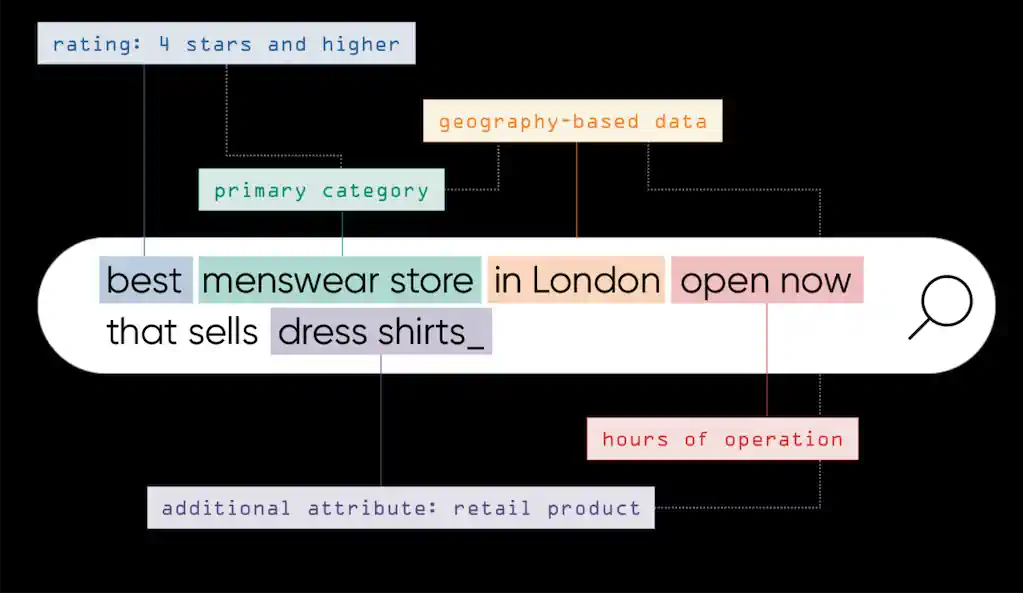
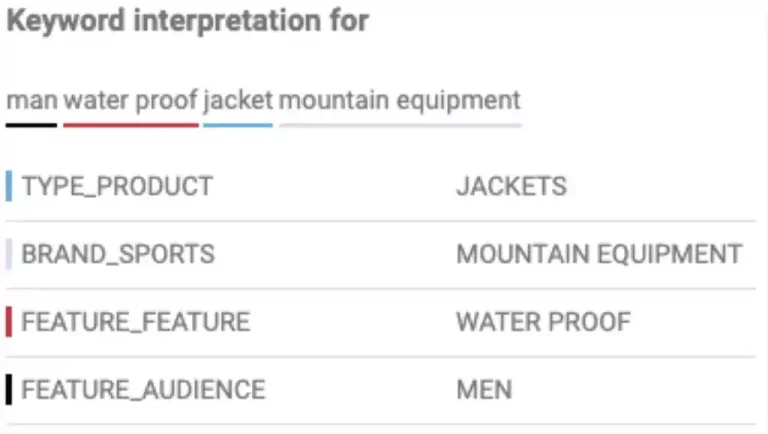
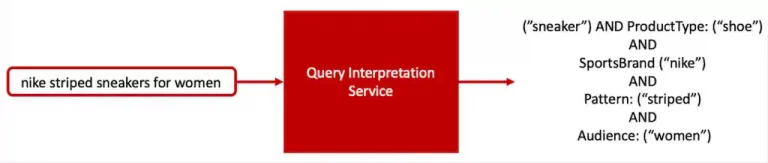
    When users search for things like “men’s waterproof jacket mountain equipment” they’re seeking help. What they expect is for the search engine to understand their intent, interpret it and return products, content or both that match. It’s essential for the search engine to differentiate types of products or content they are looking for. In this case, the customer is likely shopping for a jacket. Equipped with this domain-specific knowledge, we can tailor the search results page by displaying jacket-specific filters, banners and refine the search results by prioritizing or only showing jackets. This process is often called query-understanding. Many companies both site search vendors as well as retailers have tried developing, building and improving these systems but only few have made it work properly at large scale with manageable effort.

    Query Interpretation the backstory

    At the time of this post, all our customers combined sell

    • more than 47 million different products
    • in over 13 different languages
    • across about 5.3 million unique search intent clusters.
      • These clusters represent approximately 240 million unique search queries that cover
      • a couple billion searches.

    All our customers use some kind of taxonomy to categorize their products into thousands of “product classes”. Then they append attributes mainly for navigational purposes.

    Examples of product classes include

    • jackets
    • waterproof jackets
    • winter jackets

    Query Classifier

    The Query Classifier predicts product classes and attributes that customers are most likely to engage with, based on their search queries.
    Once a query classifier accurately predicts classes and attributes, we can enrich the search-system with structured domain knowledge.
    This transforms the search problem from purely searching for strings to searching for things.
    The result is not only a dramatic shift in how product filters are displayed relative to their product classes, but also how these filters can be leveraged to boost search results using those same classes.

    The Challenge

    Deciphering, however, which types of products, content or attributes are relevant to a search query is a difficult task. Some considerations:

    Challenge Context

    SCALE

    Every day, we help our customers optimize millions of unique search queries to search within millions of products. Both dimensions, the query-dimension and the product-dimension change daily. This makes scale a challenge already.

    LANGUAGE GAP

    Unfortunately, most of our customers are not focused on creating attributes and categories as a main optimization goal for their search & discovery systems. This leads to huge gaps when comparing the product catalog to the user query language. Additionally, every customer uses individual taxonomies making it hard to align different classes across all customers.

    SPARSITY

    A small percentage of queries explicitly mention product type making them easy to classify. Most queries do not. This forces us to take cues from users’ activities to help identify the intended product class.

    AMBIGUITY

    Some queries are ambiguous. For example, the query “desk bed” could refer to bunk beds with a desk underneath, or it could mean tray desks used in bed.

    While there isn’t much we can do about the first challenge, the good news is we already cluster search queries by intent. Knowing customer intent means searchhub can leverage all the information contained in these clusters to address challenges 3 and 4. Sparsity for example, is greatly reduced because we aggregate all query variants into clusters and use the outcome to detect different entities or types. Also the ambiguity challenge is greatly reduced as query clusters do not contain ambiguous variants. The clusters themselves, on the other hand, give us enough information to disambiguate.

    Having solved problems 3, and 4, we are able to focus on addressing the Language gap problem and building a large scale, cost efficient Search Interpretation Service.

    Our Approach

    To tackle the query understanding challenge searchhub developed our so-called Search Interpretation Service to perform live search query understanding tasks. The main task of the Interpretation service is to predict the query’s relevant classes (attributes) for a given query in real-time. The output can then be consumed by several downstream Search applications. The Query Classifier model (NER-Service) powers one of these Interpretation microservices.

    Once a query is submitted to the search interpretation service we start our NER-Service (named entity recognition and classification). This service identifies entities in user queries like brands, colors, product category, product type and product type specific attributes. All matched entities in the query are annotated with predefined tags. These tags & entities are based on our unified ontology which we’ll cover in a bit.

    For the actual query annotation, we use an in-house Trie-based solution comparable to the common FST based SolrTextTagger, only an order of magnitude faster. Additionally, we can easily add and remove entities on the fly without re-indexation. Our solution extracts all possible entities from the query, disambiguates them and annotates them with the predefined tags.

    Results

    Challenge Precision Recall F1

    Baseline (productType)

    0.97

    0.69

    0.81

    Since the detected entities in our case are applied to complete intent-clusters (representing sometimes thousands of search queries) rather than a single query, precision is of highest priority. We tried different approaches for this task but none of them gave us a precision close to what you see in the above table. Nevertheless, a quick glance and you’ll easily spot that “Recall” is the weakest part. The system is simply not equipped with enough relevant entities and corresponding tags. To learn these efficiently, the logical next step was to build a system able to automatically extract entities and tags based on available data sources. We decided to build a unified ontology and an underlying system that learns to grow this ontology on its own.

    searchhub’s unified Ontology

    Since taxonomies differ greatly across our customer base we needed an automated way to unify them, that would allow us to generate predictions across customers and languages. It’s essential we are able to use this ontology to firstly classify SKUs and secondly, use the classes (and subclasses) as named entities for our NER-service.

    Since all existing ontologies we found tend to focus more on relationships between manufacturers and sellers, we needed to design our taxonomy according to a fundamentally different approach.

    Our ontology requires all classes (and subclasses) to be as atomic as possible to improve recall.

    “An atomic entity is an irreducible unit that describes a concept.” – Andreas Wagner

    It also appends an “is-a” requirement on all subclasses for a given class. Additionally, we try to avoid combo classes unless they are sold as a set (dining sets that must contain both table and chairs). This requirement keeps the ontology simple and flexible.

    What was our process for arriving at this type of ontological structure? We began by defining Product Types. From there we built the hierarchical taxonomy in a way that maximizes the query category affinity. In essence we try to minimize the entropy of the distribution of a search result set across its categories for our top-k most important queries.

    Product Types

    A Product Type is defined as the atomic phrase that describes what the customer is looking for.

    • Consider an example, “men’s waterproof jacket mountain equipment”.
      • Here, the customer is looking for a jacket.
      • It is preferable if the jacket is waterproof
      • designed for men
      • by the Brand Mountain Equipment

    but these requirements are secondary to the primary requirement of it being a jacket. This means that any specialized product type must be stripped down to its most basic form jacket.

    Attributes

    An Attribute is defined as an atomic phrase that provides more information about a product type.

    • Consider an example “bridgedale men’s merino hiker sock”.
      • Here, we classify the term sock as a Product type
      • and we can classify the remaining terms (bridgedale, men’s, merino and hiker) as Attributes and/or Features.

    This gives us a lot of flexibility during recall. Attributes can be subclassed in Color, Material, Size, etc. depending on the category. But since our aim is to create a simplified ontology for search, we restrict attribute subclasses to what is actually important for search. This makes the system more maintainable.

    Learning to grow ONTOLOGIES

    Data Collection

    It should be obvious that building and growing this type of ontology needs some sort of automation, otherwise our business couldn’t justify maintaining it. Our biggest information source is anonymous customer behavior data. So, after some data-analyses we were able to prove that customers generally add relevant products to their shopping cart during search. This allowed us to use historical user queries and the classes of the related products added-to-cart, within a search session, as the model development dataset. For this dataset we defined a search experience as the sequence of customer activities after submitting a search query and before moving on to a different activity. For each search experience, we collected the search query and the classes of the added-to-cart-products. Each data point in our dataset corresponds to one unique search experience from one unique customer.

    Connecting Queries and Signals

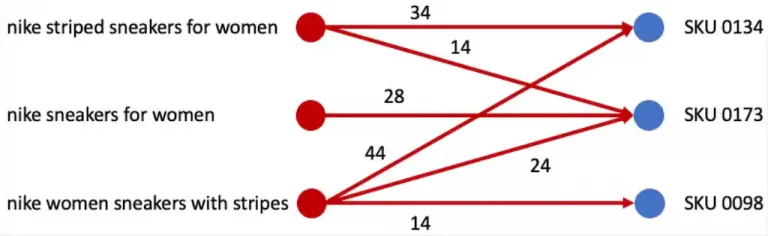
    From here we build a bipartite graph that maps a customer’s search query to a set of added-to-cart-products – SKUs. This graph can be further augmented by all sorts of different interactions with products (Views, Clicks, Buys). We represent search queries and SKUs by nodes on the graph. An edge between a query and a SKU indicates that a customer searched for the query and interacted with the corresponding SKUs. The weight of the edge indicates the strength of the relationship between the query and the SKU. For the first model we simply modeled this strength by aggregating the number of interactions between the query and the SKU over a certain period of time. There are no edges between queries or between SKUs.

    As broad queries like “cheap” or “clothing” might add a lot of noise to the data we use the entropy of a query across different categories to determine if it is broad and remove it from the graph. We use several heuristics to further augment and prune the graph. For example, we remove query-SKU pairs that have edge weights less than some predefined threshold. From here we have simply to find a way to compute a sorted list of Product sub-classes that are atomic and relevant for that category.

    Extracting Product Entities

    To our knowledge there exist several methods to automatically extract atomic Product entities from search queries and interaction data, but only one of them offered us what we needed. We required the method to be fully unsupervised, cost efficient and fast to update.

    The Token Graph Method

    This method is a simple unsupervised method for extracting relevant product metadata objects from a customer’s search query, and can be applied to any category without any previous data.

    The fundamental principle behind it is as follows: If a query or a set of queries share the same interactions we can assume that all of them are related to each other, because they share some of the same clicked SKUs. In other words, they share the same intent. This principle is also known as universal-similarity and its fundamental idea is used in almost any modern ML-application.

    Now that we have a set of different queries that are related to each other we apply a trick.
    Let us assume that we can detect common tokens (a token might be a single or multi-word-token) between the queries.
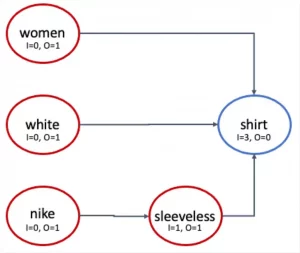
    We can now create a new graph where each token is a node and there are edges between adjacent tokens.
    The above figure shows the token graph for the query set {women shirt, white shirt, nike sleeveless white shirt}.

    It is quite safe to say that in most cases, the product token is the last term in a query (searchub is almost able to guarantee this since we use aliases that represent our clusters that are created by our own language models). With this assumption the product token should be the node that maximizes the ratio (I /(O+I)) , where O = is the number of outgoing edges and I is the number of incoming edges for the node corresponding to the token. If the search query contains just a single token, we set I = O = 1.

    We can further improve precision by requiring that I ≥ T , where T is some heuristic threshold. From here we can generate a potential product from each connected component and, aggregated over all connected components gives us a potential list of products. With this simple model we can not only extract new product types, we can actually leverage it further to learn to categorize these product types. Can you guess how ? 🙂

    What’s Next

    This approach of using a kind of rule-based-system to extract, and an unsupervised method to learn these rules, seems too simple to produce good enough results, but it does and has one very significant advantage over most other methods. It is completely unsupervised. This allows it to be used without any training data from other categories.

    Results

    Challenge Precision Recall F1

    Baseline (productType)

    0.97

    0.78

    0.86

    Additionally, this approach is incremental. This means we remain flexible, able to rollback almost instantly, all or only some newly learned classes in our ontology if something goes wrong. Currently we use this method as the initial step acting as the baseline for more advanced approaches. In the second part we’ll try some more sophisticated ways to further improve recall with limited data.

  • valantic and searchhub – partnership announcement

    valantic and searchhub – partnership announcement

    valantic and searchhub – partnership
    announcement

    Partnerships

    Valantic understands the intricacies of working with large corporate digitization projects with systems like SAP, Spryker, Magento, Shopware, and Scayle, among others. It’s common to experience a lack in these types of rollouts when it comes to onsite search. As an alternative to building a completely new site search solution valantic took a closer look at what searchhub has to offer and found tremendous potential in optimizing search for their customers using our approach.

    searchhub is the autopilot addon for every site search on the market. As such we easily integrated into the existing site search of one of Valantic’s customers, and quickly illustrated the fiscal sense behind working with us compared to heavy manual optimization or even replacing site search solutions.

    So, it is with great pride that we announce valantic as one of our new partners!

    Since 2017 we have managed to grow organically, mostly by leveraging our own network. As we transition to scaling our business model, strong partnerships with agencies will be pivotal. Markus Kehrer – searchhub

    About valantic:

    Valantic develops a digital transformation strategy with you. For over 10 years they have been successfully advising on the selection of, and assisting clients in their transition to the ideal solution. With over 2,000 in-house experts, they move fluidly from designing the optimal customer experience, to developing the platform that supports you in customer acquisition and retention with the right digital marketing tools. The result: quantifiably successful e-commerce.

  • The importance of Synonyms in eCommerce Search

    The importance of Synonyms in eCommerce Search

    The importance of Synonyms
    in eCommerce Search

    Almost any person working with search is somehow aware of Synonyms and their importance when optimizing search to improve recall. Therefore, it will be no surprise to say that adding synonyms is one of the most essential methods of introducing domain-specific knowledge into any symbolic-based search engine.

    “Synonyms give you the opportunity to tune search results without having to make major changes to your underlying data and help you to close the vocabulary gap between search queries and product data.”

    To better underline the use-cases and importance, please consider the following eCommerce examples:

    • If a customer searches for “laptop,” but the wording you are using in your product data is “notebook,” you need a common synonym, or you won’t make the sale. More precisely, this is a bidirectional synonym-mapping which means that both terms have an equivalent meaning.

    • If a customer is looking for “accu drill” or “accumulator screwdriver,” you’ll end up setting up several bidirectional synonym-mappings, one for accu = accumulator and another one for drill = screwdriver.

    • If a customer searches for “trousers,” you might also want to show him “jeans,” “shorts,” and “leggings.” These relationships are particular types of synonyms, so-called Hyponyms. The most intuitive definition I’m aware of for a hyponym is the “directed-typeOf” definition. So every jeans, shorts or leggings is a “typeOf” trouser but not the other way around.

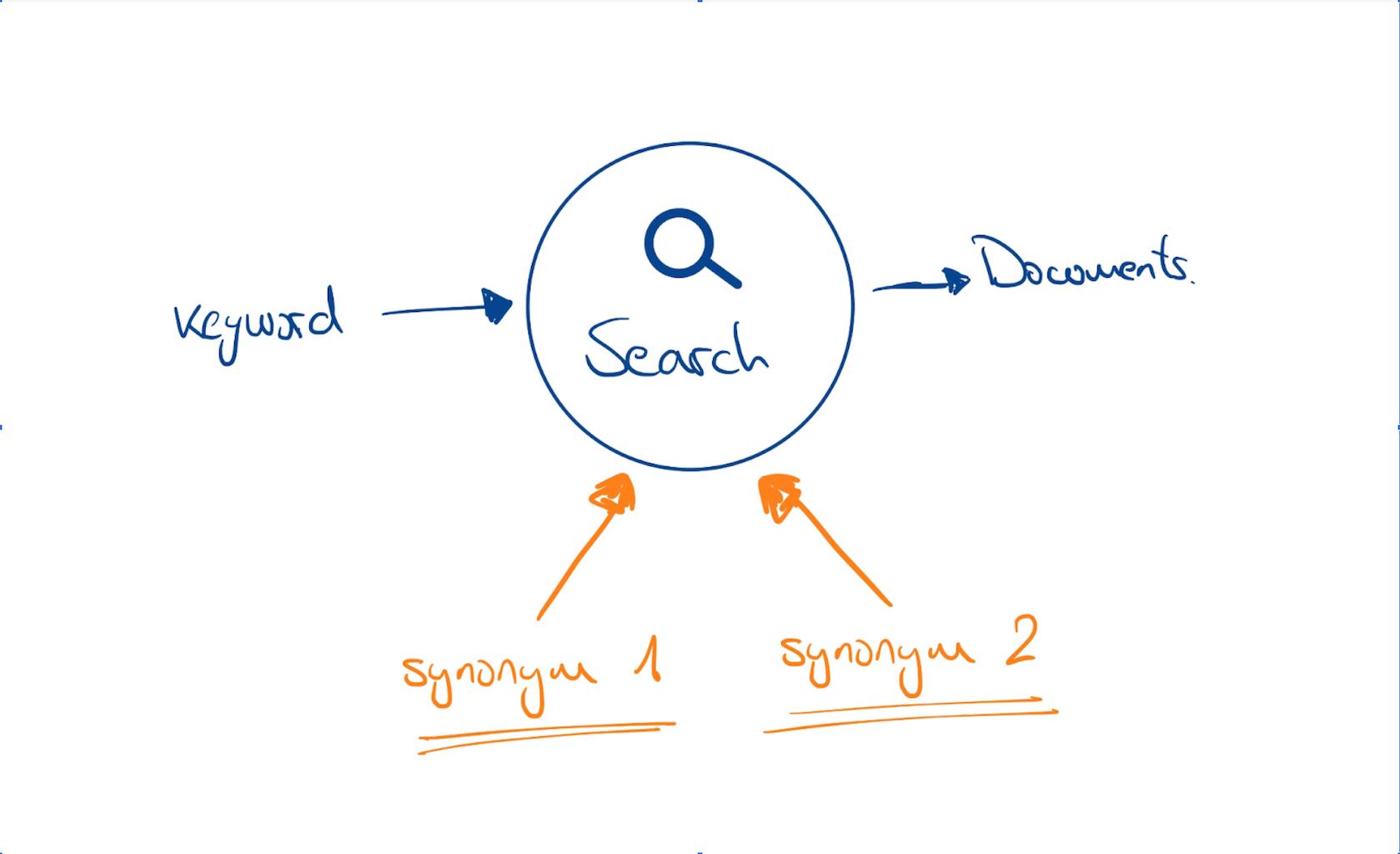
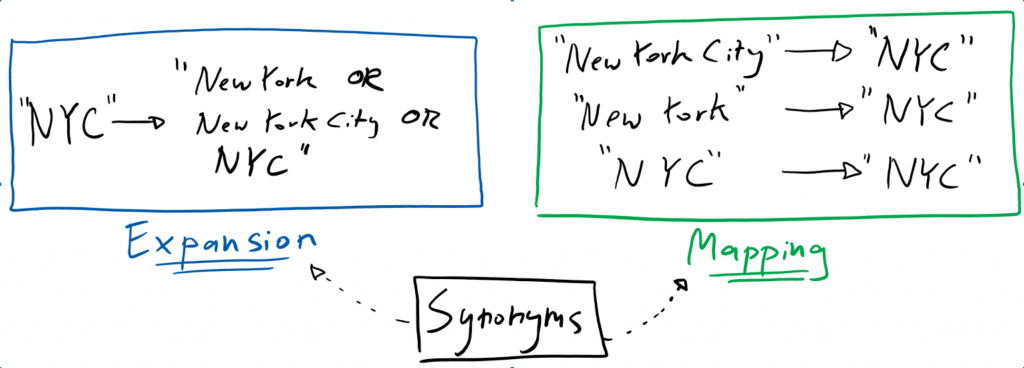
    We use synonyms to tell the search system to expand the search space (synonym-expansion). Or in other words, if a search query contains a synonym, we ask the search engine to also search for other synonymous words/phrases in the background.

    All of the above cases are very common and sound pretty straightforward. But the internal dependencies on other parts of the search analysis chain and the fundamental context-dependent meaning of words are often hidden away and not evident to the people trying to solve specific problems by introducing or managing synonyms. This often leads to unexpected, sometimes even unwanted, results.

    Spaghetti-Synonyms best of

    1. Synonyms with dependency on proper spelling and tokenization

    For most search engines, the quality of the synonym expansion is highly dependent on the quality of the so-called tokenization. So, for example, if we consider search phrases like “sonylaptopcharger”; “sony laptopcharger”; “sony laptopchager” or “charger for sonylaptop,” a simple synonym-expansion with “notebook” will most likely not work as expected. That’s because the tokenization process is unable to produce a token “laptop” that could be expanded with “notebook.”

    Additional logic and manual effort are needed to cover these cases. Unfortunately, that’s usually the point at which users start to flood the synonym files by adding misspellings and decompositions. But this is obviously not a scalable, long-term solution to the problem.

    2. Transitive compounding effects of synonyms

    Since there might be hundreds or even thousands of synonyms you’d need to cover, you will most probably end up with a long list of synonyms defining some terms and their specified mappings (“expansion candidates”).

    Now imagine you have the following two entries:

    dress, attire, apparel, skirt, costume

    shoes, boots, footgear

    Maybe you have added these synonym mappings at different times to improve the recall for a specific query like “dress” or “shoes,” for example. For these queries in isolation, everything seems fine. However, you may have unintentionally opened Pandora’s box from the moment you added the second entry. From now on, it’s likely that searches for “dress shoes” will no longer deliver the expected results. Furthermore, depending on the query parsing used, these results will be inflated by irrelevant matchings of all sorts of dresses and shoes.

    Again the most common way to solve this problem is to add manual rules like preprocessors or filters to remove the unwanted matches from the result.

    To be clear, taking the semantic context into account is the single greatest challenge for synonyms. Depending on the context, a word can have different meanings in all natural languages. For example, the word “tee” is often used as a synonym for “t-shirt” in the context of fashion, while “tee” has an entirely different meaning in the context of “food.”

    “When your customers are formulating a query they take a specific semantic context for granted. The applied synonym expansion needs to capture this context to give the best results.”

    Let’s say you work for an electronics shop and came up with the following well-thought-through list of synonyms to increase recall for searches related to the concept of “iphone cases.”

    iphone case, iphone backcover, apple backcover, apple smartphone case

    You check a couple of queries, and it seems like the job is done. Well, until someone types in the query “ipad apple backcover” and gets flooded by numerous irrelevant iPhone covers. That’s because the synonym expansion does not consider the context around the synonyms.

    BTW: do you still remember the example “accu drill” or “accumulator screwdriver” from the beginning? Hopefully, you spotted the point where I might have tricked you. While accu and accumulator are accurate synonyms, drill and screwdriver are context-dependent synonyms.

    We have seen these kinds of challenges pop up with every eCommerce retailer. Even the most advanced retailers have struggled with the side-effects of synonyms in combination with (stopwords, acronyms, misspellings, lemmatization, and contextual relationships).

    At searchhub, we thrive on making it easier to manage and operate search engines while helping search engines better understand search queries. That’s why we decided to tackle the problem of synonyms as well.

    Introducing searchhub concepts

    The main idea behind searchhub is to decouple the infinite search-query-space from the relatively small product-catalog-space. As a search user, the number of words, meanings, and ways to formulate the same intent are much much higher than the number of words you have available in your product catalog and, therefore, in your index. This challenge is called the “language gap.”

    We meet this query intent challenge head-on by clustering the search-query-space. The main advantage of taking this approach is the sheer volume of information gathered from several, sometimes thousands of queries inside a single cluster, which allows us to add information and context to every query naturally. Not only that, this enriched query context provided us with the necessary foundation to design a unique solution (so-called “concepts”) to solve the challenges of transitive compound synonyms, naturally handling contextual synonyms, and removing dependencies on spelling and tokenization.

    Let’s take a very typical example from the electronics world where we would like to encode the contextual semantic relationship between the following terms:

    ”two door fridge” and “side by side”

    This is a pretty challenging relationship because we try to encode “two door” and “side by side” as equivalent expressions but only in the context of the query intent fridge. That’s why the search manager intelligently added the word fridge, as many other products might have two doors and not be side by side.

    But maybe the search manager was unaware of the brand called “side by side,” and that next week the shop will also list some fantastic side-by-side freezers which are not precisely fridges 🙂

    In searchhub, however, you could easily add such an underlying relationship (we call it concept-definition) by simply defining “two door” = “side by side.” Under the hood, searchhub takes care of morphology, spelling, tokenization, contextual dependencies and only applies the concepts (synonyms) if the query intent is the same.

    But not only that. Since every query in our clusters is equipped with performance KPIs, we naturally support performance-dependent weighted synonyms if your search platform supports them.

    We tested this solution intensely with some of our beta customers, and the results and feedback have been overwhelming. For example

    We reduced the number of synonyms previously managed in the search platform for our customers, on average, by over 65%. At the same time, we increased query synonym expansion coverage by 19% and precision by more than 14%.

    This means we found a very scalable, and more importantly fully transparent, way for our customers to manage and optimize their synonyms at scale.

    BTW searchhub also learns these kinds of concept-definitions automatically and proactively recommends them so you can concentrate on validation rather than generation.

    If you are interested in optimizing your synonym handling, making it more scalable and accurate, let’s talk……..

    Under the hood – for our technical audience

    Synonyms are pretty easy to add in quite a lot of cases. Unfortunately, only a few people understand the challenges behind correctly supporting synonyms. Proper synonym handling is no easy task, especially for multi-word expressions, which introduce a lot of additional complexity.

    We decided to use a staged approach consisting of two stages to tackle this challenge with our concepts method.

    Stage 1 – Query Intent Clustering

    Before we have a deeper look at the solution, let’s define some general conditions to consider:

    • By using query-clusters where morphology, spelling, tokenization, and contextual dependencies like (dresses for women, drill without accu, sleeveless dress) are already taken into account, we can finally ignore spelling, tokenization and structural semantics’ dependencies.
    • We also no longer have to account for language specifics since this is already handled by the query clustering process (for example, a “boot” can mean a shoe or a boat in german, while in English, it can mean shoe or trunk).

    Stage 2 – Concepts, a way to encode contextual equivalent meaning of words or phrases

    Once a concept is defined, searchub begins with a beautifully simple and efficient concept matching approach.

    1. We scan all clusters and search for those affected by one or more concept definitions. This is a well-known and easy to solve IR problem even at a large scale.
    2. We reduce all concept-definitions for all concept-candidates using so-called concept-tokens (for example <concept-ID>). This is necessary as several transitive concept-definitions may exist for a single concept-object in multiple languages.
    3. Aggregate all reduced candidates, evaluate them based on their semantic context, and treat only the ones as conceptually equivalent, which share the same semantic context. This stage is essential, so it needs the most attention. You don’t want <concept-1>grill and grill<concept-1> to be equivalent even though they contain the same tokens or words.
    4. The last step is to merge all conceptually equivalent candidates/clusters provided they represent the same query intent. This might seem counter-intuitive since we usually think of synonym expansion. Still, to expand the meaning of a query-intent-cluster, we have to add information by merging it into the cluster.

    As a search expert, this approach might look way too simple to you, but it has already proved bullet-proof at scale. And since our searchhub platform is designed as a lambda architecture, this is all done asynchronously, not even affecting search query response times.

    credit feature image: Diego Garea Rey | www.diegogarea.com

  • How To DIY Site Search Analytics Using Athena – Part 3

    How To DIY Site Search Analytics Using Athena – Part 3

    How To DIY Site Search Analytics Using Athena
    – Part 3

    This is the final post in a series of three. If you missed Part 1 and Part 2, please head over and read them first as this post will build on the work from our sample analytics application.

    Remember: we are building an Ecommerce Site Search Analytics tool from scratch. The goal is to allow for you to more accurately gather detailed information from your site search tool in order to optimize your business for more online revenue.

    So let’s get right to it and discuss how to add the following features to our application:

    1. How-To generate random sample data to easily create queries spanning multiple days.

    2. How-To create Athena queries to fetch the E-Commerce KPIs: CTR and CR.

    3. How-To create an HTML page to visualize the KPIs in a line chart.

    1. How-To generate random sample data

    So far, our application can process a single CSV file, which it then converts into an Apache Parquet file. This file is then uploaded to AWS S3 under the partition key of the last modification date of that file.

    Now, we will create a method to generate random data across multiple days. This enables us to write Athena queries that span a time range. (E.g., get the CTR of the last 7 days.) First, we need to make some necessary changes to the FileController and FileService classes even though this clearly violates the Single-Responsibility-Principle. However, for the purposes of this post, it will serve our needs.

    Open up the FileController and add the following method:

    				
    					@GetMapping("/randomize/{numDays}")
    @ResponseBody
    public List<URL> randomize(@PathVariable int numDays) {
        return fileService.createRandomData(numDays);
    }


    The endpoint expects a path variable containing the number of days the random data should be created. This variable is subsequently passed to a new method in the FileService which contains the actual logic:

    				
    					public List<URL> createRandomData(int numberOfDays) {
        List<String> queries = new ArrayList<>(List.of("dress", "shoes", "jeans", "dress red", "jacket", "shoes women", "t-shirt black", "tshirt", "shirt", "hoodie"));
        String rawSchema = getSchemaFromRootDir();
        MessageType schema = MessageTypeParser.parseMessageType(rawSchema);
        LocalDate now = LocalDate.now();
        Random random = new Random();
        AmazonS3 s3 = AmazonS3ClientBuilder.standard().build();
        List<URL> uploadUrls = new ArrayList<>(numberOfDays);
        for (int i = 0; i < numberOfDays; i++) {
            Collections.shuffle(queries);
            Path tempFile = createTempDir().resolve("analytics" + String.valueOf(i) + ".parquet");
            org.apache.hadoop.fs.Path path = new org.apache.hadoop.fs.Path(tempFile.toUri());
            try (
                    CsvParquetWriter writer = new CsvParquetWriter(path, schema, false);
            ) {
                for (String query : queries) {
                    Integer searches = random.nextInt(100);
                    Double ctrBound = 0.3 * searches;
                    Integer clicks = ctrBound.intValue() == 0 ? 0 : random.nextInt(ctrBound.intValue());
                    Double transactionsBound = 0.1 * searches;
                    Integer transactions = transactionsBound.intValue() == 0 ? 0 : random.nextInt(transactionsBound.intValue());
                    List<String> values = List.of(query, searches.toString(), clicks.toString(), transactions.toString());
                    writer.write(values);
                }
            }
            catch (IOException e) {
                throw new StorageFileNotFoundException("Could not create random data", e);
            }
            String bucket = String.format("search-insights-demo/dt=%s", now.minusDays(i).toString());
            s3.putObject(bucket, "analytics.parquet", tempFile.toFile());
            uploadUrls.add(s3.getUrl(bucket, "analytics.parquet"));
        }
        context.execute(QUERY_REPAIR_TABLE);
        return uploadUrls;
    }


    					# Create random data for the last seven days
    curl -s localhost:8080/csv/randomize/7
    # The response returns the S3 URLs for every generated Parquet file
    ["https://s3.eu-central-1.amazonaws.com/search-insights-demo/dt%3D2021-10-11/analytics.parquet","https://s3.eu-central-1.amazonaws.com/search-insights-demo/dt%3D2021-10-10/analytics.parquet","https://s3.eu-central-1.amazonaws.com/search-insights-demo/dt%3D2021-10-09/analytics.parquet","https://s3.eu-central-1.amazonaws.com/search-insights-demo/dt%3D2021-10-08/analytics.parquet","https://s3.eu-central-1.amazonaws.com/search-insights-demo/dt%3D2021-10-07/analytics.parquet","https://s3.eu-central-1.amazonaws.com/search-insights-demo/dt%3D2021-10-06/analytics.parquet","https://s3.eu-central-1.amazonaws.com/search-insights-demo/dt%3D2021-10-05/analytics.parquet"]


    Now that our files are uploaded to S3 let’s check if Athena partitioned the data correctly by executing the count request.

    				
    					curl -s localhost:8080/insights/count
    # The response should look like
    Executing query     : select count(*) from "ANALYTICS"
    Fetched result      : +-----+
                        : |count|
                        : +-----+
                        : |  73|
                        : +-----+                                  
    Fetched row(s)      : 1  


    2. How-To create Athena queries to fetch the E-Commerce KPIs: CTR and CR

    The Click-Through-Rate (CTR) and Conversion-Rate (CR) are among the most frequently used KPIs when it comes to measuring the performance of an E-Commerce-Search.

    Most search vendors claim that their solution boosts your Conversion-Rate by X %

    Often the promise is made to increase the CR by upwards of 30%. More than anything, this is clever marketing as the potential increase goes hand in hand with increased sales. However, as highlighted in the blog series by Andreas Wagner it’s necessary to not only rely on these KPIs to optimize search. Nevertheless, they are part of the big picture, so let’s talk about retrieving these KPIs. Technically, if you already have the correct data, the calculation is pretty straightforward.

    A Definition of the KPIs CR and CTR:

    • CR or Conversion Rate: Number of transactions / Number of searches
    • CTR or Click Through Rate: Number of clicks / Number of searches

    Now that we know what these KPIs are and how to calculate them, we need to add the new REST endpoints to the AthenaQueryController

    				
    					@GetMapping("/ctr")
    public ResponseEntity<ChartData> getCTR(@Valid AnalyticsRequest request) {
        return ResponseEntity.ok(queryService.getCTR(request));
    }
    @GetMapping("/cr")
    public ResponseEntity<ChartData> getCR(@Valid AnalyticsRequest request) {
        return ResponseEntity.ok(queryService.getCR(request));
    }


    The parameter of both methods has two unique features:

    1. @Valid This annotation is part of the Java Bean Validation specification. It ensures that the fields of the subsequent object (AnalyticsRequest) are validated using their internal annotations. This ensures that inputs made in most cases by a user via a GUI meet specific criteria. In our case, we want the user to enter the period for calculating the CR/CTR, and we want to make sure that the start date is before the end date. We achieve this with another annotation @AssertTrue in the AnalyticsRequest class:
    				
    					@Data
    @AllArgsConstructor
    @NoArgsConstructor
    public class AnalyticsRequest {
        @DateTimeFormat(iso = ISO.DATE)
        private LocalDate   from;
        @DateTimeFormat(iso = ISO.DATE)
        private LocalDate   to;
        @AssertTrue
        public boolean isValidDateRange() {
            return from != null && to != null && !to.isBefore(from);
        }
    }


    The incoming REST request will automatically be validated for us. Additionally, our service method will only be called if the isValidDateRange method returns true otherwise, a validation error response will be sent to the client. If you followed the second part of this article and tried to add those annotations, you will get an error due to missing required dependencies. So let’s go ahead and add them to the pom.xml

    				
    					<dependency>
        <groupId>org.springframework.boot</groupId>
        <artifactId>spring-boot-starter-validation</artifactId>
    </dependency>


    This Spring starter pulls in hibernate-validator, the reference implementation of the validation API. Additionally, jakarta.el, an implementation of the Expression Language specification, which supports variable interpolation as part of the validation API, is also loaded.

    1. AnalyticsRequest is not preceded by any @RequestParam, @RequestBody or @PathVariable annotation. As a result, Spring tries to map each request parameter to a field in the specified DTO – Data Transfer Object. In order for this to work, the parameter and field name must be identical.

    In our case, this means the request must look like this: baseUrl/cr?from=yyyy-MM-dd&to=yyyy-MM-dd

    That’s it for the controller.

    How-To Make The Necessary Changes to the AthenaQueryService

    Let’s dig into the details of the changes in the AthenaQueryService using the example of CR

    				
    					public ChartData getCR(AnalyticsRequest request) {
        Field<BigDecimal> crField = saveDiv(sum(ANALYTICS.TRANSACTIONS), sum(ANALYTICS.SEARCHES), new BigDecimal(0));
        return getKPI(request, crField);
    }


    Very straightforward with the help of two auxiliary methods – where the real magic is at. So let’s examine those auxiliary methods in more detail now.

    We begin with saveDiv

    				
    					private Field<BigDecimal> saveDiv(AggregateFunction<BigDecimal> dividend, AggregateFunction<BigDecimal> divisor, BigDecimal defaultValue) {
            return coalesce(dividend.cast(DECIMAL.precision(18, 3)).div(nullif(divisor, new BigDecimal(0))), defaultValue);
        }


    Here we use several functions of the JOOQ DSL to protect ourselves from division errors. The most infamous, known by every developer, is division by 0. You see, in practice, there is hardly a webshop that tracks all data correctly. As a result, these protective mechanisms are of utmost importance for volatile data such as E-Commerce search tracking.

    1. coalesce: returns the first value of the list that is non-null.
    2. nullif: returns null if both expressions are equal otherwise, it returns the first expression.
    3. div divides the first value by the second.

    The second helper method getKPI creates the actual Athena query and extracts it. This allows the query to be reused when calculating the CTR, thanks to JOOQ and its Field abstraction.

    				
    					private ChartData getKPI(AnalyticsRequest request, Field<BigDecimal> field) {
        ChartDataBuilder chartDataBuilder = ChartData.builder();
        context.select(ANALYTICS.DT, field)
                .from(ANALYTICS)
                .where(partitionedBetween(request))
                .groupBy(ANALYTICS.DT)
                .orderBy(ANALYTICS.DT.desc())
                .fetch()
                .forEach(rs -> {
                    try {
                        chartDataBuilder.label(LocalDate.parse(rs.get(0, String.class)).toString());
                        chartDataBuilder.data(rs.getValue(1, Double.class) * 100);
                    }
                    catch (DataTypeException | IllegalArgumentException e) {
                        throw new IllegalArgumentException(e);
                    }
                });
        return chartDataBuilder.build();
    }


    The JOOQ DSL should be very easy to read for anyone who understands SQL syntax. First, we select the date, and our aggregation (CR or CTR), grouped and sorted by date. A slight peculiarity is hidden in the where clause where another auxiliary method is used.

    				
    					private Condition partitionedBetween(AnalyticsRequest request) {
        Condition condition = DSL.trueCondition();
        if (request.getFrom() != null) {
            condition = condition.and(ANALYTICS.DT.greaterOrEqual(request.getFrom().toString()));
        }
        if (request.getTo() != null) {
            condition = condition.and(ANALYTICS.DT.lessOrEqual(request.getTo().toString()));
        }
        return condition;
    }


    Here we restrict the result based on the start and end date of our DTO. With the help of the JOOQ DSL trueCondition, we can ensure that our method always returns a Condition object. Even if we do not have a start or end date in our DTO object. This is excluded by the bean validation, but it is common practice to take protective measures in the service class and not rely solely on functions outside of it. In the last part of the method, each data record from the database is converted into the response format using a for-loop.

    Let’s complete the AthenaQueryService by adding the missing CTR calculation.

    				
    					public ChartData getCTR(AnalyticsRequest request) {
            Field<BigDecimal> ctrField = saveDiv(sum(ANALYTICS.CLICKS), sum(ANALYTICS.SEARCHES), new BigDecimal(0));
            return getKPI(request, ctrField);
        }


    That’s it!

    We should now be able to start the application and call our new endpoints.

    				
    					# GET the CR. Please adjust from and to accordingly
    curl -s "localhost:8080/insights/cr?from=2021-10-04&to=2021-10-11"
    # GET the CTR. Please adjust from and to accordingly
    curl -s "localhost:8080/insights/ctr?from=2021-10-04&to=2021-10-11"


    However, instead of the expected response, we get an Internal Server Error. Looking at the Stacktrace you should see:

    				
    					org.jooq.exception.DataAccessException: SQL [select `ANALYTICS`.`DT`, coalesce((cast(sum(`ANALYTICS`.`TRANSACTIONS`) as decimal(18, 3)) / nullif(sum(`ANALYTICS`.`SEARCHES`), ?)), ?) from `ANALYTICS` where (true and `ANALYTICS`.`DT` >= ? and `ANALYTICS`.`DT` <= ?) group by `ANALYTICS`.`DT` order by `ANALYTICS`.`DT` desc]; [Simba][AthenaJDBC](100071) An error has been thrown from the AWS Athena client. line 1:23: backquoted identifiers are not supported; use double quotes to quote identifiers


    So how do we tell JOOQ to use double quotes instead of backquotes for identifiers? In the world of Spring, this is done mainly by declaring a bean, so here too. Open the SearchInsightsDemoApplication class and add the following:

    				
    					@Bean
    Settings athenaSettings() {
        return new Settings().withRenderQuotedNames(RenderQuotedNames.NEVER);
    }


    If you try the request again, you will fail once again! This time with:

    				
    					Caused by: java.sql.SQLException: [Simba][AthenaJDBC](100071) An error has been thrown from the AWS Athena client. SYNTAX_ERROR: line 1:1: Incorrect number of parameters: expected 4 but found 0


    This is a tricky one as it’s not immediately clear what’s going wrong here. However, after spending a decent amount of time scanning the Athena and JOOQ documentation, I found that Athenas engine in version 1 and its corresponding JDBC driver do not support Prepared statements.

    This behavior changed in version 2 of the Engine as the Docs claim. But I haven’t tested it so far … The fix in our case is to add another JOOQ configuration setting withStatementType. This is how our final bean definition looks:

    				
    					@Bean
    Settings athenaSettings() {
        return new Settings().withStatementType(StatementType.STATIC_STATEMENT).withRenderQuotedNames(RenderQuotedNames.NEVER);
    }


    Fingers crossed for our next try, and voila, we have our CR response:

    				
    					: +----------+--------+
    |DT    |coalesce|
    +----------+--------+
    |2021-10-11|  0.038|
    |2021-10-10|  0.029|
    |2021-10-09|  0.015|
    |2021-10-08|  0.035|
    |2021-10-07|  0.033|
    +----------+--------+
    |...record(s) truncated...
    Fetched row(s)      : 7


    3. How-To create an HTML page to visualize the KPIs in a line chart

    The project contains a very minimal frontend that uses Chartjs to render two line charts for CR and CTR. I don’t want to go into detail here; just have a look at the index.html file under src/main/resource/static. Once you start the application, point your browser to http://localhost:8080/ and enter from and to dates in the format yyyy-MM-dd. Afterward, you can press one of the buttons to see the chart rendering
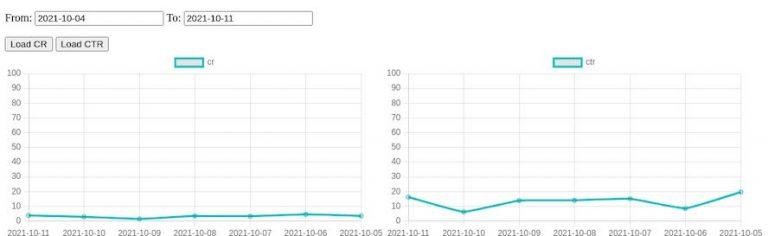
    This ends our series on how to develop your own site search analytics that

    1. Is cost-effective
    2. Is highly scalable
    3. Is expandable as it’s self-owned

    However, this is only the beginning. For a proper site search analytics tool that you can use to optimize your business, additional KPIs are required. These can be added easily enough if you have the appropriate data.

    And that’s a crucial, if not the most important, factor!

    Without the RIGHT DATA it’s shit in, shit out!

    No matter how good the underlying architecture is, without correct data, an analysis of the search offers no added value. On the contrary, wrong decisions are made from wrong data, which leads to a direct loss of sales in the worst-case scenario. If you want to minimize the risk of bad data, try tackling E-Commerce search tracking yourself and use an open-source solution such as the Search Collector. But please keep in mind that these solutions only provide the framework for tracking data. If used incorrectly, they cause the same problems as commercial solutions.

    Do Ecommerce Site Search analytics, but do it properly or not at all!

    The final source code can be found on github.

  • How SmartQuery boosts onsite search query parsing with Querqy

    How SmartQuery boosts onsite search query parsing with Querqy

    How SmartQuery boosts onsite search query
    parsing with Querqy

    Do you know Querqy? If you have a Lucene-based search engine in place – which will be Solr or Elasticsearch in most cases – you should have heard about Querqy Sounds like: “Quirky“! It’s a powerful query parsing and enhancement engine. It uses different rewriters to add context to the incoming search queries. The most basic rewriter uses a manual rule configuration to add Synonyms, Filters, and Up- and Down-Boostings for the final Lucene Query. More rewriters handle decomposition, number unit normalization, and replacements.

    Error-Tolerance know when to say when

    If you use another search engine, you most likely have similar tools to handle synonyms, filtering, and so on. So this post is also for you because search engines all share one big problem: rules have to be maintained manually! And all those rules are not error-tolerant. So let’s have a look at some examples.

    Example 1 – the onsite search typo

    Your rule: Synonym “mobile” = “smartphone” The query: “mobil case” As you can see, this rule won’t match because of the missing “e” in “mobile”. So in this example, the customer won’t see the smartphone cases.

    Example 2 – the search term composition

    The same rule, another query: “mobilecase” Again the synonym won’t be applied since the words are not separated correctly. For such queries, you should consider Querqys word-break rewriter.

    Example 3 – search term word order

    Your rule: women clothes = ladies clothes The query: “clothes for women” or “women’s outdoor clothes” A unique problem arises when using rules for multiple words. There will be many cases where the order changes and the rules won’t match anymore.

    These are just a few constructed examples, but there are plenty more. None of them are fundamental, but they stack up quickly. Additionally, different languages come with other nuances and tricky spelling issues. For us, in Germany, word-compositions are one of the significant problems. From our experience, at least 10-20% of search traffic contains queries with such errors. And we know that there is even more potential for improvement. Our working hypothesis assumes around 30% of traffic can be rephrased into a unified and corrected form.

    What options do you have? Well, you could add many more rules, but you’ll run into the following problem: Complexity.

    We’ve seen many home-grown search configurations with thousands of rules. Over time, these become problematic because the product basis changes. Meaning old rules lead to unexpected results. For example, the synonym “pants” and “jeans” was a good idea once, but since the data changed, you have a lot of mismatches because meanwhile, the word “jeans” references many different concepts.

    SearchHub – your onsite search’s intuitive brain!

    With SearchHub, we reduce the number of manual rules by unifying miss-spellings, composition and word-order variants, and conceptual similar queries.

    If you don’t know SearchHub yet, our solution groups different queries with the same intent and decides the best candidate. Then, come search-time, we transform unwanted query variants into their best candidate respectively.

    What does that mean for your rules? First, you can focus on error-free, unified, and standard queries. SearchHub handles all spelling errors, compositions alternatives, and word order variations.

    Additionally, you can forego adding rules to add context to your queries. For example, it might be tempting to add “apple” when someone searches for “iphone”. But this could lead to false positives when searching for iPhone accessories from different brands. SearchHub, on the other hand, only adds context to queries where people search for such connections. In case of ambiguous queries, you can further split these queries into two unique intents.

    Use the best tools

    Querqy is great. It allows you to add the missing knowledge to the user’s queries. But don’t misuse it for problems like query normalization and unified intent formulation; for that, there’s SearchHub. The combination of these tools makes for a perfect symbiosis. Each one increases the effectiveness of the other. Leveraging both will make your query parsing method a finely tuned solution.

  • Optimise Business Process for Communication

    Optimise Business Process for Communication

    Optimise Business Process for
    Communication

    Mushrooms are some of the oldest and compared to us humans – simplest, organisms. What we call a mushroom is actually just a fruit body of a complex underground network of fungal threads called mycelium – that’s where all the exciting stuff happens. Not only does mycelium provide the nutrients, but it also serves as a communication network.

    How-to Optimize business Process for Communication – lessons from a Mushroom

    While yet to be studied in full detail, scientists understand that the network sends various signals which incentivize growth in a particular direction, alerts for danger, and more. The network communicates very efficiently. Scientists were able to make it solve basic labyrinths or even optimize city traffic problems.

    Why Human Communication doesn’t scale for Business

    Humans are not like this.

    We don’t naturally form networks when building and collaborating; human communication just doesn’t scale. People are most comfortable communicating one on one – they can get all verbal and non-verbal signals and form a pretty good understanding between themselves. But when we start introducing more people to the group, the communication efficiency drops incredibly fast. There are multiple studies, both behavioral and historical in nature, on the optimal size of a group. The consensus is that groups larger than 10 people cannot collaborate efficiently.

    This is hardly novel, but that’s not the point. What possessed me to write these lines is how often we forget or ignore that the drop in communication efficiency happens right after moving away from the one-to-one setup. Time and again, we see projects grow to 10s of people, introduce multiple decision centers, heavy inter-team dependencies and eventually deliver poor products or services.

    Why It’s Not Enough for Software to Scale – Business Communication Must be Human as Well

    The solution is to implement a “no compromise” attitude, putting efficient human-modeled communication practices above all else, reshaping the organization and the product accordingly.

    After all, agile doesn’t only mean the development team is using delivery sprints – the entire business must be agile.

    Conway’s law states that an organization’s output unwittingly becomes a copy of the communication structure within that organization. In this way, we can apply this rule to our scenario: the structure of a piece of software will mirror the structure of the organization that built it.

    You want world-class software – make efficient communication your system optimization factor.

  • Benchmark Open Commerce Search Stack with Rally

    Benchmark Open Commerce Search Stack with Rally

    Benchmark Open Commerce Search Stack
    with Rally

    In my last article, we learned how to create and run a Rally-Track. In this article, we’ll take a deeper and look at a real-world Rally example. I’ve chosen to use OCSS, where we can easily have more than 50.000 documents in our index and about 100.000 operations per day. So let’s begin by identifying which challenges make sense for our sample project.

    Identify what you want to test for your benchmarking

    Before benchmarking, it must be clear what we want to test. This is needed to prepare the Rally tracks and determine which data to use for the benchmark. In our case, we want to benchmark the user’s perspective on our stack. The open-commerce search stack, or OCSS, uses ElasticSearch for a commerce search engine. In this context, a user has two main tasks within ElasticSearch:

    • searching
    • indexing

    We can now divide these two operations into three cases. Below, you will find them listed in order of importance for the project at hand:

    1. searching
    2. searching while indexing
    3. indexing

    Searching

    In the context of OCSS, search performance has a direct impact on usability. As a result, search performance is the benchmark we focus on most in our stack. Furthermore, [OCSS] does more than transforming the user query into a simple ElasticSearch query. OCSS goes a step further and uses a single search query to generate one or more complex ElasticSearch queries (take a look here for more detailed explanation). For this reason, our test must account for this as well.

    Searching while Indexing

    Sometimes it’s necessary to simultaneously search and index your complete product data. The current [OCSS] search index is independent of the product data. This architecture was born out of Elasticsearch’s lack of native standard tools (not requiring hackarounds over snapshots) to clearly and permanently define nodes for indexing and nodes for searching. As a result, the indexing load influences the whole cluster performance. This must be benchmarked.

    Indexing

    The impact of indexing time to the user within OCSS is marginal. However, in the interest of a comprehensive understanding of the data, we will also test indexing times independently. And rounding off our index tests: we want to determine how long a complete product index could possibly take to run.

    What data should be used for testing and how to get it

    For our benchmark, we will need two sets of data. The index data itself, with the index settings and the search queries from OCSS to ElasticSearch. The index data and settings within Elasticsearch are easily extracted using the Rally create-track command. Enabling the spring-profile: trace-searches allows us to retrieve the Elasticsearch queries generated by the OCSS based on the user query. Then configure the logback function in OCSS so that each search records to the searches.log. This log contains both the raw user query and the generated Elasticsearch query from OCSS.

    How to create a track under normal circumstances

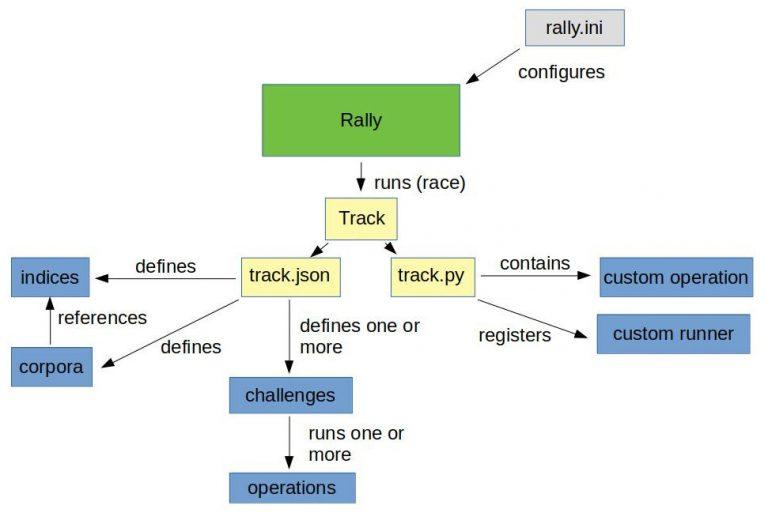
    After we have the data and basic track (generated by the create-track command) without challenges, it’s time to execute our challenges from above. However, because Rally has no operation to iterate and subsequently render every file line as a search, we would have to create a custom runner to provide this operation.

    Do it the OCSS way

    We will not do this by hand in our sample but rather enable the trace-searches profile and use the OCSS bash script to extract the index data and settings. This will generate a track based on the index and search data outlined in the cases above.

    So once we have OCSS up and running and enough time has passed to gather a representative number of searches, we can use the script to create a track using production data. For more information, please take a look here. The picture below is a good representation of what we’re looking at:

    Make sure you have all requirements installed before running the following commands.

    First off: identify the data index within OCSS:

    				
    					(/tmp/blog)➜  test_track$ curl http://localhost:9200/_cat/indices
    green open ocs-1-blog kjoOLxAmTuCQ93INorPfAA 1 1 52359 0 16.9mb 16.9mb


    Once you have the index and the searches.log you can run the following script:

    				
    					(open-commerce-stack)➜  esrally$ ./create-es-rally-track.sh -i ocs-1-blog -f ./../../../search-service/searches.log -o /tmp -v -s 127.0.0.1:9200
    Creating output dir /tmp ...
    Output dir /tmp created.
    Creating rally data from index ocs-1-blog ...
        ____        ____
       / __ ____ _/ / /_  __
      / /_/ / __ `/ / / / / /
     / _, _/ /_/ / / / /_/ /
    /_/ |_|__,_/_/_/__, /
                    /____/
    [INFO] Connected to Elasticsearch cluster [ocs-es-default-1] version [7.5.2].
    Extracting documents for index [ocs-1-blog]...       1001/1000 docs [100.1% done]
    Extracting documents for index [ocs-1-blog]...       2255/2255 docs [100.0% done]
    [INFO] Track ocss-track has been created. Run it with: esrally --track-path=/tracks/ocss-track
    --------------------------------
    [INFO] SUCCESS (took 25 seconds)
    --------------------------------
    Rally data from index ocs-1-blog in /tmp created.
    Manipulate generated /tmp/ocss-track/track.json ...
    Manipulated generated /tmp/ocss-track/track.json.
    Start with generating challenges...
    Challenges from search log created.


    If the script is finished, the folder ocss-track is created in the output location /tmp/. Let’s get an overview using tree:

    				
    					(/tmp/blog)➜  test_track$ tree /tmp/ocss-track 
    /tmp/ocss-track
    ├── challenges
    │   ├── index.json
    │   ├── search.json
    │   └── search-while-index.json
    ├── custom_runner
    │   └── ocss_search_runner.py
    ├── ocs-1-blog-documents-1k.json
    ├── ocs-1-blog-documents-1k.json.bz2
    ├── ocs-1-blog-documents.json
    ├── ocs-1-blog-documents.json.bz2
    ├── ocs-1-blog.json
    ├── rally.ini
    ├── searches.json
    ├── track.json
    └── track.py
    2 directories, 13 files


    OCSS output

    As you can see, we have 2 folders and 13 files. The challenges folder contains 3 files where each file contains one of our identified cases. The 3 files in the challenges folder are loaded in track.json.

    OCSS Outputs JSON Tracks

    The custom_runner folder contains the ocss_search_runner.py. This is where our custom operation is stored. It controls the iterations across searches.json. This same operation fires each Elasticseach query to be benchmarked against Elasticsearch. The custom runner must be registered in track.py. The ocs-1-blog.json contains the index settings. The files ocs-1-blog-documents-1k.json and ocs-1-blog-documents.json include the index documents; and are available as .bz2 files. The last file we have is the rally.ini file; it contains all Rally settings and, in the event a more detailed export is required, beyond a simple summary like in the example below, this file specifies where the metrics should be outputted. The following section of rally.inidefines that the result data should be stored in Elasticsearch:

    				
    					[reporting]
    datastore.type = elasticsearch
    datastore.host = 127.0.0.1
    datastore.port = 9400
    datastore.secure = false
    datastore.user = 
    datastore.password = 


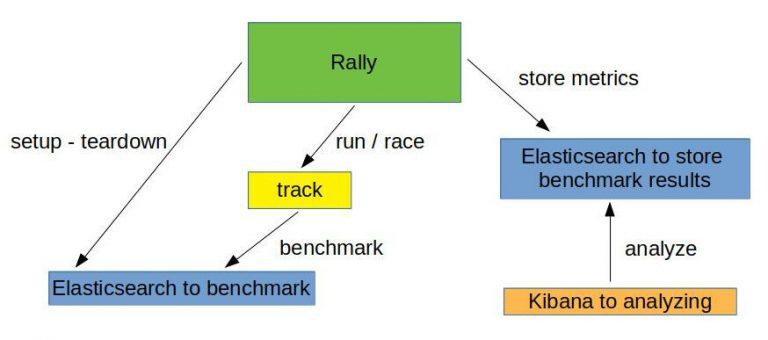
    Overview of what we want to do:

    Run the benchmark challenges

    Now that the track is generated, it’s time to run the benchmark. But, first, we have to initiate Elasticsearch and Kibana for the benchmark results. This is what docker-compose-results.yaml is for. You can find here.

    				
    					(open-commerce-stack)➜  esrally$ docker-compose -f docker-compose-results.yaml up -d
    Starting esrally_kibana_1 ... done
    Starting elasticsearch    ... done
    (open-commerce-stack)➜  esrally$ docker ps
    CONTAINER ID        IMAGE                                                       COMMAND                  CREATED             STATUS              PORTS                              NAMES
    b3ebb8154df5        docker.elastic.co/elasticsearch/elasticsearch:7.9.2-amd64   "/tini -- /usr/local…"   15 seconds ago      Up 3 seconds        9300/tcp, 0.0.0.0:9400->9200/tcp   elasticsearch
    fc454089e792        docker.elastic.co/kibana/kibana:7.9.2                       "/usr/local/bin/dumb…"   15 seconds ago      Up 2 seconds        0.0.0.0:5601->5601/tcp             esrally_kibana_1


    Benchmark Challenge #1

    Once the Elasticsearch/Kibana stack is ready for the results, we can begin with our first benchmark challenge by sending indexthe following command:

    				
    					docker run -v "/tmp/ocss-track:/rally/track" -v "/tmp/ocss-track/rally.ini:/rally/.rally/rally.ini" --network host  
        elastic/rally race --distribution-version=7.9.2 --track-path=/rally/track --challenge=index --pipeline=benchmark-only --race-id=index


    Now would be a good time to have a look at the different parameters available to start Rally:

    • –distribution-version=7.9.2 -> The version of Elasticsearch Rally should use for benchmarking
    • –track-path=/rally/track -> The path where we mounted our track into the rally docker-container
    • –challenge=index -> The name of the challenge we want to perform
    • –pipeline=benchmark-only the pipeline rally should perform
    • –race-id=index -> The race-id which to use instead of a generated id (helpful for analyzing)

    Benchmark Challenge #2

    Following the index challenge we will continue with the search-while-index challenge:

    				
    					docker run -v "/tmp/ocss-track:/rally/track" -v "/tmp/ocss-track/rally.ini:/rally/.rally/rally.ini" --network host  
        elastic/rally race --distribution-version=7.9.2 --track-path=/rally/track --challenge=search-while-index --pipeline=benchmark-only --race-id=search-while-index


    Benchmark Challenge #3

    Last but not least the search challenge:

    				
    					docker run -v "/tmp/ocss-track:/rally/track" -v "/tmp/ocss-track/rally.ini:/rally/.rally/rally.ini" --network host  
        elastic/rally race --distribution-version=7.9.2 --track-path=/rally/track --challenge=search --pipeline=benchmark-only --race-id=search


    Review the benchmark results

    Let’s have a look at the benchmark results in Kibana. A few special dashboards exist for our use cases, but you’ll have to import them into Kibana. For example, have a look at either this one or this one here. Or, you can create your own visualization as I did:

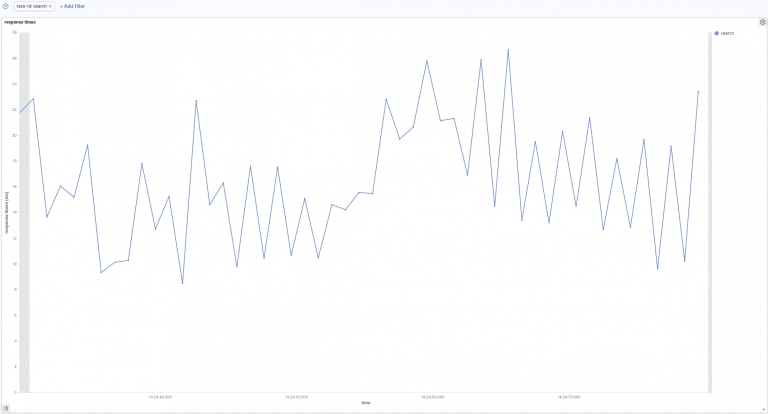
    Search:

    In the above picture, we can see the search response times over time. Our searches take between 8ms and 27ms to be processed. Next, let’s go to the following picture. Here we see how search times are influenced by indexation.

    Search-while-index:

    The above image shows search response times over time while indexing. In the beginning, indexing while simultaneously searching increases the response time to 100ms. This later decreases to 10ms and 40ms.

    Summary

    This post gave you a more complete understanding of how benchmarking your site-search within Rally looks. Additionally, you learned about the unique OCSS application to trigger tracks within Rally. Not only that, you now have a better practical understanding of Rally benchmarking, which will help you create your own system even without OCSS.

    Thanks for reading!

    References

    https://github.com/elastic/rally

    https://esrally.readthedocs.io/en/stable/

    https://github.com/Abmun/rally-apm-search/blob/master/Rally-Results-Dashboard.ndjson

    https://github.com/elastic/rally/files/4479568/dashboard.ndjson.txt